Owner’s Manual | PCAS XRX
BUTTONS AND FUNCTIONS 43
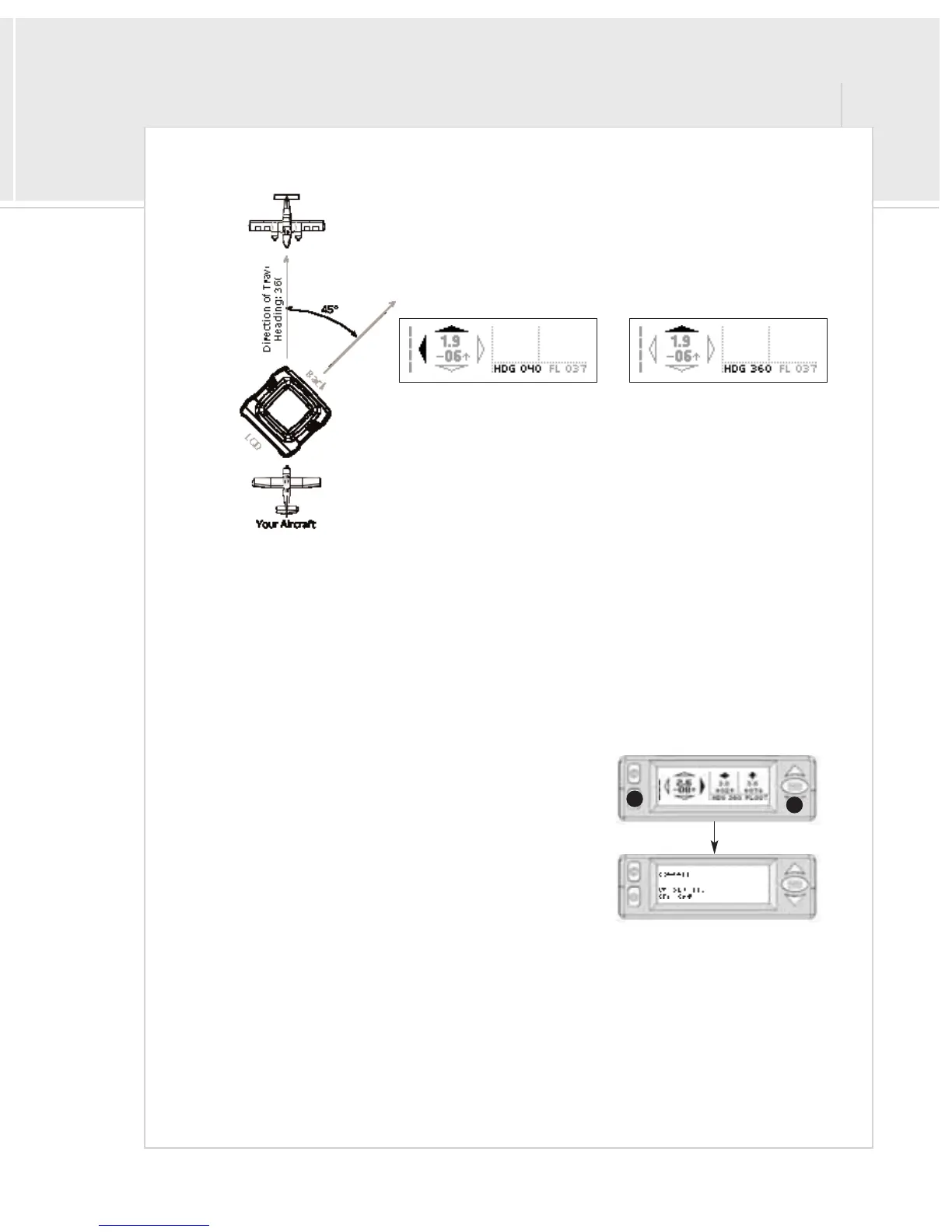
> Screen A 45: This setting will adjust the bearing and compass 45 degrees to the
left so that XRX can be placed on the right side of the instrument panel and
angled towards the pilot. If your glareshield is short, or standard unit placement
directly in front of you is not possible or inconvenient, this setup will allow for
an alternate placement.
If you calibrate the compass with the 45° correction turned on, you must still
face XRX due north. Calibration will ignore the 45° correction.
> Screen B 45: This setting will perform the same angle correction as the above setting, but will display Screen B.
Additional Menus: Administrative Mode
Your XRX unit comes fully calibrated and ready to use. If, however, any of the internal sensors start to drift, adjustments
can be made using the admin menus. This menu provides access to compass and altimeter calibration screens, as well
as a general information about the environment and the information the on-board sensors are tracking.
To enter Admin mode:
1>Press and hold the mute button
2>Press the down button within 3 seconds
Without the 45° correction, the
unit would display the aircraft in the
example to the right incorrectly.
With the 45° correction, the unit
allows the correct processing of the
aircraft in relation to the aircraft.
Admin Mode
2
1
Press and Hold


 To Next Page