Owner’s Manual | PCAS XRX
BUTTONS AND FUNCTIONS 47
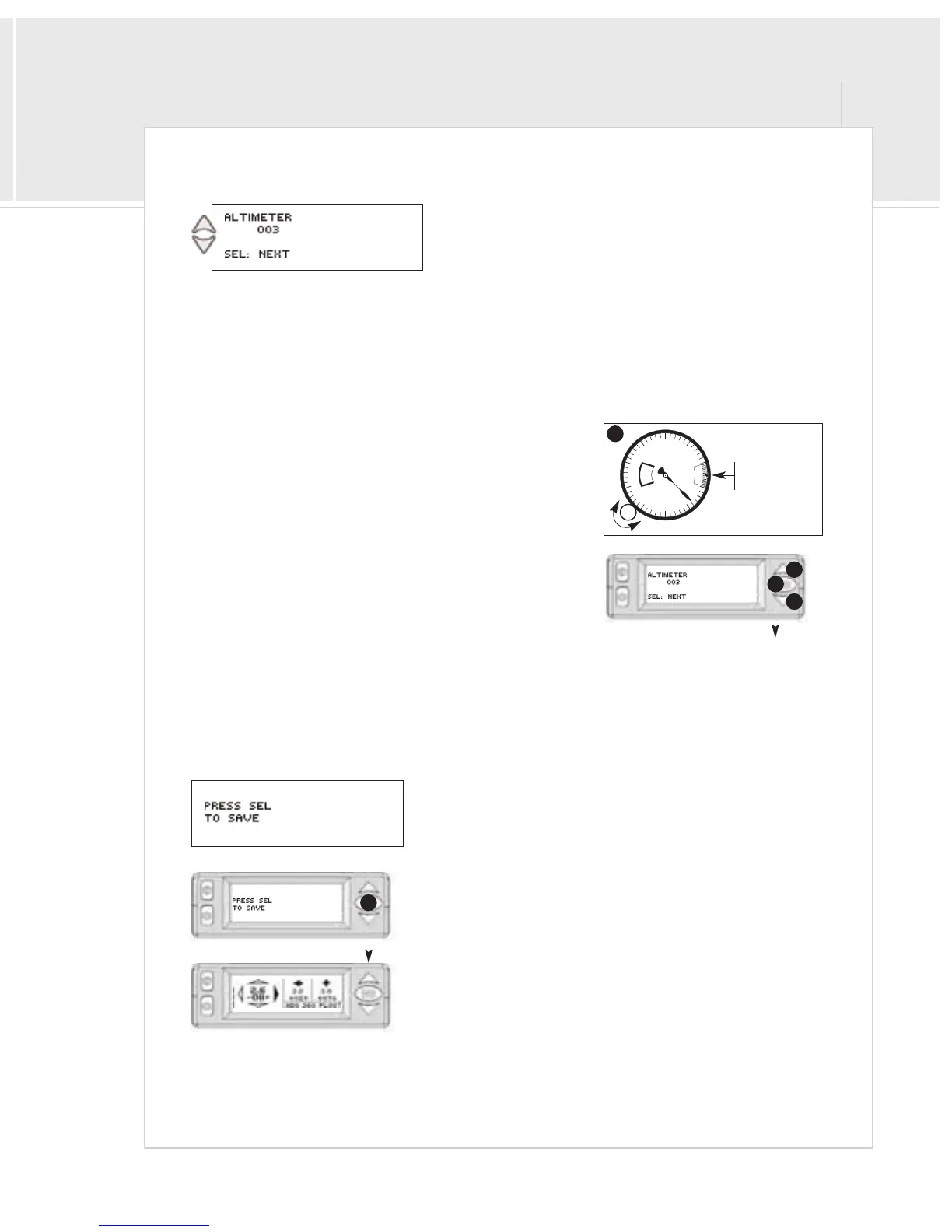
Page 3: Altimeter Calibration
It is recommended that you check your altimeter every 6 months by
comparing your aircraft altimeter’s pressure altitude (tuned to 29.92) to
the XRX pressure altitude shown in the right hand bottom of the traffic
screen.
The following actions can be performed on this page:
A > Press the menu/select button to continue to the next page
B>Adjust the internal altimeter using the procedure below.
To adjust your altimeter:
1 > In your aircraft, enter 29.92 into the Kollsman window of
your altimeter
2>Press the up and down buttons to match your aircraft’s
altimeter pressure altitude of 29.92. The XRX displays
altitude in 100 ft. increments, or flight levels. For example,
003 equals 300 feet.
Pressing up or down will change the altitude shown.
However, when you switch from changing altitude down or
up, the altitude will reset to the factory default setting.
Simply continue from this point to press the down or up
buttons until you achieve the desired altitude. To continue
to the next screen, press the menu/select button [A].
Saving the Settings
The next admin page allows you to save to flash RAM the changes you have
made in the admin pages and will remain even after turning off the unit.
Press the menu/select button [A] to return to the traffic screen.


 To Next Page