OPERATION
Stemi DV4 / DR Basic instrument as compact version with stand C Carl Zeiss
B 40-003 e 08/00 3-3
3.1.3 Illumination
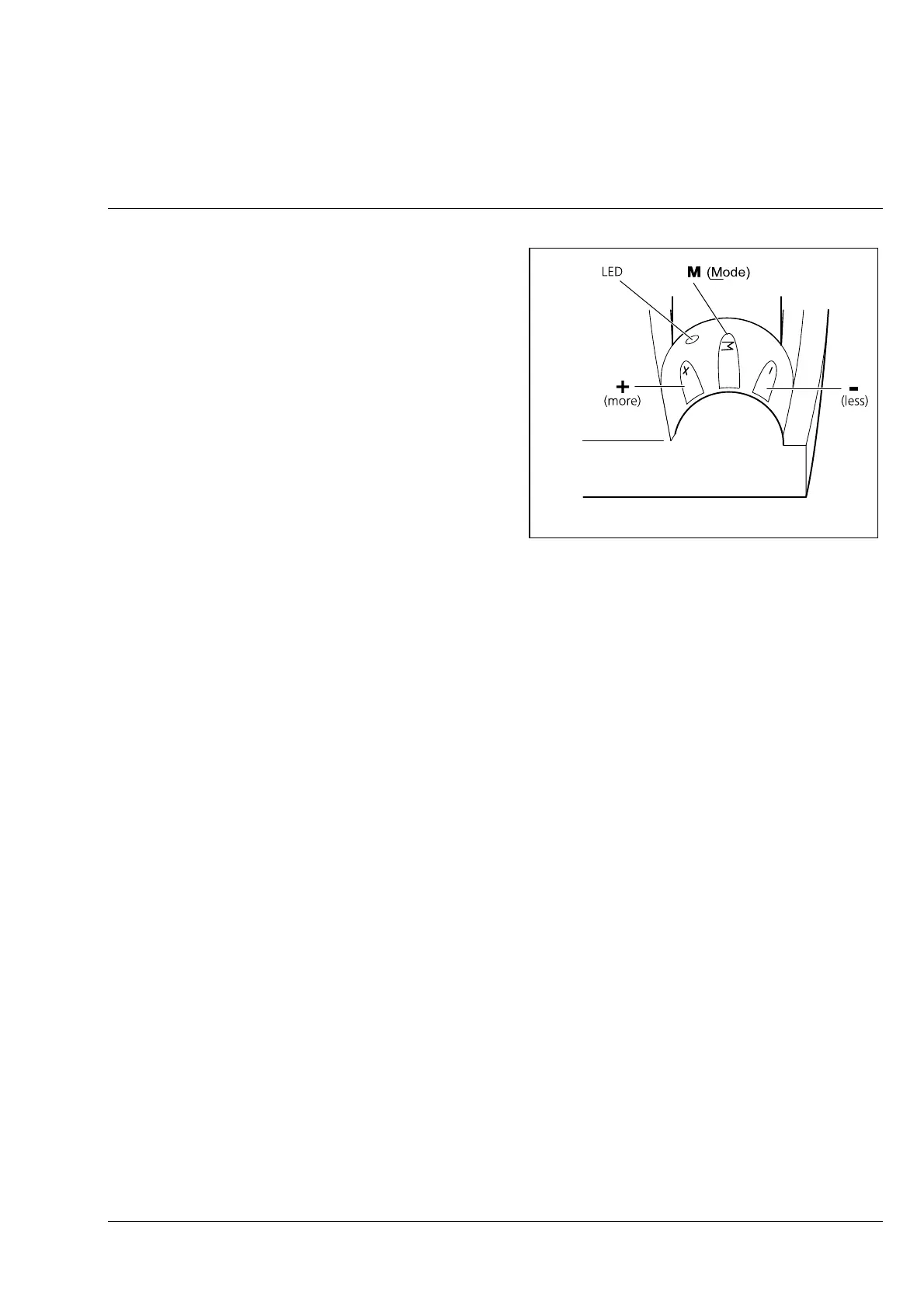
The three membrane keys of the illumination
control permit both selection of the illumination
mode (reflected, transmitted and mixed light) and
the control of the illumination intensity for the
selected illumination mode.
The pressure points of the membrane keys feature
three nubs which can be easily made out by
touching during microscopy.
3.1.3.1 Selection of the illumination mode
The illumination mode is selected via key M on the illumination control panel. This key has been
designed as a series switch with 4 switching statuses. Each switching procedure between these statuses
is performed via a single press of key M. The following sequence of switching statuses is always
observed:
− basic status after start-up illumination off (standby), blue LED lights up
− pressing key M reflected light on (transmitted light off)
− pressing key M again transmitted light on (reflected light off)
− pressing key M again mixed light on (reflected and transmitted light on)
− pressing key M again basic status (standby)
☞
In each case, switching is performed not before key M has been released!
Fig. 3-3 Illumination control











 To Next Page