OPERATION
Carl Zeiss Core accessories Stemi DV4 / DR
3-10 B 40-003 e 08/00
3.2 Core accessories
3.2.1 Attachment for transmitted-light
darkfield
Microscopy in transmitted-light darkfield requires
the glass plate in the stand base to be exchanged
for the attachment for transmitted-light darkfield
for stand C (DL-DF/C attachment).
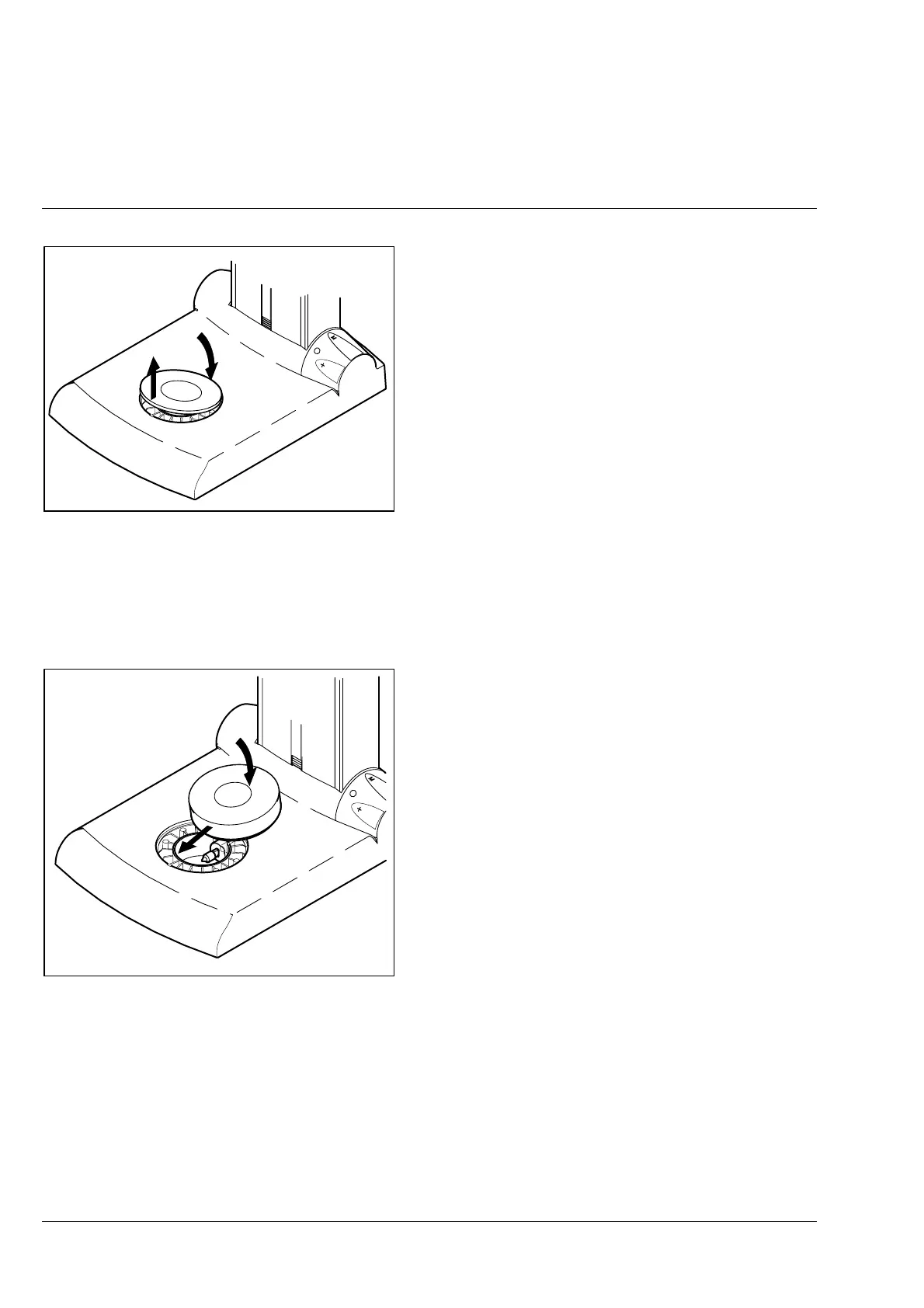
• Tilt glass plate by pressing on its rear edge
(North) and remove it from the stand base.
• Press the DL-DF/C attachment against the
spring in the stand base at the front (South)
and lower it at the back until stop. Make sure
that the DL-DF/C attachment is seated
horizontally. Caution: the glass plate in the DL-
DF/C attachment has only been loosely inserted.
• Switch on the transmitted light and set
maximum intensity.
☞
If maximum illumination intensity is
set in transmitted light, the intensity
is automatically reduced after 3
minutes to protect the specimens
from excess heat. If required, the
intensity must be set to maximum
again.
Proceed as follows to remove the transmitted-light
darkfield attachment:
• Hold the DL-DF/C at the rear (North) below the
step, press it out of the stand base in upward
direction and remove it in forward direction.
☞
To avoid background brightening, the removable glass plate of the DL-DF/C attachment must
be carefully cleaned.
When the 0.63x attachment lens is used, slight image trimming can occur in the magnification
range < 10x caused by the diaphragm of the attachment.
Fig. 3-11 Removing the glass plate
Fig. 3-12 Insertion of transmitted-light
darkfield attachment











 To Next Page