OPERATION
Carl Zeiss Core accessories Stemi DV4 / DR
3-18 B 40-003 e 08/00
• Move the microhead camera in the eyepiece adapter axially to focus the image on the connected
monitor.
• Tighten clamping screw (SW 1.5 mm) on the eyepiece adapter and check the focus. If required,
repeat the procedure.
• Turn the eyepiece adapter in the eyepiece tube to align the camera image until the image on the
monitor is upright and unreversed.
• Tighten retainer ring of the eyepiece adapter and check the setting; if required, repeat the procedure.
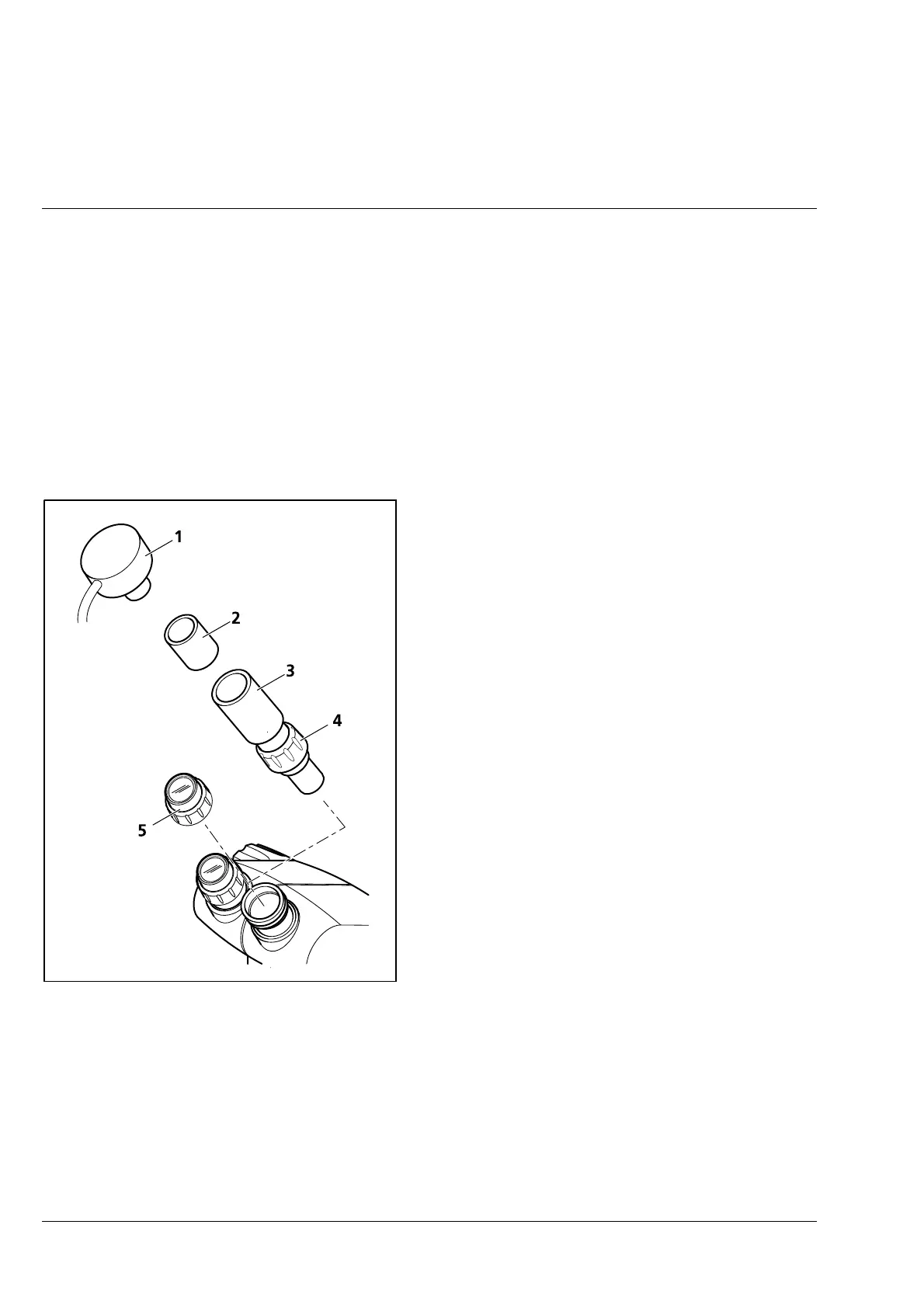
3.2.3.7 Eyepiece insertion camera
• Unscrew eyepiece (3-21/5) from one of the
eyepiece tubes.
• Insert eyepiece adapter 0.8x (3-21/3) into the
eyepiece tube and tighten the retainer ring
(3-21/4).
• Insert dia. 30 mm or dia. 23.2 mm eyepiece
insertion camera (3-21/1) into the mounting
tube of the eyepiece adapter via the adapter for
dia. 30 mm eyepieces (3-21/2) and align the
image position.
Fig. 3-21 Attachment of insertion camera











 To Next Page