F
out
[Hz]
08.05.2012
v_fxdm_setsig_min_max.vsd
1 2
3
4 5
6
7 8
9
10
Analog In 1
40
35
30
25
20
15
10
5
2 4
6
8 10
12 14 16
18
20
0...10 V
0...20 mA
10 20
30
40 50
60 70 80
90
100
0...100 % PWM
0
0
0
45
50
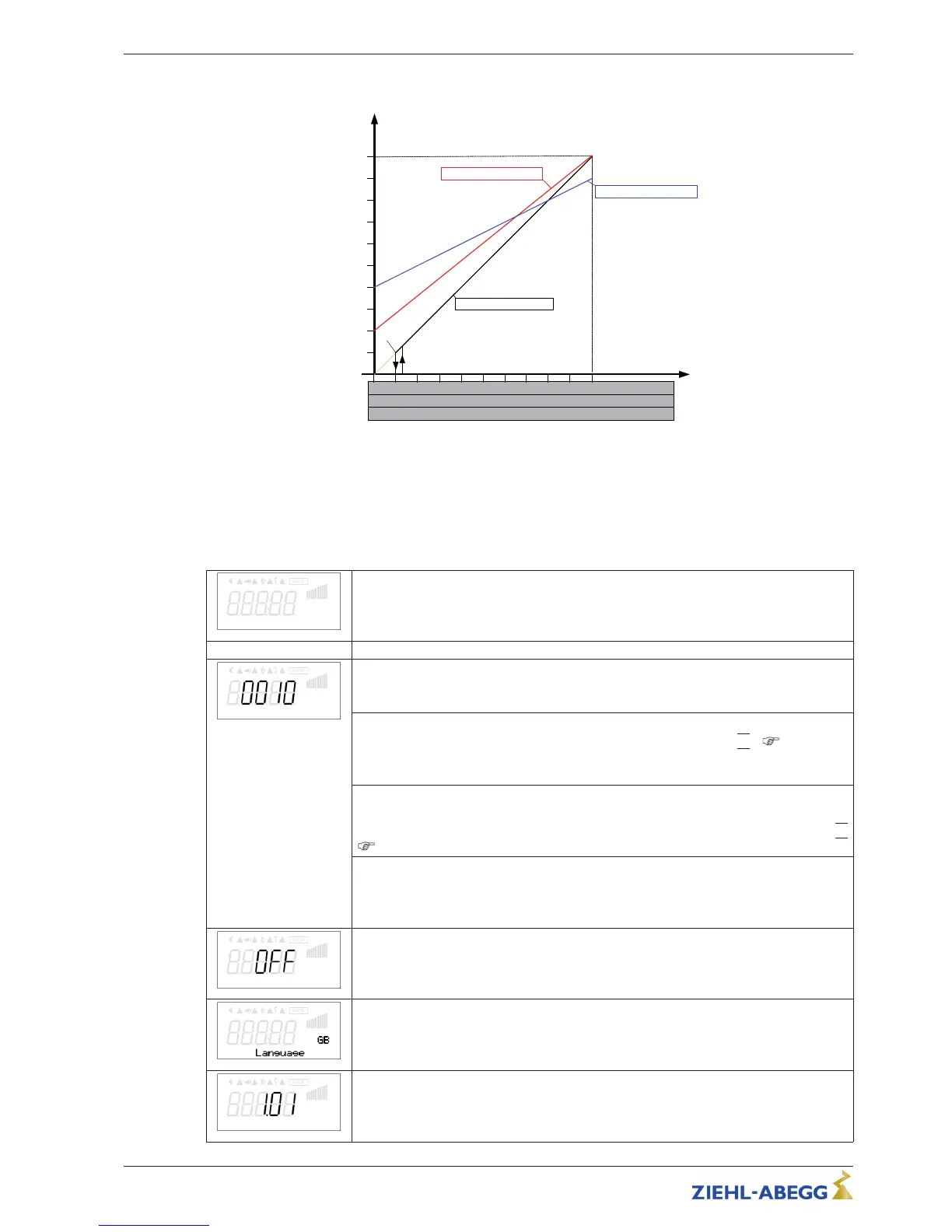
n-min OFF n-max. = 50 Hz
n-min 20 Hz n-max. = 45 Hz
n-min 10 Hz n-max. = 50 Hz
F
off
= 5 Hz
F
on
= 6 Hz
Fout: Output frequency
Analog In: Speed setting signal
n-min: Min. Speed
n-max: Max. Speed
Foff: Shutdown Freq.
Fon: Switch on Freq.
8.2 Menu group Start
Start
Start
PIN input
PIN input
The service menu for the installation can be protected against unintentional changes
by a pin code. With further pin codes putting back to pre-setting is possible.
PIN 0010
Release of the service settings with programmed PIN-Accesslevel
|
0
|
(
“Controller
Setup”).
Menu groups Service: “Controller Setup”, “IO Setup”, “Motor Setup”
PIN 1234
Opening “setting”.
Release of the menu group for the user “setting” with programmed PIN-Accesslevel
|
0
|
(
“Controller Setup”).
PIN 9095
Load factory setting (exception, the menu language setting is retained).
Only the parameters which are released by the currently set PIN-Accesslevel are
loaded.
Reset
Reset
Complete re-start of the device
Language
Menu language by the factory set to English.
In this menu different national languages can be selected (GB = English, D = German
...).
Firmware
Software version
Operating Instructions Fcontrol Basic – model series FSDM2.5..50AM Programming
L-BAL-E174-GB 1704 Index 005 Part.-No.
24/49


 To Next Page