806834 v1.02 07.21 G5 Online install instructions and user guide
74
USER GUIDE
SAFETY
INSTALLATION
TROUBLE
SHOOTING
COMMISSION
USER GUIDE
TAP SAFETY
LCD SCREEN
CONTACT
INSTALLATION
GUIDE
Section 2 How to use the Touch-Free Wave HydroTap
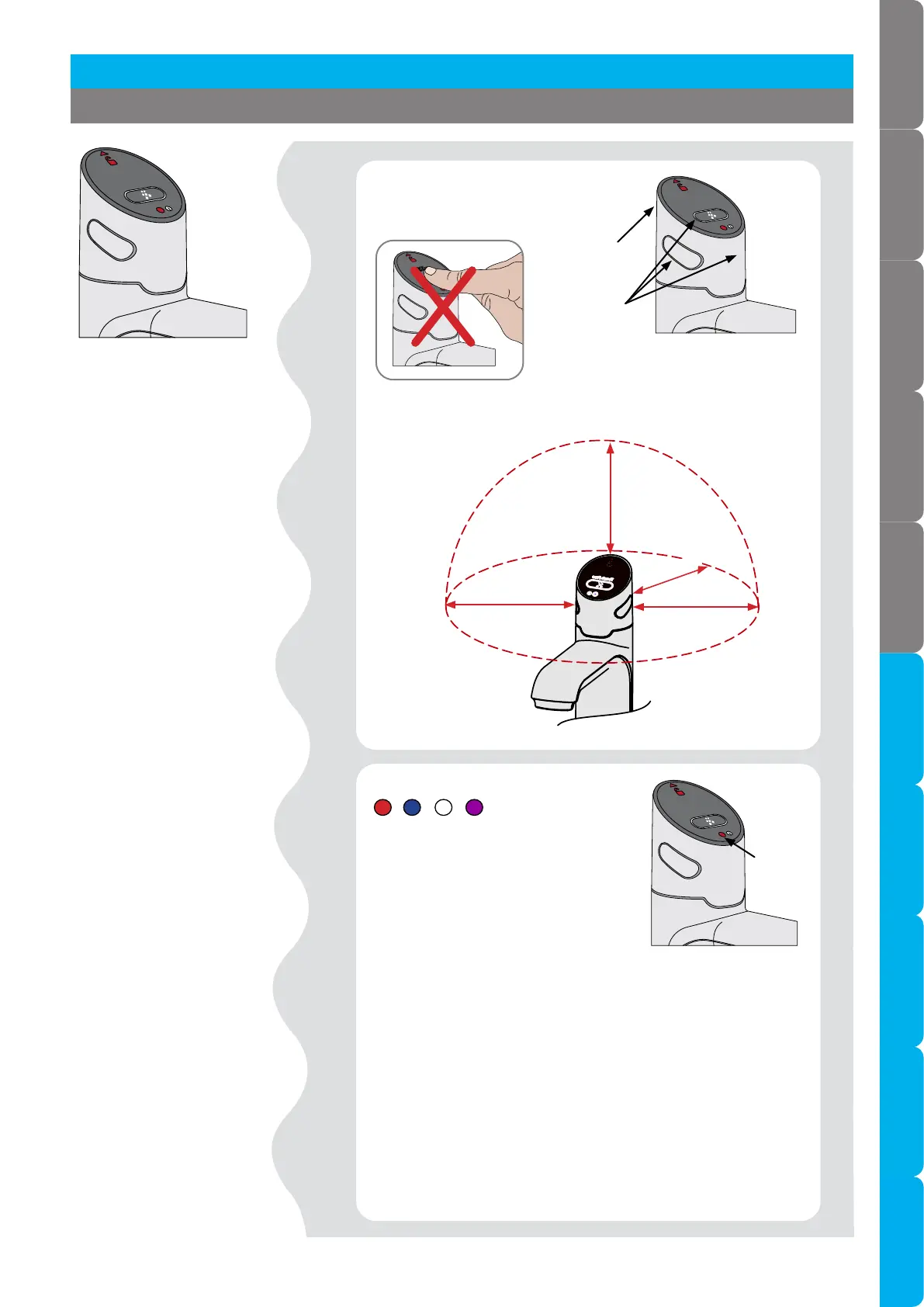
Controls Touch-free sensors on the
tap top, back and sides.
Touch-free
Dispense
sensors
Safety sensor
(at back)
Lights
Info.
- Light modes
100mm
Clearance requirements
100mm
100mm
100mm
RED Boiling & safety sensors
activated, water dispensed.
BLUE Chilled sensor
activated, water dispensed.
WHITE Sparkling sensor activated,
water dispensed.
PURPLE Lock mode on (when tap is
idle).
Flashing RED Sensor activated incorrectly; hand may be too
close to sensor, sensor has been touched or covered.
WHITE / BLUE / RED Cycling 5 to 10 seconds
Filter needs replacing, CO warning (G5), unit is in an error
mode (refer to Command Centre screen).
WHITE Flashing rapidly
Sensors are calibrating for 10 seconds when power is first
applied to the tap.
USER GUIDE



 To Next Page