806834 v1.02 07.21 G5 Online install instructions and user guide
103
USER GUIDE
SAFETY
INSTALLATION
TROUBLE
SHOOTING
COMMISSION
USER GUIDE
TAP SAFETY
LCD SCREEN
CONTACT
INSTALLATION
GUIDE
Section 4 User maintenance
4.1 Filter maintenance
Internal filter change
• The HydroTap notifies when filter replacement
is due. If you notice one of the following, you will
need to change the filter.
• The tap and screen will indicate that a filter
needs to be changed.
• Depending on local water quality conditions
and usage, the filter may require changing
before the filter change indication is shown. You
may also need to replace the filter if you notice
an increase in chlorine, taste or odour.
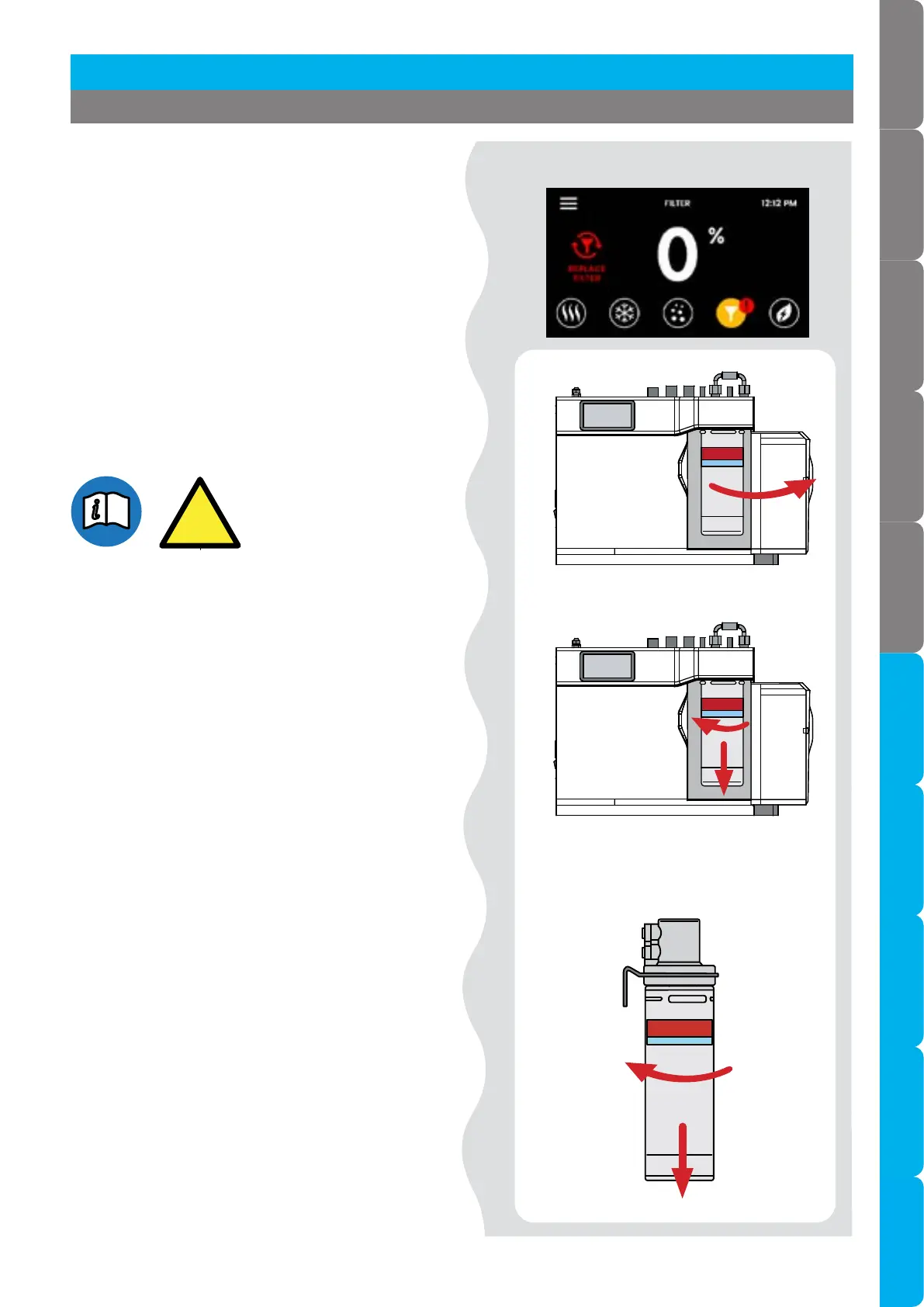
4.1.1 Internal filter change
• Remove old filter.
• Open the filter door.
• Place a cloth or towel under the filter cartridge
before removing.
• Grip the cartridge , turn it clockwise, then pull
down.
• Water will drip as the cartridge is removed.
• Do not tilt the cartridge as water may spill from
it if tilted.
Rotate
Pull
Remove old filter.
Open filter door.



 To Next Page