806834 v1.02 07.21 G5 Online install instructions and user guide
85
USER GUIDE
SAFETY
INSTALLATION
TROUBLE
SHOOTING
COMMISSION
USER GUIDE
TAP SAFETY
LCD SCREEN
CONTACT
INSTALLATION
GUIDE
FILTER SETTINGS 12:12 PM
Filter
Reset
Filter
Life
Filter
Flush
Tank
Flush
3.7.1 Filter settings
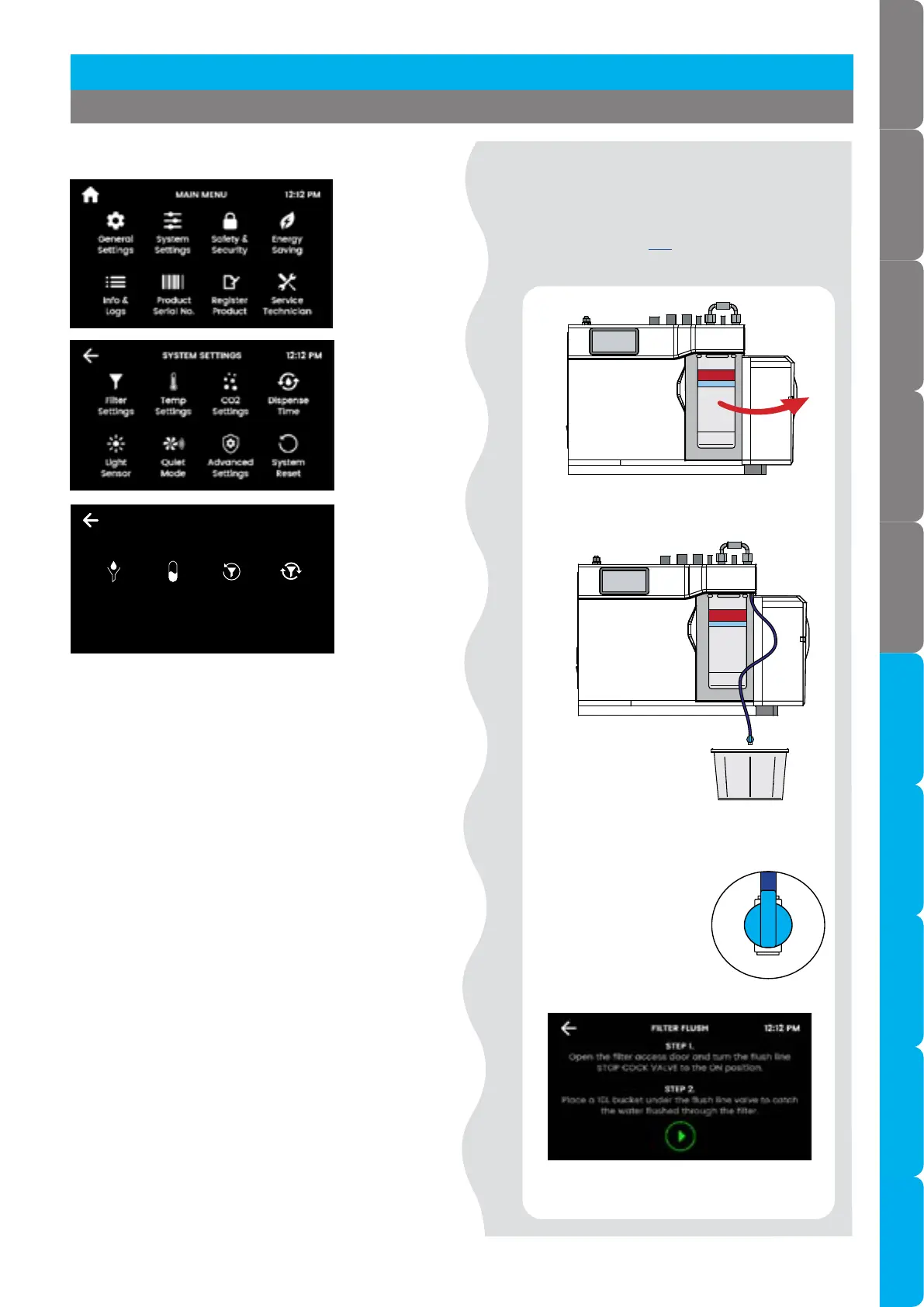
Filter flush
• Use Filter Flush during commissioning of a
• new installation, and after every filter
change. see page 103 for filter change
instructions.
• Follow the steps on-screen to flush the filter.
• Place a cloth or towel under the filter cartridge
to catch any water that may spill.
• Open the flush line tap.
• Once the filter flush is finished, close the flush
line tap.
• Wipe up any spills.
• Close the door to secure the appliance.
• Reset the filter counter.
• Open filter door.
• Uncoil flush line.
• Direct flush line into bucket.
• Open flush line tap,
shown open
adjacent.
[ ]
[ ]
• Start filter flush.
Section 3 Command Centre Screen



 To Next Page