806834 v1.02 07.21 G5 Online install instructions and user guide
79
USER GUIDE
SAFETY
INSTALLATION
TROUBLE
SHOOTING
COMMISSION
USER GUIDE
TAP SAFETY
LCD SCREEN
CONTACT
INSTALLATION
GUIDE
Section 3 Command Centre Screen
3.1 How to use the Command Centre screen
• The Command Centre has a colour touch screen
liquid crystal display.
• The display consists of icons, buttons and fields
which can be changed by simply touching the
buttons and icons.
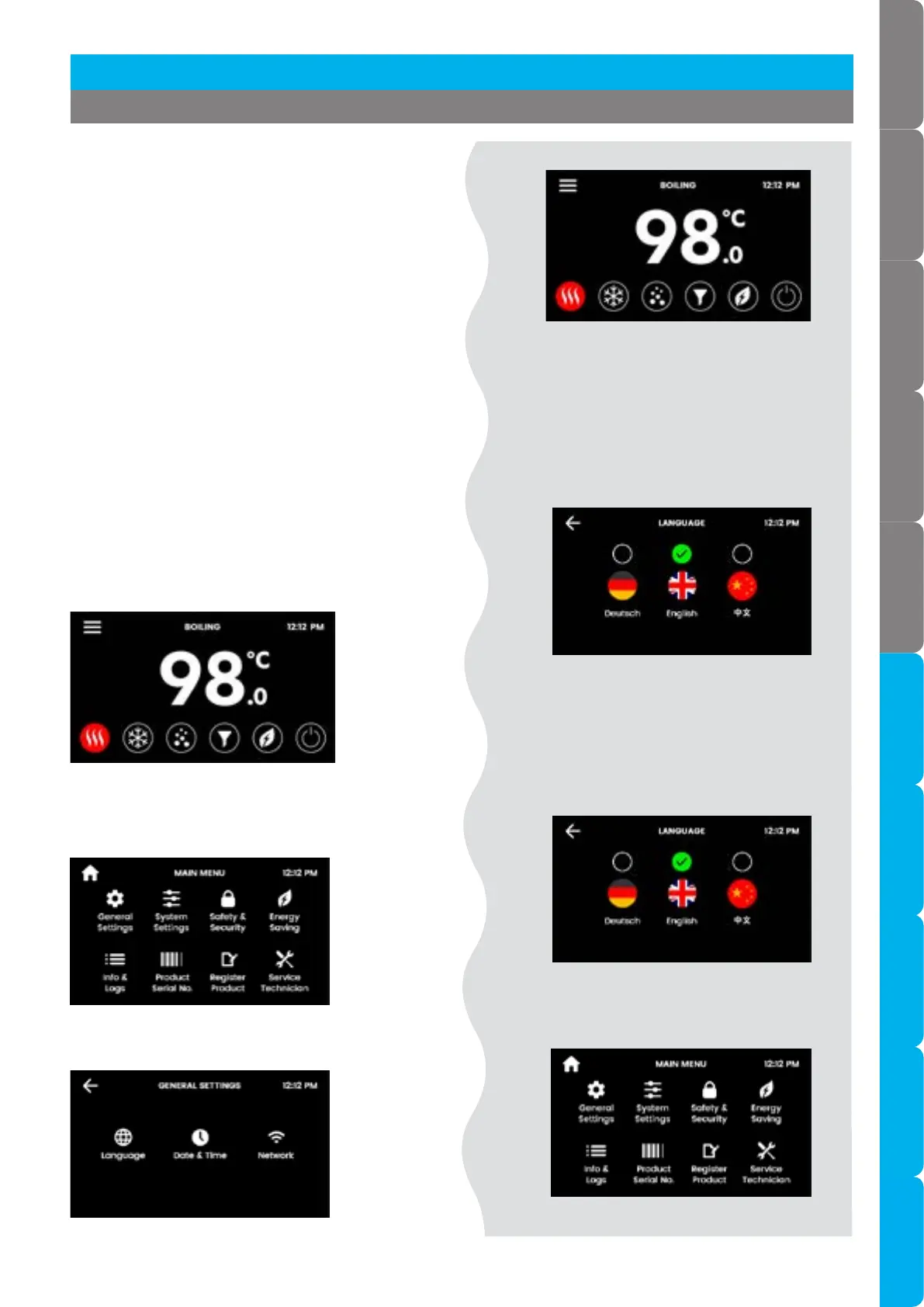
• Navigate to the required screen. Here's an
example :
• The display consists of over 150 individual menus
and screens.
• Navigate to the required screen on this side of
the page, here's an example :
Set the language
• Touch the 'top left' icon to navigate to the main
menu.
3.2 Screen guide
• Then touch the general settings icon to navigate
to the general settings menu.
• Touch the language icon to navigate to the
language screen.
Language Set the language
• Touch the relevant button to choose
the language.
• Tips and guidance are written on both
sides of the page to help you navigate
and understand the options.
• The settings are made on this side of
the page.
• To go back.
• To go to the home screen.
[ ]
[ ]
[ ]
[ ]
[ ]
[ ]



 To Next Page