EC16 Elevator Control Panel & DEX16 Elevator Floor Extension Board User Manual
P a g e | 28 Copyright©2023 ZKTECO CO., LTD. All rights reserved.
5.1.5 Add Reader on the Software
EC16 elevator controller supterminals connecting Wiegand or RS-485 communication reader.
5.1.5.1 Connect RS-485 Reader via RS-485
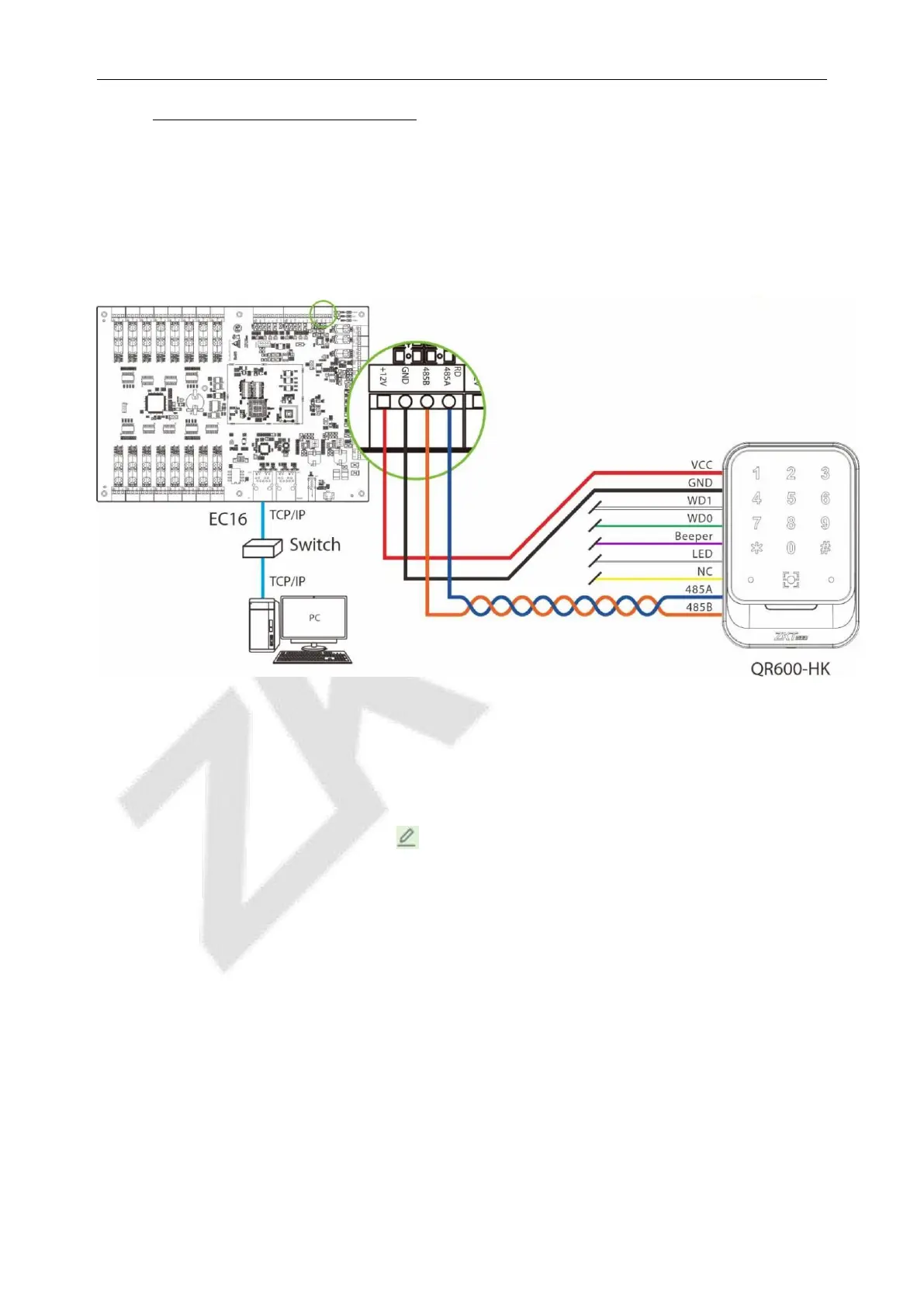
1. Connect the VCC, GND, 485A and 485B terminals of the reader to the RS-485 communication
terminal of the elevator controller, and the wiring is shown in the following figure.
Figure 5- 1 Wiring Schematic of RS-485 Reader and EC16 Elevator Controller
2. Set the 485 addresses (machine number) of the reader by software.
1) Click [
Elevator
] > [
Elevator Device
] > [
Reader
] to enter the setting interface.
2) Select the reader and click [Edit] icon behind it to enter the editing screen.
3) Change the communication type of the reader to RS485 in the edit window and enter the RS485
address.
4) Click [OK] to confirm and exit, as shown in the figure below.



 To Next Page