20
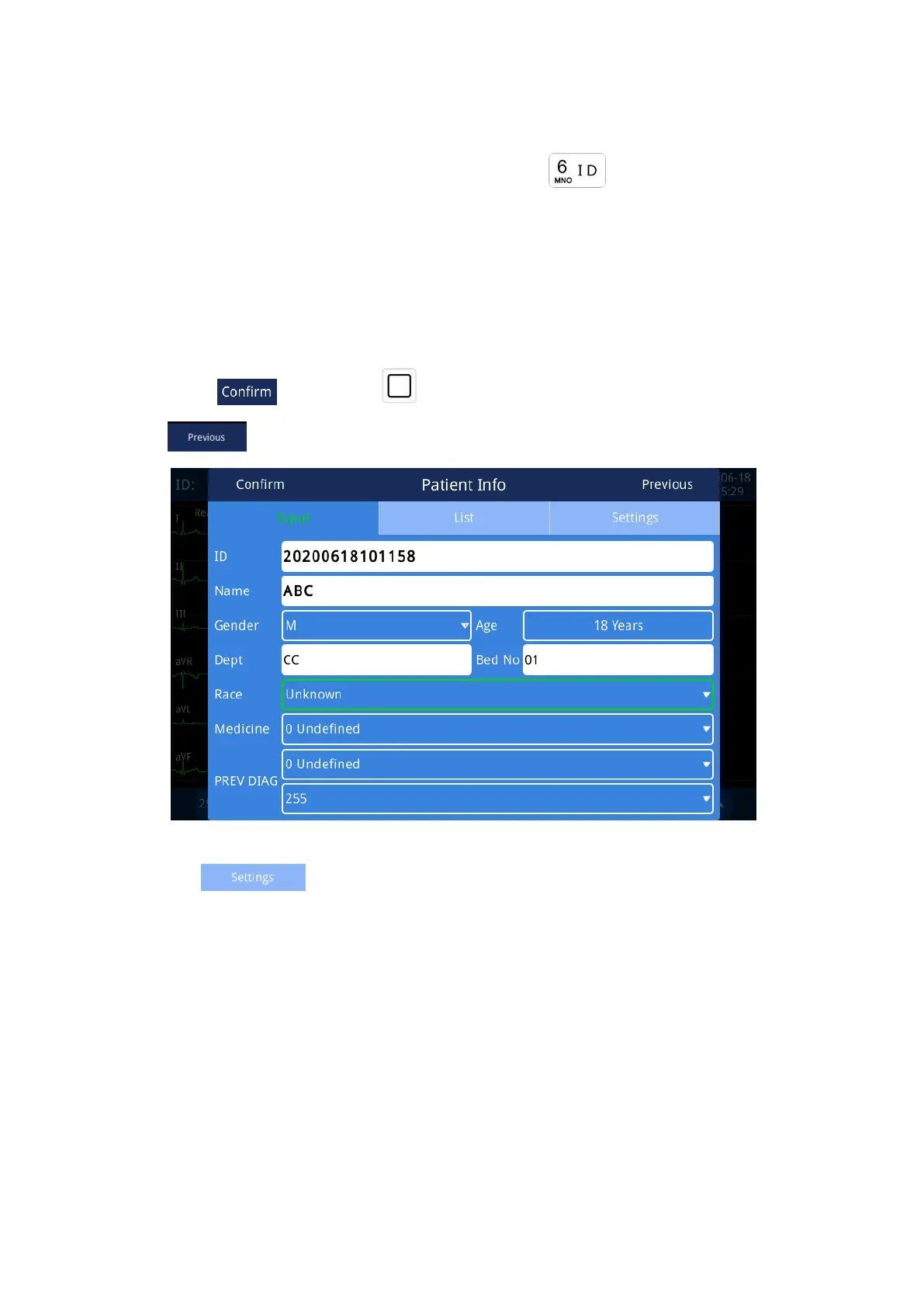
2.3.2 Patient Info Interface
In the waveform acquisition interface, you can press“ ”key to enter the patient
information page, finish patient basic information input. Press “▲”or “▼”direction key to select
different items,press “#”to change between Number, English and Symbol,and then input
through the keyboard.(input method please refer section 4.1).System will generate ID
automatically when you enter patient info interface. After the input is completed, press direction
key to select“ ”,then press“ ”to save and return to waveform acquisition interface.
Press“ ” to automatically generate the last patient information.
Fig. 2.8 Patient Info Interface
Click the " " button in the Patient information interface, enter the server's IP
address, port and path (for details, please consult your network administrator). You can
synchronize the patient information data in the server, and directly import the patient information
into the list. Click on one of the patients to automatically generate patient information. Before
importing data, please test whether it can be connected.
If the automatic list synchronization function is enabled, the system will automatically
synchronize the server data each time you enter the list interface.



 To Next Page