Apps and Entertainment Productivity 180
1.
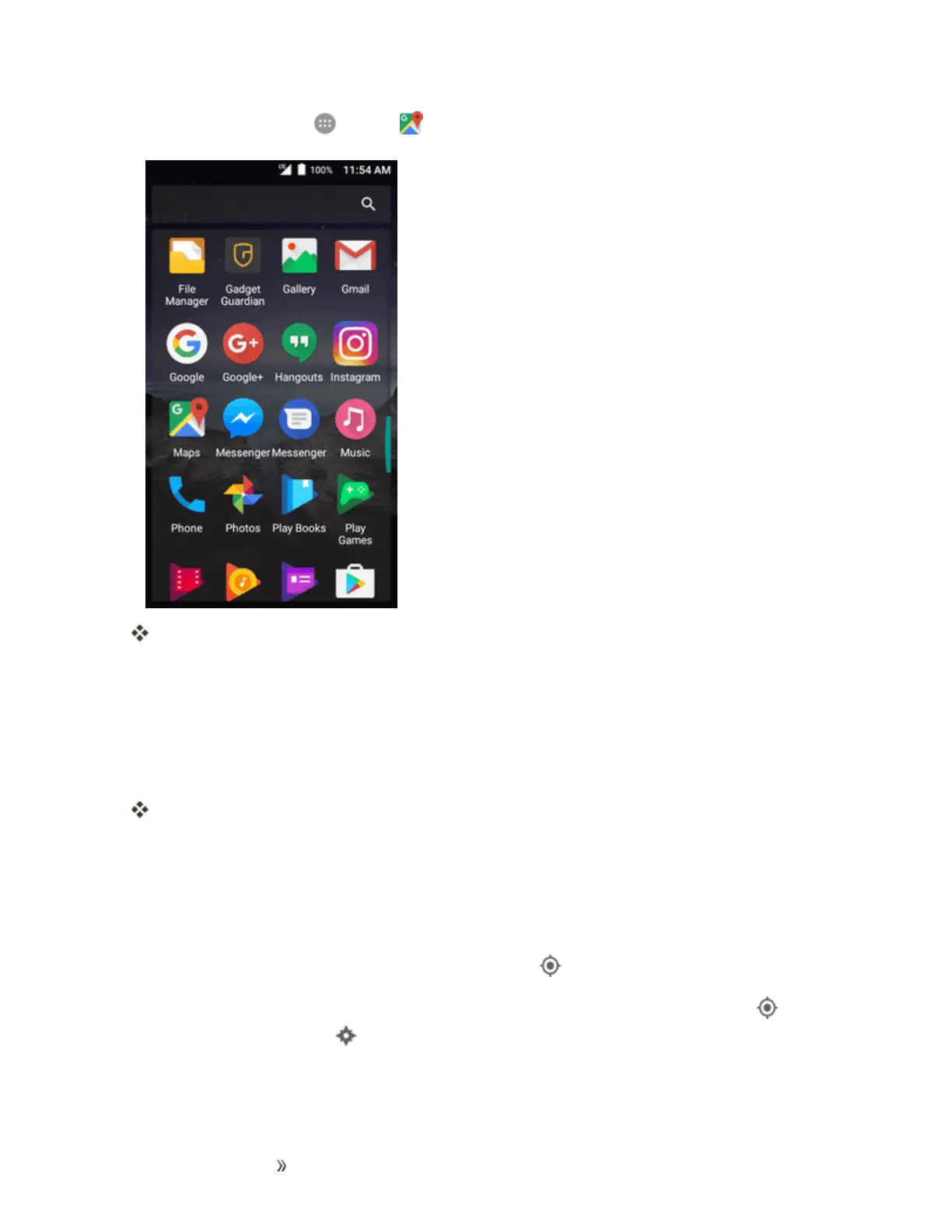
Fromhome,tap Apps >Maps .
GoogleMapsopens.
l Ifprompted,followtheonscreeninstructionstoaccepttermsofuse.
2. Tapthesearchboxatthetop.
3. Enteranaddress,city,facilityname,etc.,andthentapacandidateintheresultslist.
Note:Ifyoursearchtermisspecificenough,themapwillautomaticallypantothatlocation.
Theinformationcardforthespecificlocationopens.Youcanfindoutitsaddress,openhours,
streetview,people'sreview,howtogetthere,givetheplaceacall,saveittoyourGoogle
Account,andmore.
l Slidethecarddowntoviewtheplaceonthemap.
Google Maps Operations
n
Viewing Current Location:FromtheMapsapp,tap .
n
Obtain Useful Area Information for Current Location:FromtheMapsapp,tap .When
yourlocationisfound,tap atthebottomofthescreenand,inthenewscreen,selectatypeof
businessorattractiontobrowserelatedlocations.Youcanthentapalocationtoviewdetailed
informationandfindouthowtogetthere.



 To Next Page