8.3. Calibration Using an External Weight
This function calibrates the balance using an external weight.
Operation
1 Connect the AC adapter and warm up the balance
for at least 30 minutes with nothing on the pan.
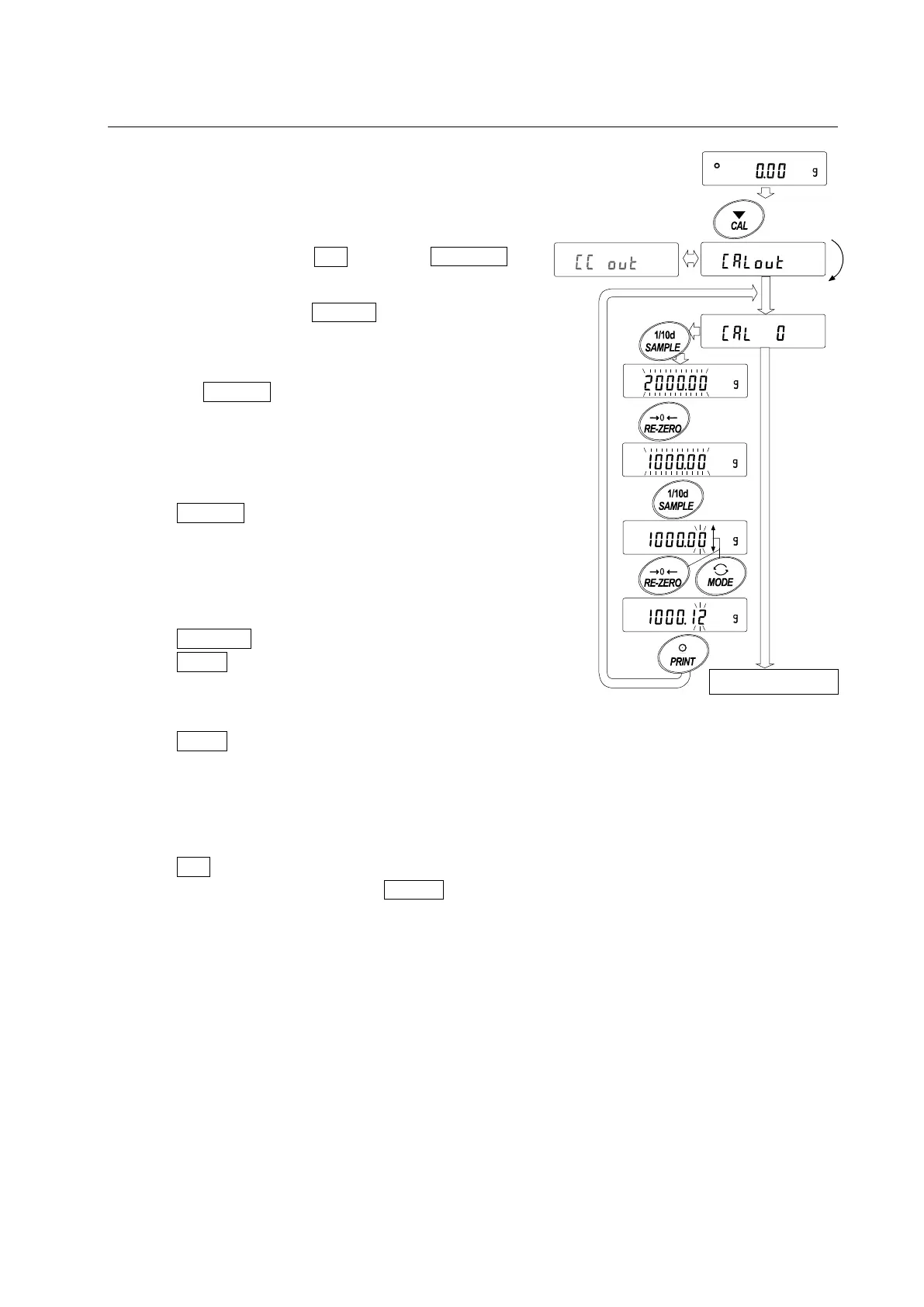
2 Press and hold the CAL key until Calout is
displayed, and then release the key.
3 The balance displays Cal 0 .
If you want to change the calibration weight (a list
of usable weights is shown on page 31), press
the SAMPLE key and go to step 4.
If you use the calibration weight value stored in
the balance, go to step 5.
4 Specify the calibration weight value as follows:
SAMPLE key To switch the display condition
to: “All of weight selection
mode) or “The last two digits
blinking” (value adjustment
mode).
RE-ZERO key (To increase the value)
MODE key (To decrease the value)
To select the calibration
weight or adjust the value.
PRINT key To store the new weight
value. Even if the AC adapter
is removed, the data is
maintained in non-volatile
memory.
CAL key To cancel the operation and
return to Cal 0 .
Select a
weight
To
nex
t p
age
Rele
ase
the key
e.g
. C
ali
brat
io
n
w
eight value
1000.12 g
Press and
hold the key
(for 2 seconds)



 To Next Page