PROGRAMMABLE-UNIT
This is a programmable unit conversion function. It multiplies the weight data in grams by an arbitrary
coefficient set in the function table and displays the result.
The coefficient must be within the range between the minimum and maximum shown below. If the
coefficient set is beyond the range, an error is displayed and the balance returns to the coefficient
setting mode, prompting to enter an appropriate value. A coefficient of 1 was set at the factory.
Model
120
i
/200
i
/300
i
/500
i
120
i
WP/200
i
WP /300
i
WP 120GD/200GD/300GD
0.000001
1000
1200
i
/2000
i
/3000
i
/5000
i
1200
i
WP /2000
i
WP /3000
i
WP 1200GD/2000GD/3000GD
100
Operation
1 Press and hold the SAMPLE key until ba5fnc of the function table is displayed.
2 Press the SAMPLE key several times to display mltj .
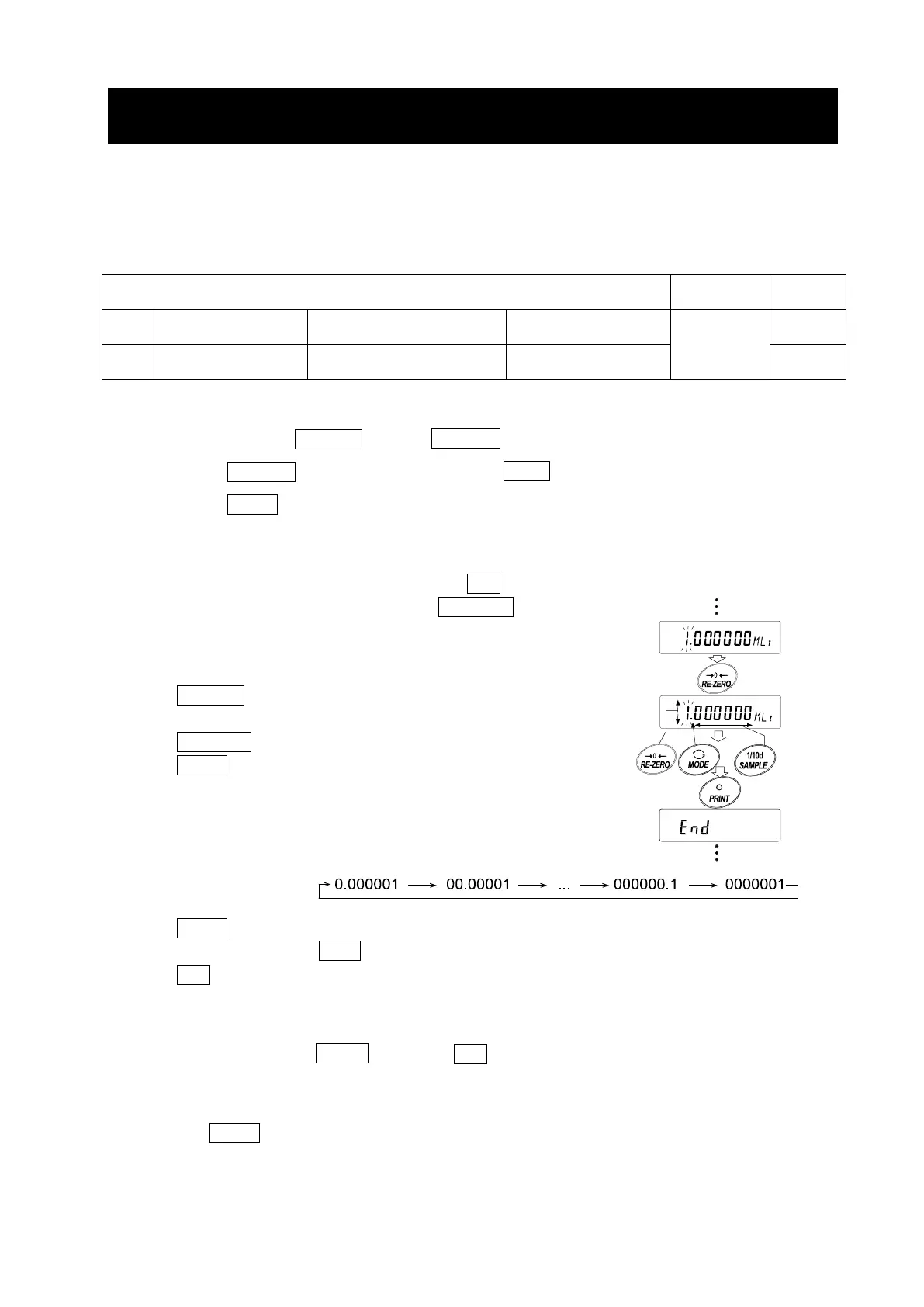
3 Press the PRINT key. The balance enters the mode to confirm or set the coefficient.
Confirming the coefficient
4 The current coefficient is displayed with the first digit blinking.
When it is not to be changed, press the CAL key and go to step 6.
When it is to be changed, press the RE-ZERO key and go to step 5.
Setting the coefficient
5 Set the coefficient using the following keys.
SAMPLE key To select a digit to change the
value. The selected digit blinks.
RE-ZERO key To change the value.
MODE key To change the decimal point
position.
Each time the switch is pressed,
the decimal point position
changes as follows:
PRINT key To store the new setting, display
end and go to step 6.
CAL key To cancel the new setting and
go to step 6.
Quitting the operation
6 The balance displays Unit . Press the CAL key to exit the programmable-unit function and
return to the weighing mode.
Using the function
Press the MODE key to select the programmable-unit (no display on the unit section). Perform
weighing as described in “6.1. Basic Operation (Gram Mode)”. After weighing, the balance displays
the result (weight data in grams x coefficient).



 To Next Page