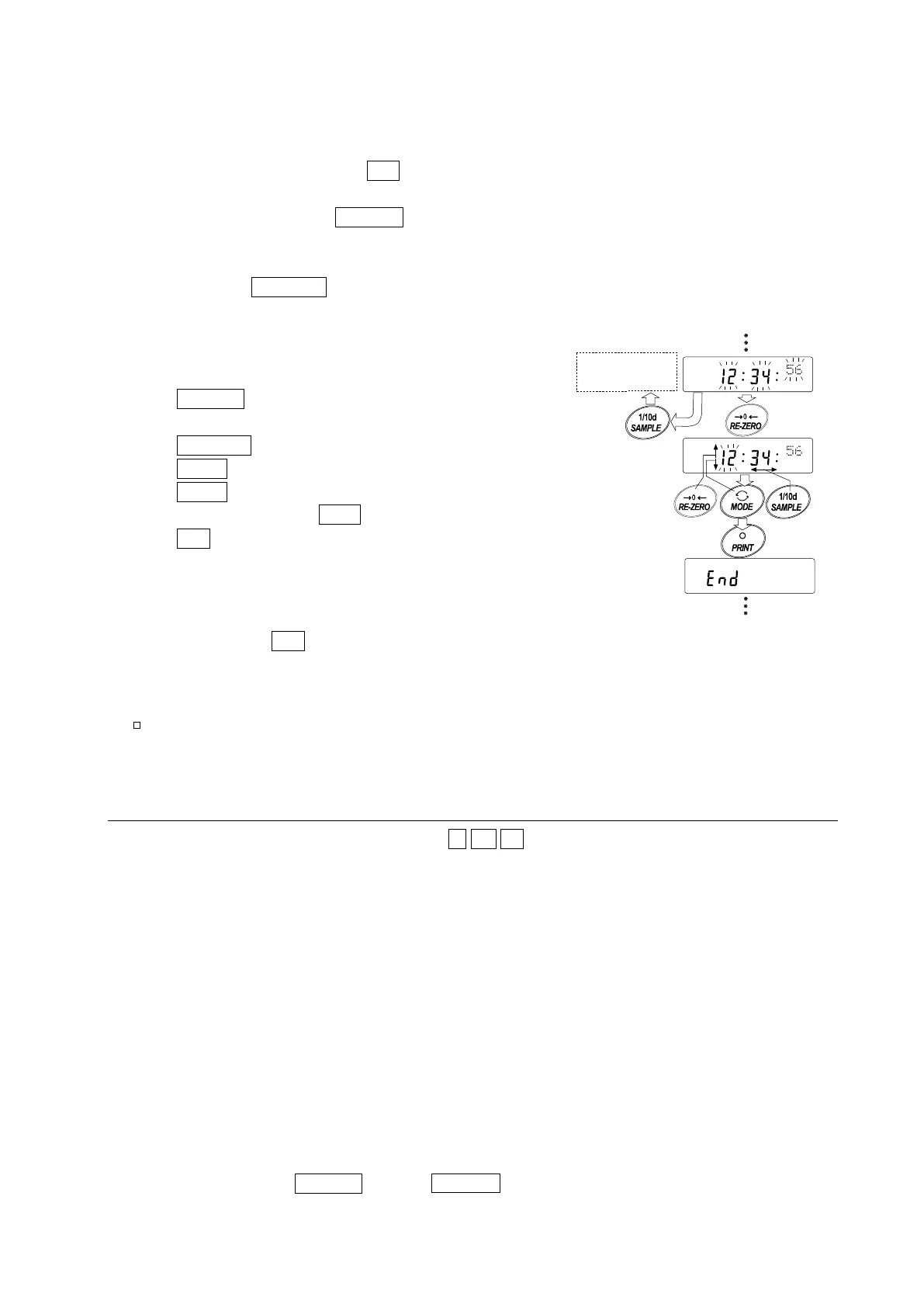
Confirming the time
6 The current time is displayed with all the digits blinking.
When the time is correct and the date does not need
to be confirmed, press the CAL key and go to step 8.
When the time is correct and the date is to be
confirmed, press the SAMPLE key and go back to
step 4.
When the time is not correct and is to be changed,
press the RE-ZERO key and go to step 7.
Setting the time (with part of the digits blinking)
7 Set the time in a 24-hour format using the following
keys.
SAMPLE key To select the digits to change the
value. The selected digits blink.
RE-ZERO key To increase the value by one.
MODE key To decrease the value by one.
PRINT key To store the new setting, display
end and go to step 8.
CAL key To cancel the new setting and
go back to step 4.
Quitting the operation
8 The balance displays the next menu of the function
table. Press the CAL key to exit the clock and calendar
function and return to the weighing mode.
Notes
Do not enter invalid values such as a non-existing date when setting the time and date.
10.10. Comparator Function
The results of the comparison are indicated by HI OK LO on the display.
Operating conditions: No comparison
Comparison when the weight data is stable or overloaded, excluding “near zero”
Comparison when the weight data is stable or overloaded, including “near zero”
Continuous comparison, excluding “near zero”
Continuous comparison, including “near zero”
To compare, use: Upper limit value and lower limit value
Input method: Digital input
Note
"Near zero" means that the weight value is within
10 digits of the minimum weighing value.
For example, using an FX-3000i in gram mode, the range of
0.10 g is “near zero”.
For the description of “Comparator (Cp fnc)”, refer to “10.3. Details of the Function Table”.
Setting example
(Continuous comparison, excluding “near zero”, upper limit and lower limit values, digital input)
Selecting a comparator mode
1 Press and hold the SAMPLE key until ba5fnc of the function table is displayed.
To the date
setting mode
Confirm



 To Next Page