10
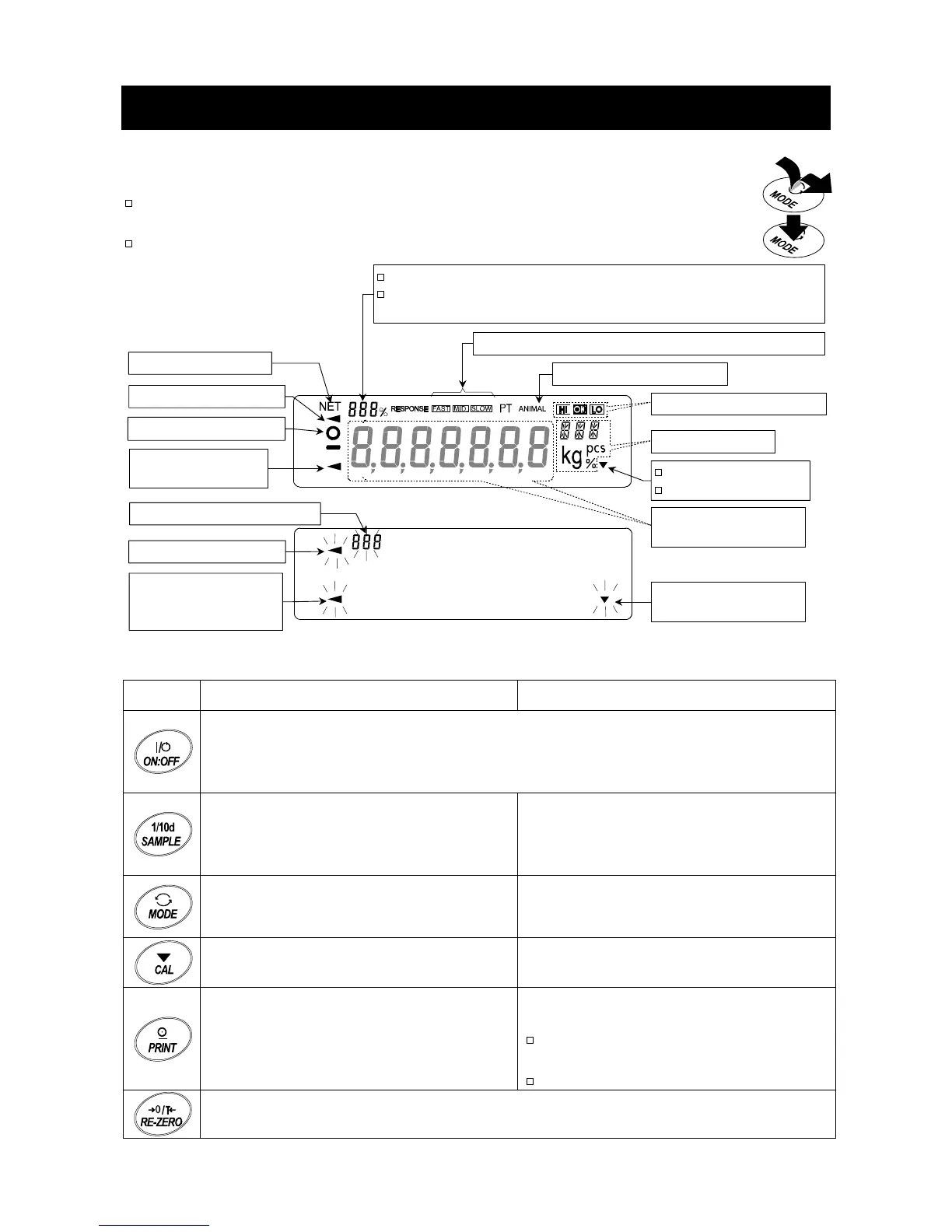
4. Display Symbols and Key Operation
Key Operations
Key operation affects how the balance functions. The basic key operations are:
"Press and release the key immediately" or "Press the key" are normal operation.
= normal key operation during measurement
"Press and hold the key".
Display
Each key, when pressed or when pressed and held, functions as follows:
Key
When pressed and released When pressed and held
Turns the display ON and OFF. The standby indicator is displayed when the display
is turned off. The weighing mode is enabled when the display is turned on. This key
is available anytime. Pressing the key during operation will interrupt the operation
and turn the display OFF.
In the weighing mode, turns the
minimum weighing value ON and OFF.
In the counting or percent mode, enters
the sampling mode.
Enters the function table mode.
Refer to "10. Function Table".
Switches the preset weighing units
stored in the function table. Refer to "5
Weighing Units".
Performs weighing speed adjustment
(response adjustment) and self check.
Performs calibration using the internal
mass for GX-K series.
Displays other items of the calibration
menu.
Stores the weighing data in memory or
outputs to a printer or personal computer
depending on the function table settings.
(Factory setting = output)
No function at the factory setting.
By changing the function table:
Outputs "Title block" and "End block"
for GLP report.
Displays the data memory menu.
Sets the display to zero.
Blinking indicators
Weighing data or
stored data
Units
Interval memor



 To Next Page