20
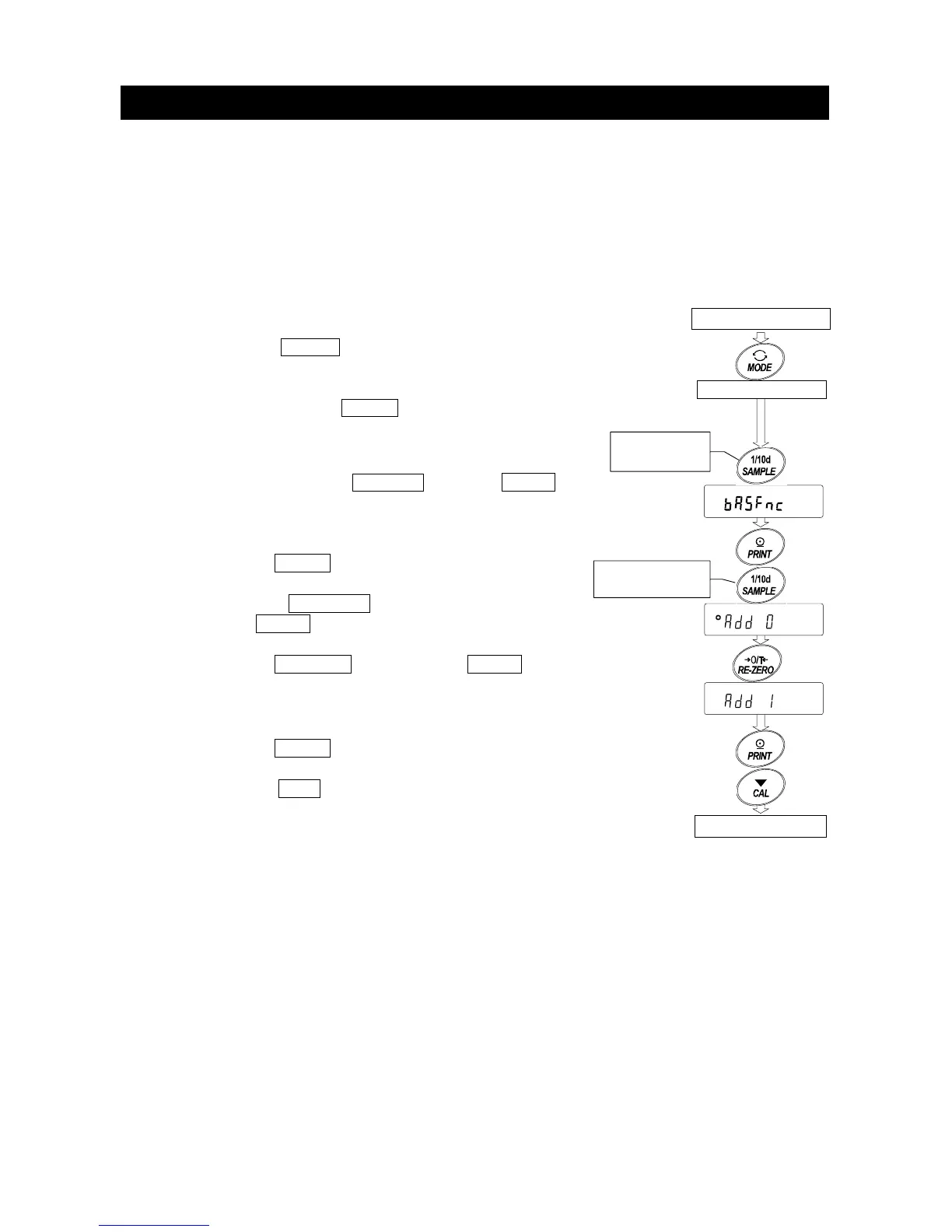
6-5. Accumulation Function
The accumulation function sums the weighing data and displays the total value.
To use the accumulation function, set the "Accumulation function (add)" parameter of the
function table as described below.
Note
While the accumulation function is in use, the data memory function is not available.
When using the accumulation function, make sure that the "Data memory (data)"
parameter of the function table is set to "0".
Selecting The Unit
Step 1 Press the MODE key to select a unit to be
used for accumulation.
Note While the accumulation function is in use, unit
selection using the
MODE key is not available.
Setting The Function Table
Step 2 Press and hold the SAMPLE key until ba5fnc
of the function table is displayed, then release
the key.
Step 3 Press the PRINT key.
Step 4 Press the SAMPLE key several times to
display add 0 .
Step 5 Press the RE-ZERO key to display add 1 .
Note To disable the accumulation function, set the
"Accumulation function (add)" parameter to "0".
Step 6 Press the
PRINT key to store the setting.
Step 7 Press the CAL key to return to the weighing
mode.
Weighing mode
Weighing mode
Press and
hold the key
Press the key
several times
Selected uni



 To Next Page