21
Using The Accumulation Function
Use the following keys to operate the accumulation function.
MODE key
..........
Displays the weighing data and the total value alternately each time it is
pressed. While the accumulation function is in use, the unit can not be
changed.
RE-ZERO key
.....
Sets the display to zero while the weighing data is displayed.
Deletes the total value while the total value is displayed.
PRINT key
..........
Outputs and adds the weighing data while the weighing data is displayed.
Outputs the total value while the total value is displayed.
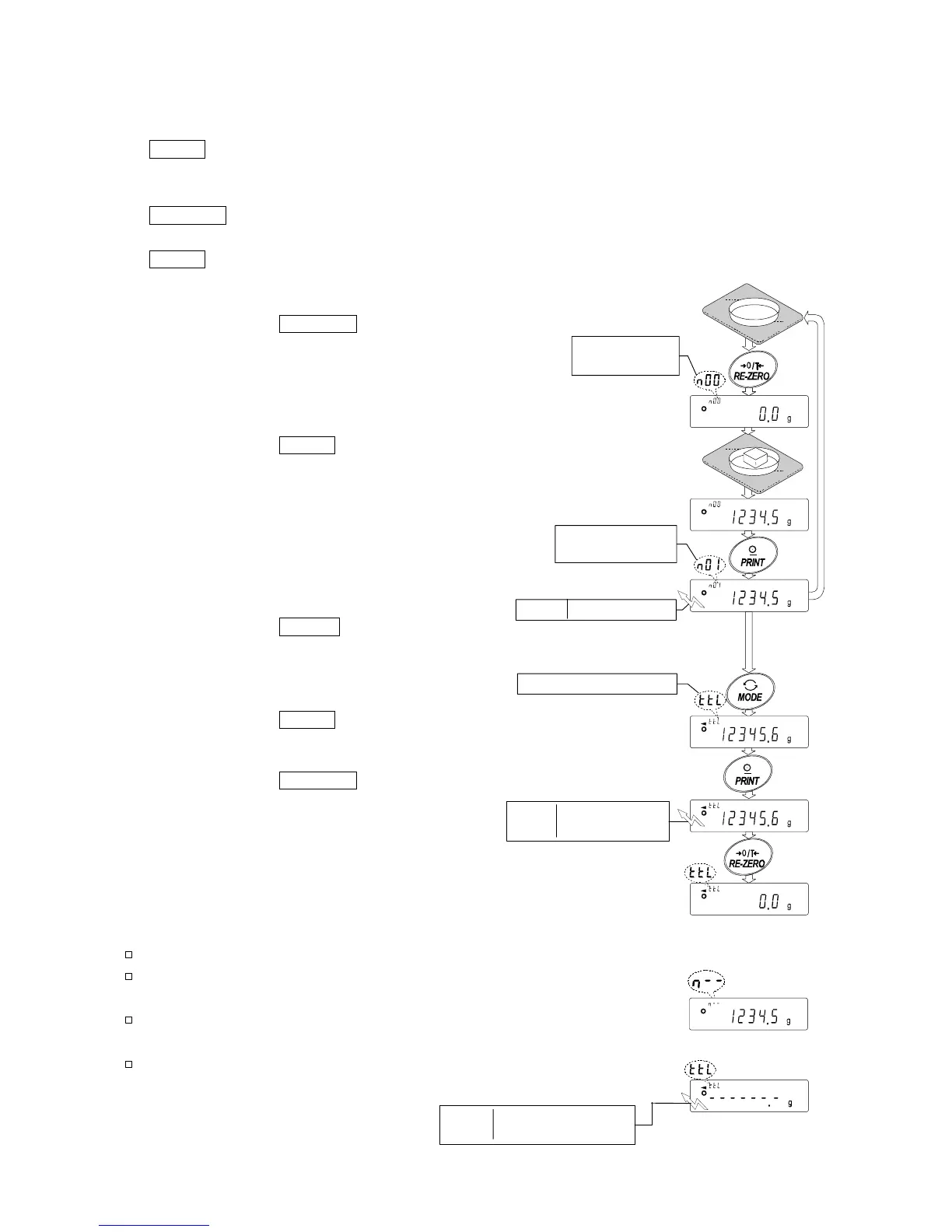
Step 1 Press the RE-ZERO key to zero the
display.
Step 2 Place a sample on the pan. The weight
value is displayed.
Step 3 Press the PRINT key. The weight
value is added to the total and is
output.
The accumulation number at the upper
left of the display increases by one.
Step 4 Repeat steps 1 to 3, when
accumulating more data.
Step 5 Press the MODE key to display
the total value.
Outputting the value
Step 6 Press the PRINT key to output the
total value.
Step 7 Press the
RE-ZERO key to delete
the total value.
Notes And Displaying Or Outputting An Overloaded Total
The output format depends on the function table setting.
While the accumulation function is in use, the data memory
function is not available.
To disable the accumulation function, set the
"Accumulation function (add)" parameter to "0".
When the "Data number output (d-no)" parameter is set to
"1", the accumulation number will be output before the
weighing data.
Output ST,+012345.6 g



 To Next Page