15
5-2. Changing the Units
The units or modes can be selected and stored in the function table. The sequence of
displaying them can be arranged in the function table, so as to fit the frequency of use.
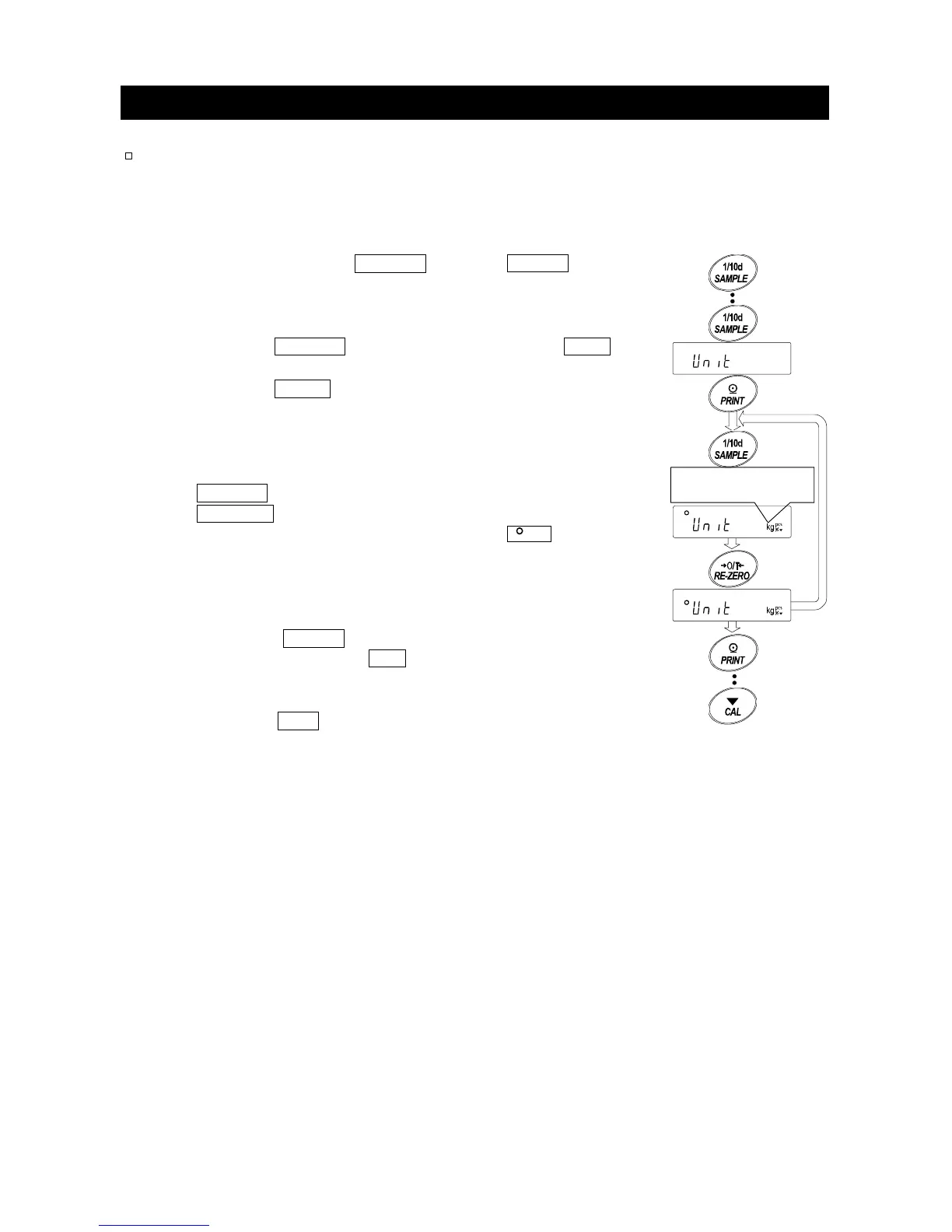
Select a unit or mode and arrange the sequence of display as follows:
Step 1 Press and hold the SAMPLE key until ba5fnc of the
function table is displayed in the weighing mode, then
release the key.
Step 2 Press the SAMPLE key several times to display Unit .
Step 3 Press the PRINT key to enter the unit selection mode.
Step 4 Specify a unit or mode in the order to be displayed using
the following keys.
SAMPLE key
......
To display the units sequentially.
RE-ZERO key
.....
To specify a unit or mode. The
stabilization indicator appears
when the displayed unit or mode is
specified.
Step 5 Press the PRINT key to store the units or modes.
The balance displays end and then displays the next
menu item of the function table.
Step 6 Press the
CAL key to exit the function table. Then the
balance returns to the weighing mode with the selected
unit.
Displays the units
se



 To Next Page