32
9-2. Initializing The Balance
This function returns the following parameters to factory settings.
Calibration data
Function table
The sample unit mass value (counting mode),
100% reference mass value (percent mode)
The data that is stored in the balance using the data memory function
External calibration weight and target weight value
Function switch settings
Liquid density and temperature in the density mode
Note Be sure to calibrate the balance after initialization.
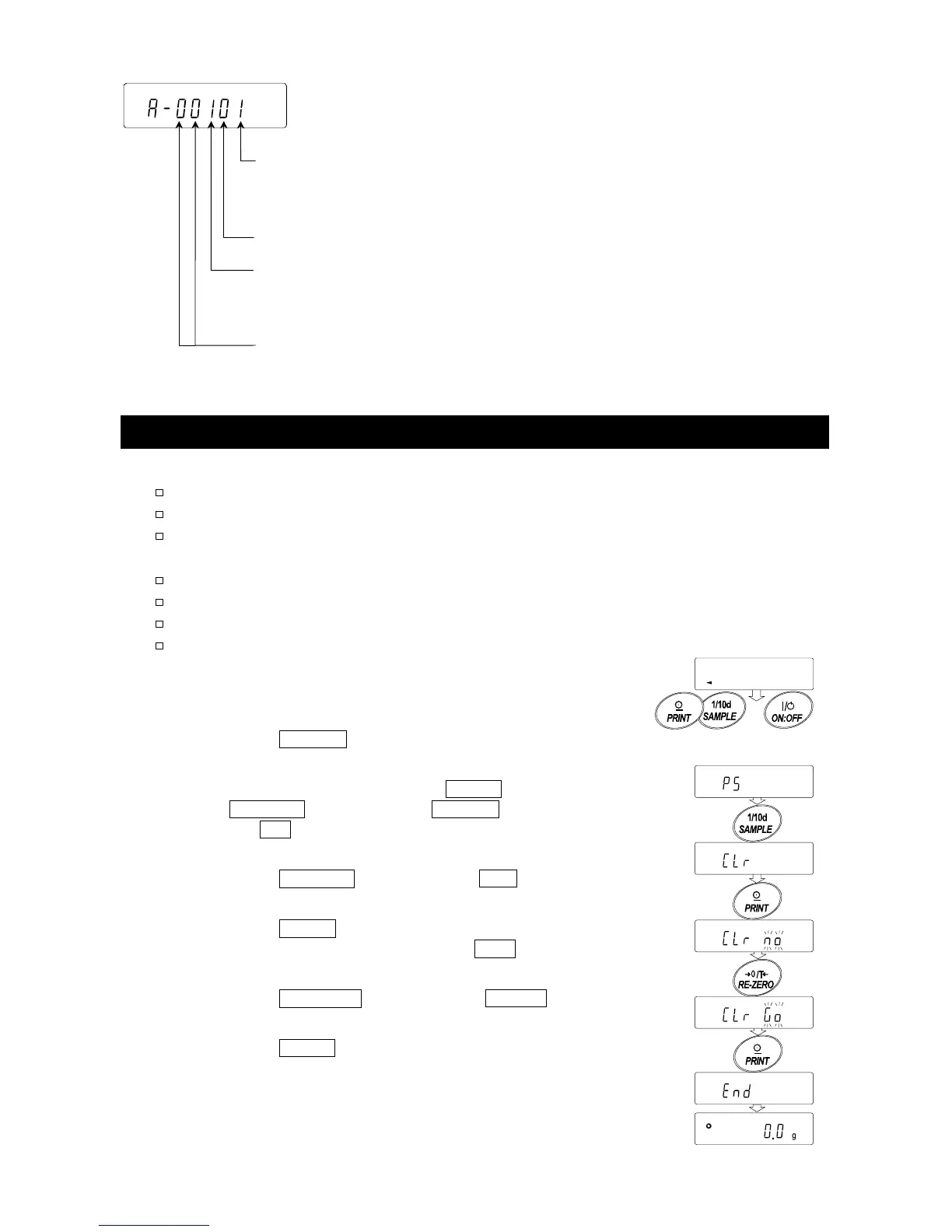
Step 1 Press the
ON:OFF key to turn off the display.
Step 2 While pressing and holding the PRINT key and
the SAMPLE key, press the ON:OFF key to
display p5 .
Step 3 Press the SAMPLE key to display Clr .
Step 4 Press the
PRINT key.
To cancel this operation, press the CAL key.
Step 5 Press the
RE-ZERO key to display Clr go .
Step 6 Press the PRINT key to initialize the balance.
The balance will automatically return to the weighing
mode.
Function table
0 To inhibit changes to the function table.
1 To permit changes to the function table.
Not used
Calibration using an external weight
0 To inhibit calibration using an external weight.
1 To permit calibration using an external weight.
Not used
GF-K series. The display shown left indicates the factory settings.
With these keys Press the key
held down



 To Next Page