65
Notes
Using the "CN:mm" command, the comparator limit values can be recalled.
The upper limit value recalled can be output using the "?HI" command.
The lower limit value recalled can be output using the "?LO" command.
The upper limit value can be changed using the "HI:" command.
The lower limit value can be changed using the "LO:" command.
"mm" indicates a two-digit numerical value 01 to 20, which corresponds to C01 - C20.
Digital input mode
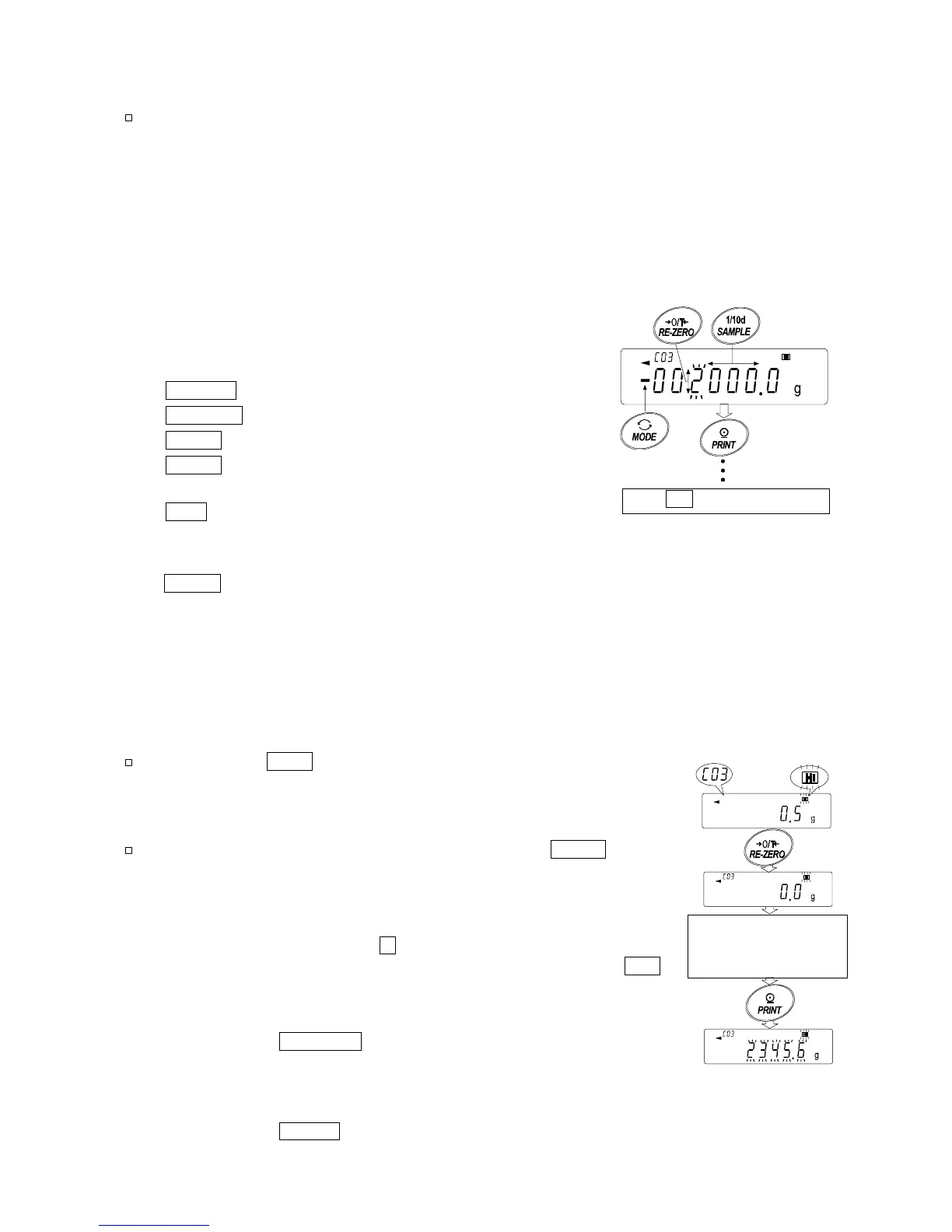
In the digital input mode, the upper and lower limit values are
entered digitally using the keys. Use the following keys to store
upper and lower limit values in digital input mode.
SAMPLE key
...
To select the digit to be changed.
RE-ZERO key
..
To change the value of the selected digit.
MODE key
......
To switch the polarity.
PRINT key
.......
To store the upper and lower limit values.
Go to step 3 of the previous page.
CAL key
..........
To return to the upper and lower limit
values confirmation mode
Go to step 3 of the previous page.
MODE key
Press and hold to go to the weighing input mode.
Weighing input mode
In the weighing input mode, a sample is placed on the pan to store the upper and lower limit
values.
Notes
Pressing the CAL key will interrupt the operation and the
balance will return to the upper and lower limit values
confirmation mode (step 3 in "Storing the upper and lower
limit values").
To go to the digital input mode, press and hold the MODE key.
Step 1 The first display in the weighing input mode depends on the
comparator number selected in step 4 in "Storing the upper and
lower limit values".
For example, when "C03 H1 " is selected in step 4, the display is
the current weight value and the comparator number with HI
blinking.
Step 2 Place a container on the weighing pan, if necessary.
Press the
RE-ZERO key to set the display to zero.
Step 3 Place a sample corresponding to the upper limit value,
on the pan or in the container.
Step 4 Press the
PRINT key to store the upper limit value.
Value
Di



 To Next Page