69
12-6-2. Recalling the tare value (Quick selection mode)
The procedure below describes an easy way to recall the tare value to be used for weighing.
When the recalled tare value is to be changed, refer to "12-6-1. Storing the tare value".
Step 1 Set the "Data memory (data)" parameter to "5".
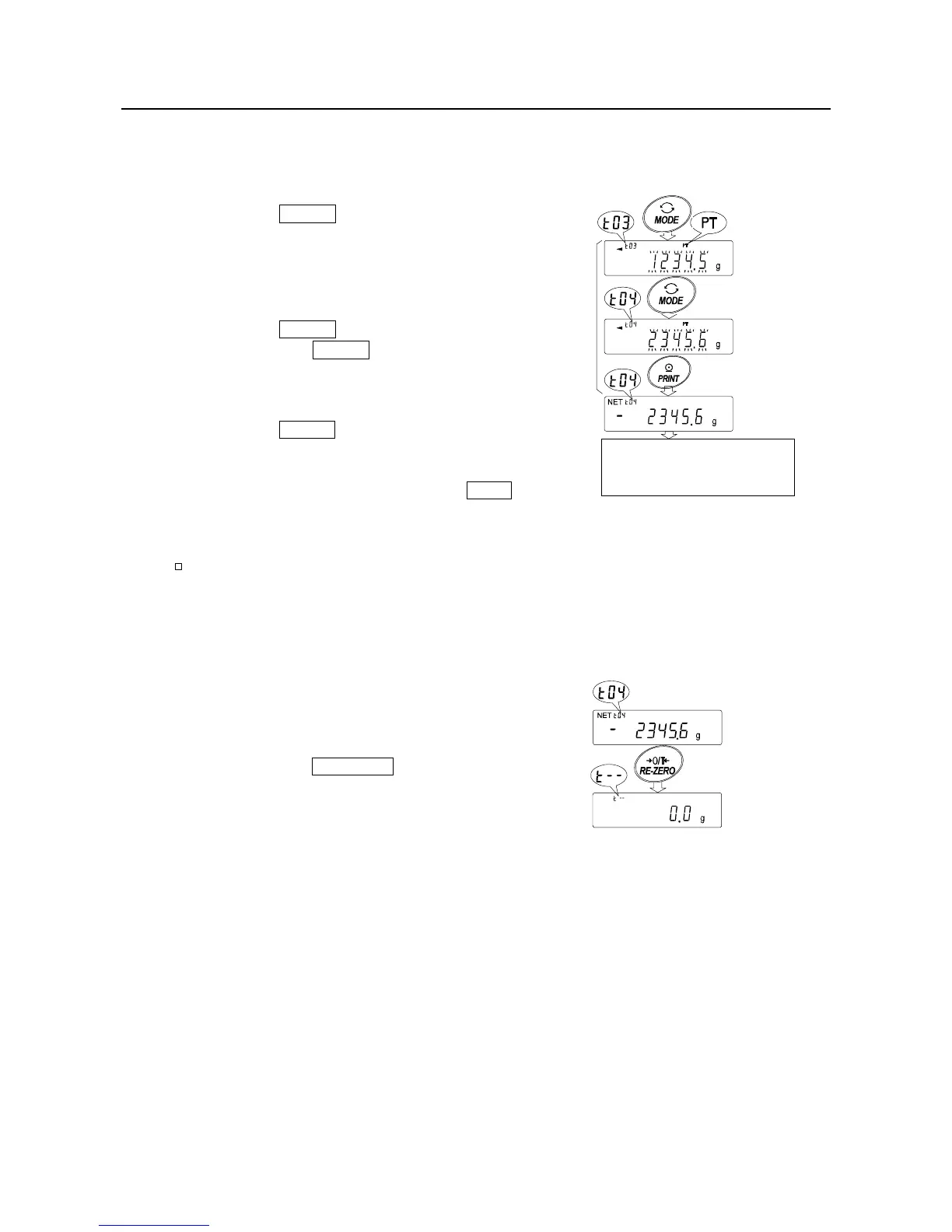
Step 2 Press the MODE key to enter the tare value
recalling mode. The tare value last selected
with its tare number appears. The display is
as shown to the right, with all the digits
blinking.
Step 3 Press the MODE key to select the value.
Each time the MODE key is pressed, the
displayed value changes as follows:
(
.....
↔
t03 ↔ t04 ↔
........
↔t20 ↔ t01 ↔
...
)
Step 4 Press the PRINT key to confirm the selection.
The balance returns to the weighing mode with
the selected tare value ready for use.
To cancel the selection, press the CAL key.
The balance returns to the weighing mode.
Note
When no operation is performed in step 4 (after a few seconds of inactivity), the
balance selects the value currently displayed and returns to the weighing mode
automatically.
Canceling the tare value data
Cancel the tare value data as follows:
Step 1 Remove everything from the weighing pan
and press the RE-ZERO key to cancel the
tare value.
Tare value
Tare numbe



 To Next Page