76
15-1-2. Measuring the density
Note If the liquid temperature or the type of liquid is changed during measurement,
input again the value of the liquid density as necessary. Refer to "C. Entering
the density of a liquid".
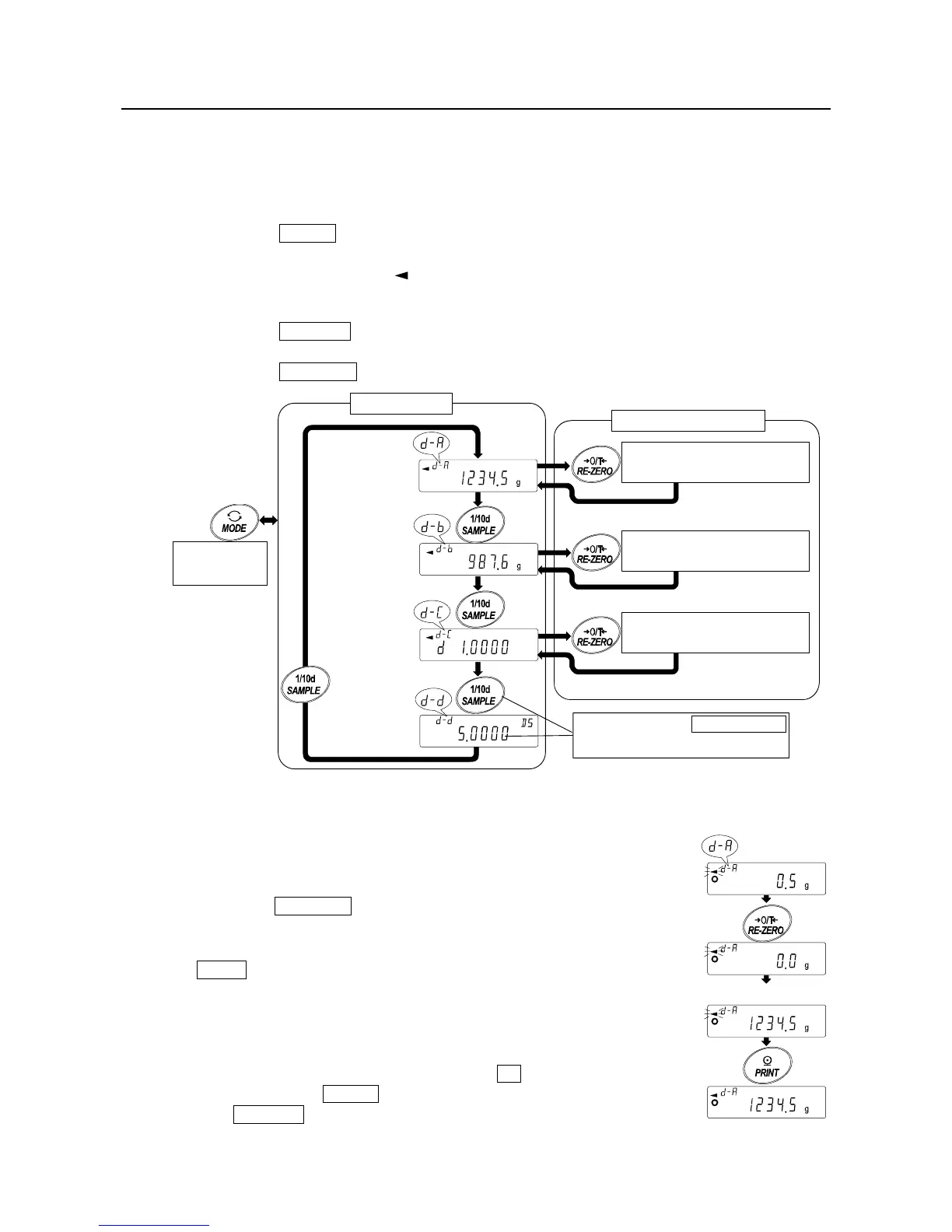
Entering the density mode
Step 1 Press the MODE key as necessary to select the density mode.
When the density mode begins, "d-a" (weight in air), "g (gram)" for the unit and
the processing indicator ( ) are turned on.
Step 2 Selecting a parameter to set.
Press the SAMPLE key to select a parameter to set. Each pressing of the key
switches the parameter.
Press the
RE-ZERO key to enter the inputting mode of the parameter selected.
Setting the parameter
Step 3 Setting the parameter.
(A) Entering the weight of a sample in air
1 Confirm that nothing is placed on the upper pan (in air).
Press the
RE-ZERO key to set the display to zero.
2 Place a sample on the upper pan. When the value
displayed on the balance becomes stable, press the
PRINT
key. The sample weight in air is confirmed and
the balance will return to the density mode (
Go to "Step
2 Selecting a parameter to set"
).
3 Remove the sample from the upper pan.
Note If an unstable value, a negative value or e (error)
is displayed, the PRINT key is disabled.
The SAMPLE key can not be used to change the
minimum weighing value.
Pres



 To Next Page