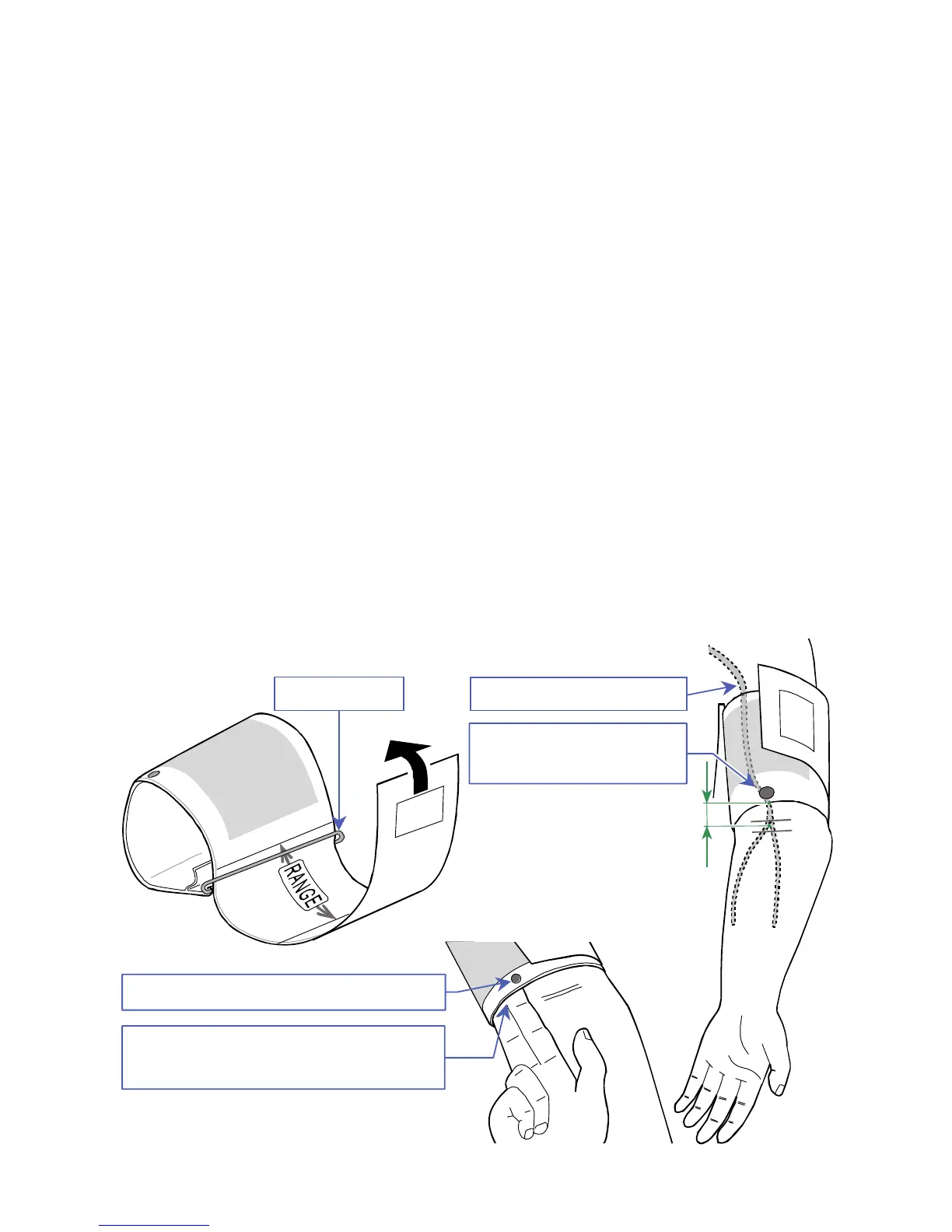
Step 4.
Have room to insert two
fingers
Step 3.
White artery
position mark
Step 2.
Brachial artery
How to put on the cuff, recorder and holder
Step 1.
Pass the end of the cuff through the ring and make the shape
of bracelet.
Step 2.
Find the brachial artery of left arm using palpation.
Step 3.
Attach the cuff directly against the skin so that the white mark is
directly over the brachial artery and the lower edge of the cuff is
put on approximately 1 - 2 cm above the inside of the elbow.
Step 4.
Wrap the cuff so that the ring is within the range, it is flat and
does not slip down, but has room to insert two fingers.
Step 5.
Fix the air hose using adhesive tape so as to pass over the
shoulder.
Step 6.
Pass the belt through the carrying holder.
Step 7.
Adjust the belt so that the carrying holder is on left side.
Step 8.
Connect the air plug to the air socket on the recorder.
Step 9.
Put the recorder into the carrying holder.



 To Next Page