Accsense VersaLog Data Loggers User’s Manual Page 24
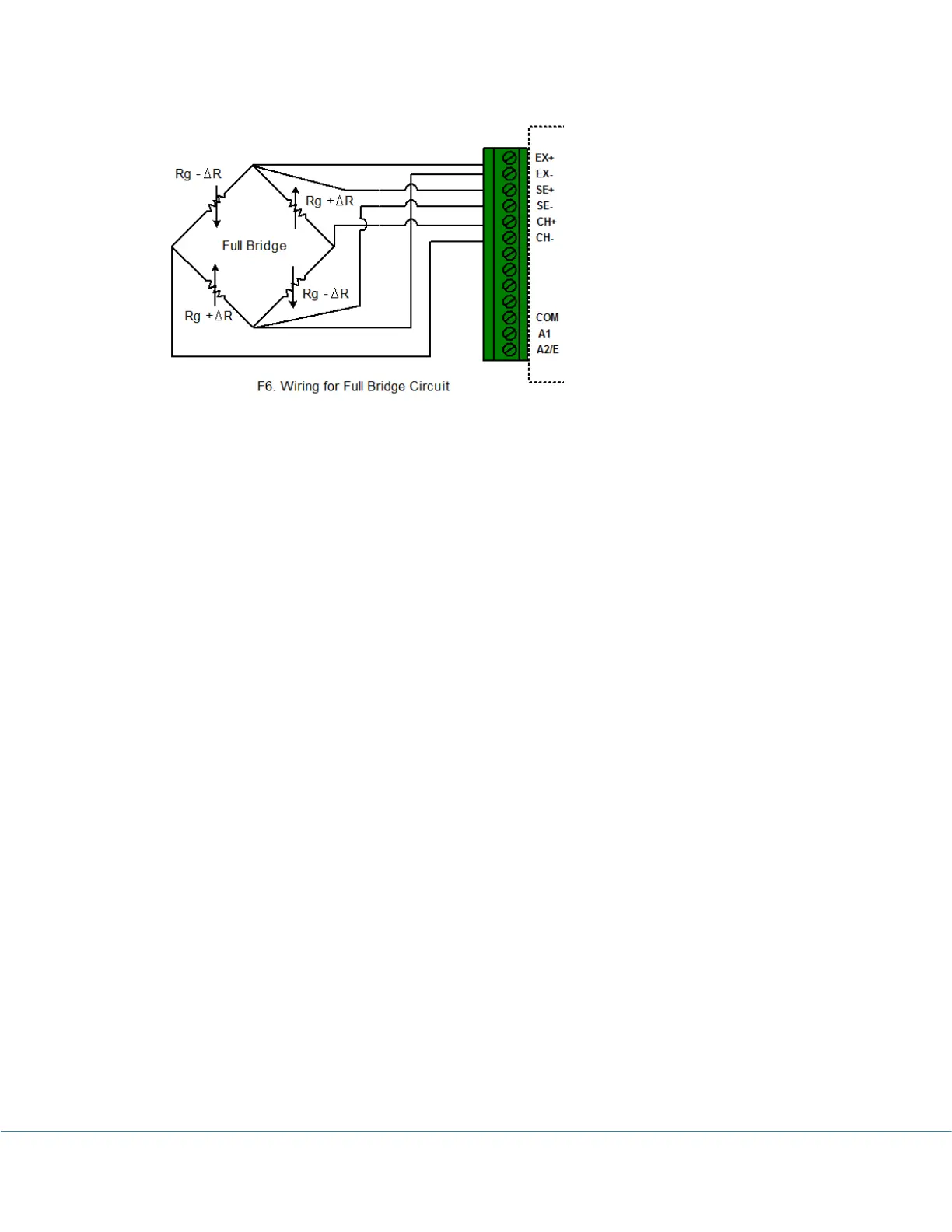
This circuit is for equation “FullBridge”. When configure the logger, choose “FullBridge”
equation and click “Change GF” to change the Gauge Factor.
Other Bridge Circuit:
If your bridge circuit is not included in the above configurations, you may need to write
your own equation. SiteView includes a custom equation “BridgeSample” for your
reference. The source code looks like:
// Sample Equation for iLog Strain Gauge/Bridge
public double SampleBridge(double Input)
{
//Change it according to your curcuit
double GF = 1;//Gauge Factor
//The voltage of the bridge output
double Vo = Input;
//The voltage of the Excitation sense channel
double Vex = Channels[0].Measurement;
/* this block is for half bridge circuit
double strain = -2 * Vo / (Vex * GF);
return strain;
*/
/* this block is for full bridge circuit
double strain = -Vo / (Vex * GF);
return strain;
*/
/* this block is for quarter bridge circuit */
double strain = -4 * Vo / ((2 * Vo + Vex) * GF);
return strain;
}



 To Next Page