Accsense VersaLog Data Loggers User’s Manual Page 64
High is “- 435” (calculated from 65100 – 65535). The equation entity will subtract this
value (-435) from the digital value when resolving the highest digital value.
The valid range for these two parameters is from –32768 to 32767.
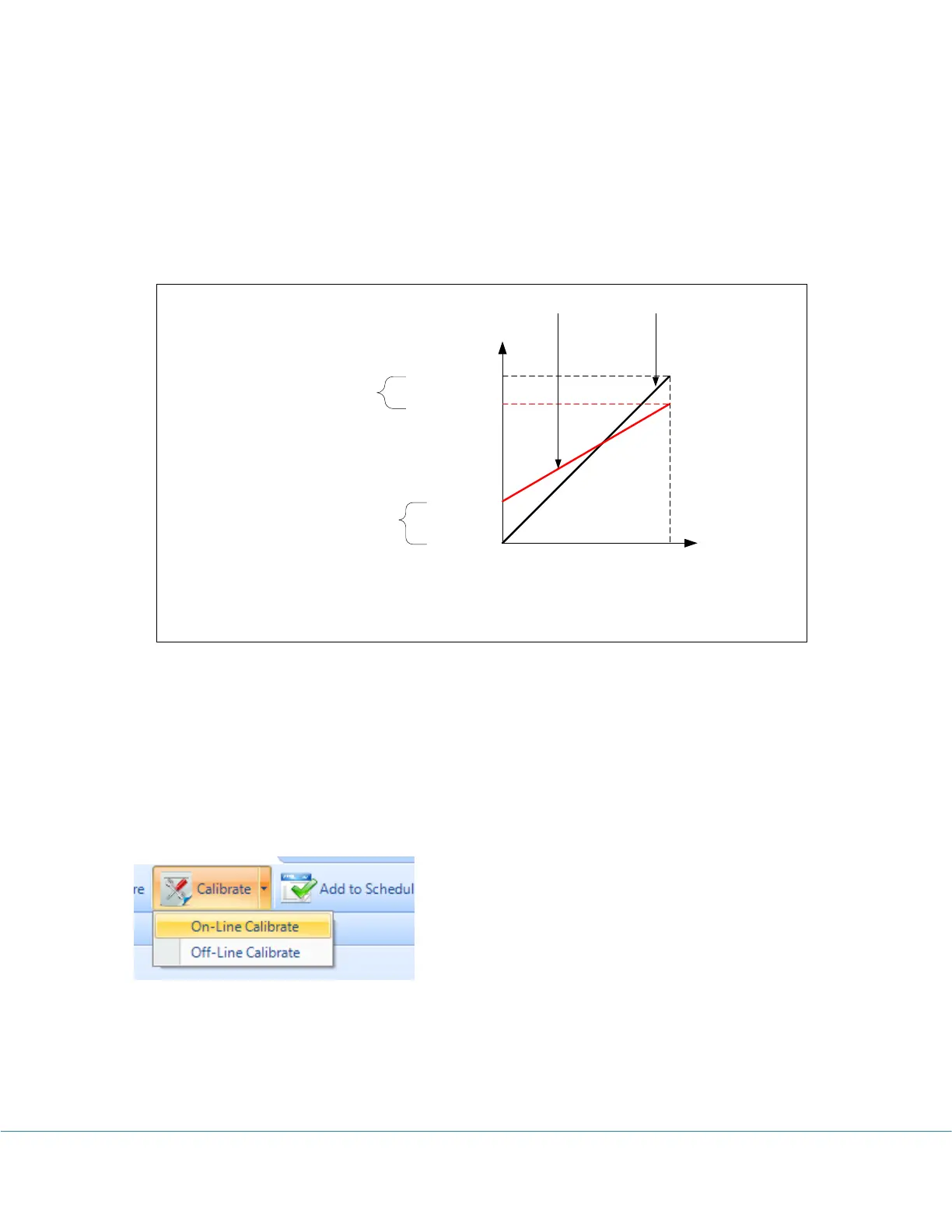
The following figure illustrates the relationship between an ideal data line and a measured
data line and how Cali. Low and Cali. High correct the measured data line.
Max. = 65535
Max. = 65535
Min. = 0
Min. = 100
Max. = 65100
Measured Data Ideal Data
Input
Output
Cali. Zero = 100 – 0 = 100
Cali. Span = 65100 - 65535 = - 435
After Correction, Min. Value = 100 – 100 = 0
After Correction, Max. Value = 65100 – ( - 435) = 65535
Decide On-Line or Off-Line Calibration
If the source signal like voltage or current can be connected to the logger while the logger is
connecting to the computer, you can calibrate the logger on-line. If the source signal like a
temperature or relative humidity is not available for on-line calibration, you can calibrate the
logger off-line after the logger has recorded the low and high point data.
You access On-Line / Off-Line Calibration via Calibrate button on the logger status tool bar.
The following dialog appears:



 To Next Page