8Introduction
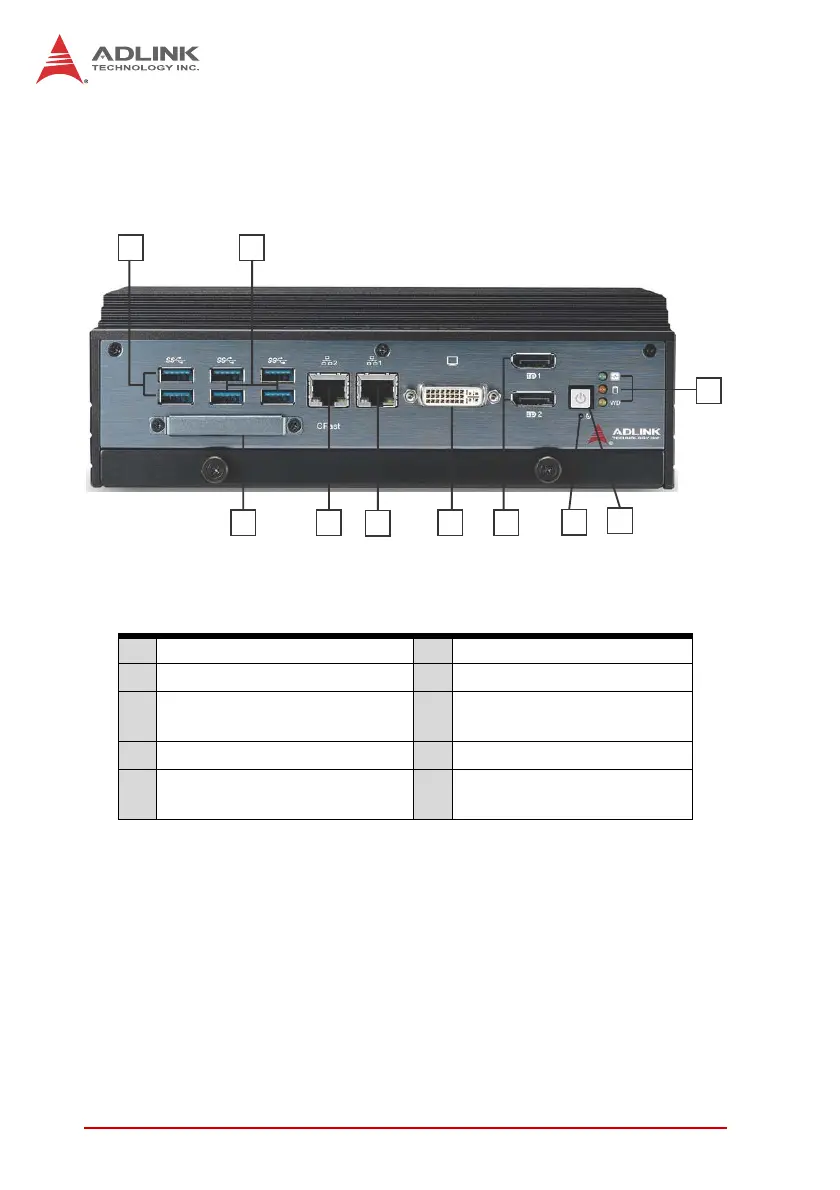
1.6 Front Panel I/O Connectors
This section describes the I/O connectors located on the front
panel of the MXE-5400.
Figure 1-6: Front Panel I/O
Table 1-1: MXE-5400 Front Panel I/O Connector Legend
1.6.1 Power Button
The power button is a non-latched push button with a blue LED
indicator. System is turned on when button is pressed, and the
power LED lit. If the system hangs, depressing the button for 5
seconds powers down the system.
A LED indicators F I217 Gigabit Ethernet port
B Power button G I210 Gigabit Ethernet port
C Reset button H
CFast connector
(Push-Push, Type II)
D Dual DisplayPort connector I Dual USB 3.0 port
E DVI-I connector J
Dual USB 3.0 ports
(1600mA supported)
A
B
C
D
E
F
G
H
I J



 To Next Page