Introduction 15
MXE-5400
USB flash, USB external HDD, and USB CD-ROM drivers and
boot priority and boot device configured in BIOS.
1.6.8 CFast Port
A type II push-push CFast host connector on the front panel con-
nects to the host controller by SATA interface, with data transfer
rates up to 3.0Gb/s(300MB/s)/1.5Gb/s(150MB/s) supported.
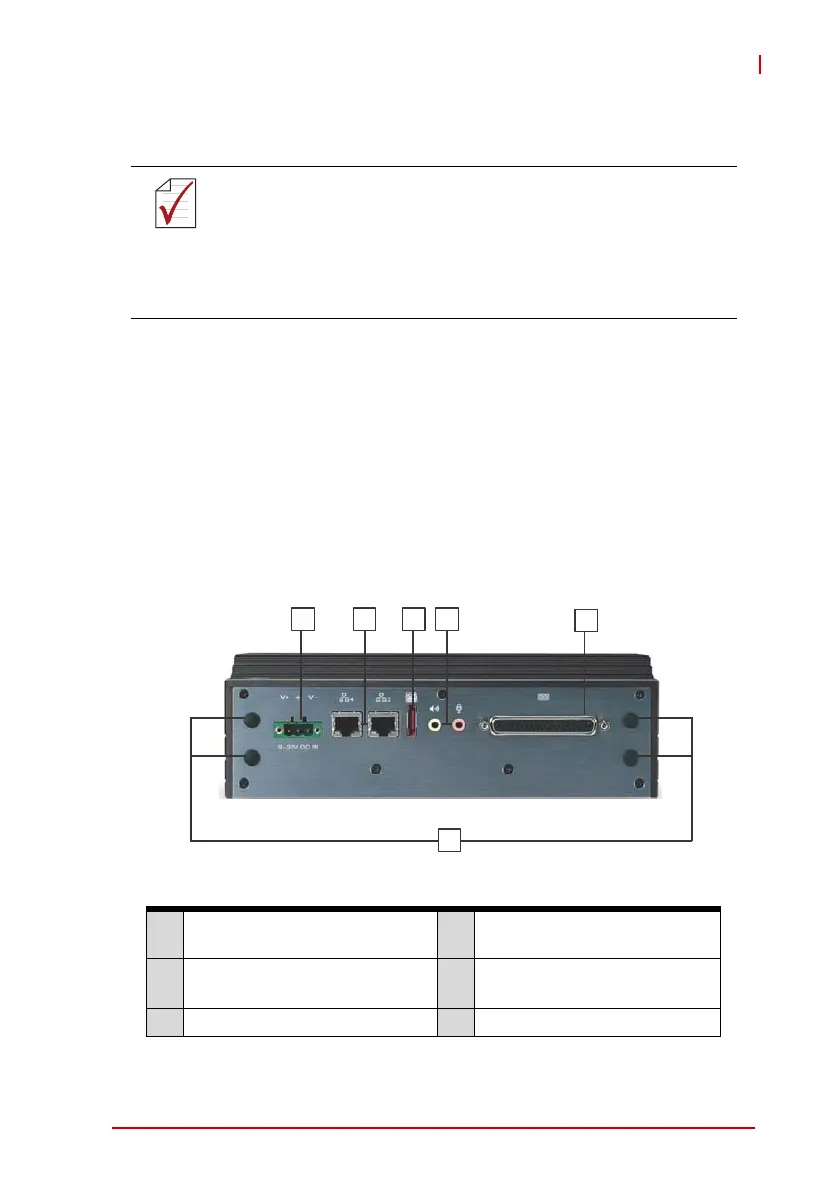
1.7 Rear Panel I/O Connectors
This section describes I/O connectors located on the rear panel of
the MXE-5400.
Figure 1-8: Rear Panel I/O
Table 1-7: MXE-5400 Rear Panel I/O Connector Legend
NOTE:
NOTE:
X When using USB CD-ROM via USB 3.0 port to
re-install or repair the OS, cold boot should be
utilized
X Four USB 3.0 ports support additional current up
to 1600mA, positioned as shown in Table 1-1 on
page 8
A
Antenna connection plugs
(X4)
D eSATA connector
B
DB-62P COM ports and digital
I/O connector
E
I210 Gigabit Ethernet ports
(X2)
C Audio jacks F DC power supply connector
A
B
CDEF



 To Next Page