AUTOMATIC
14
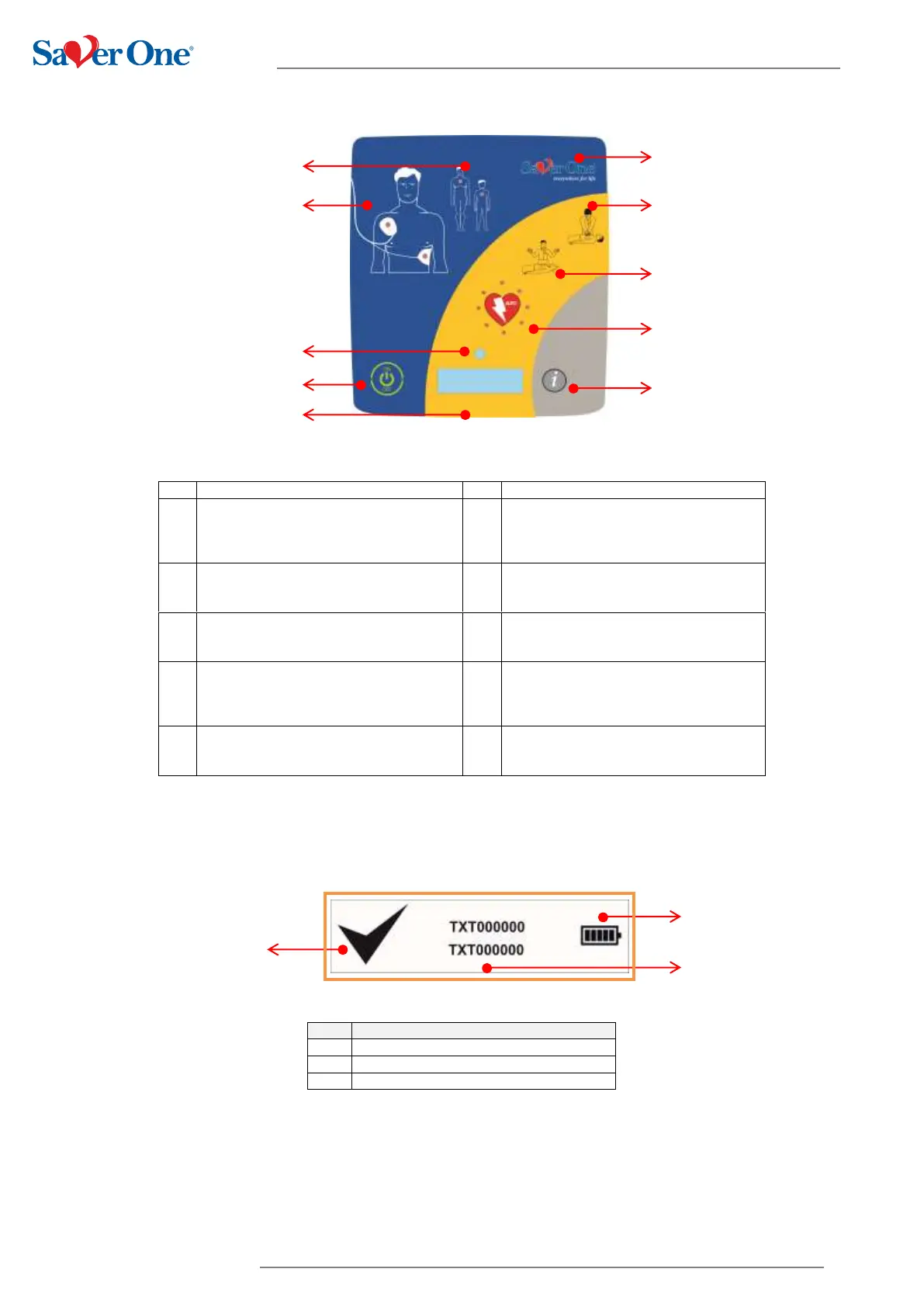
4.2 Keys, icons and indicators
“Patient Type” Indicator
Indicates the type of mode in use:
Adult if you insert Adult PADs
Child if you insert paediatric PADs
Product logo
Indicates the model of the device
"Place PADs" Indicator
Icon equipped with LEDs indicating to
position the defibrillation PADs.
"CPR" Indicator
Indicates to start CPR
Control LEDs
Luminous LED (red / green) allows you to
check the functional status of the AED.
"Do Not Touch" Indicator
Icon equipped with LEDs indicating not to
touch the patient during certain operations
ON / OFF button
Allows you to switch the device on or off.
"Automatic Shock" indicator
Icon equipped with LEDs indicating that
the defibrillation shock is about to be
delivered automatically
Status mini display
It allows you to check the functional status
of the device
"I" button
Allows in operating mode to show useful
information on the device
4.3 Status display


 To Next Page