MND172201 P a g e | 32 Software Revision 1.4.1
Blockage Mode
Sensitivity is used to set up blockage monitoring. The sensitivity
value (between 1 and 100) sets the minimum seeds per second that
seed must flow through the sensors before a blockage alarm occurs.
It is normal for seed flow rate to vary slightly during seeding. The
goal is to set the sensitivity value high enough to detect actual
blockages without causing nuisance alarms due to slight variations in
seed flow rate.
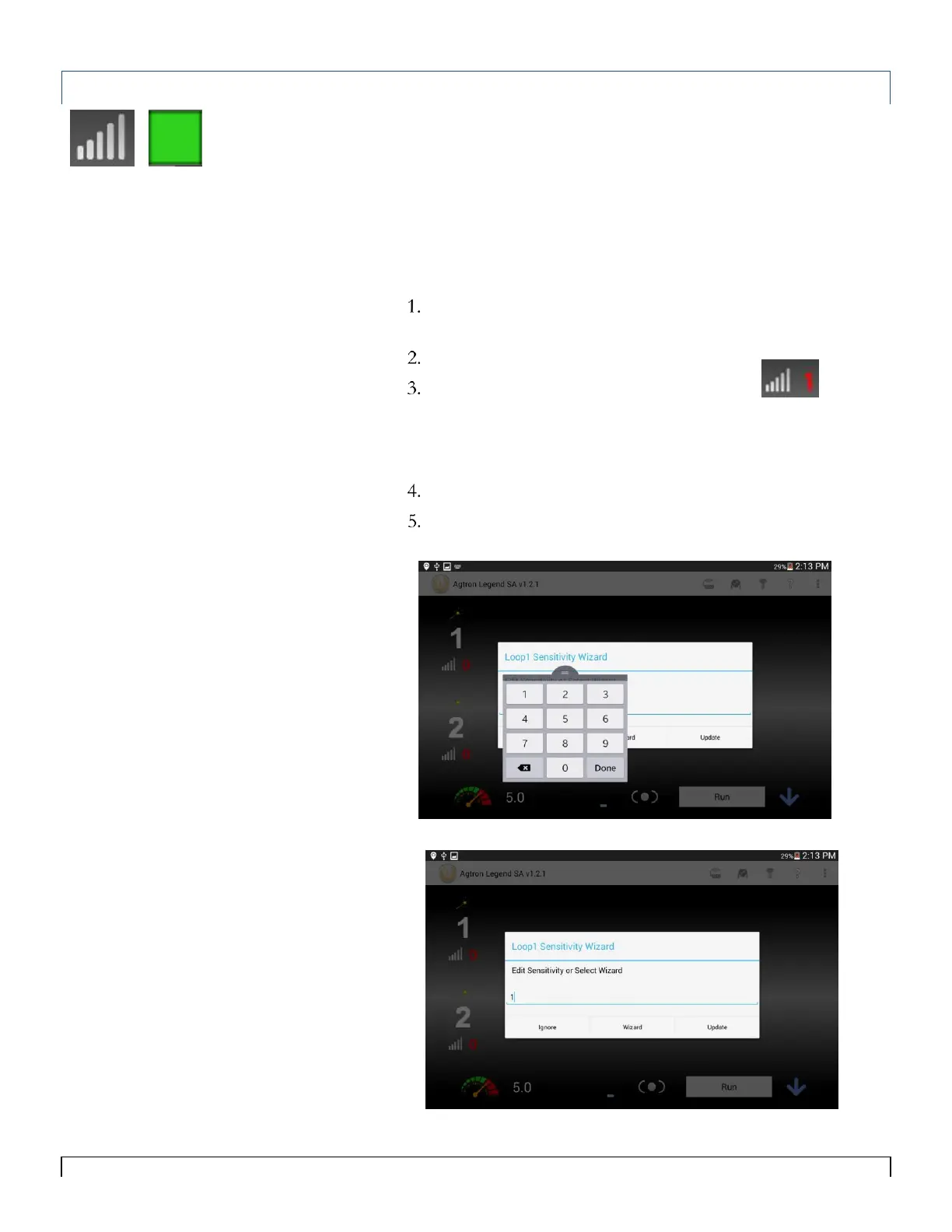
To set the sensitivity:
Check the condition of the air seeder and ensure that there
are no blockages.
Begin seeding.
On the Main screen, tap the sensitivity icon .
You can manually enter in a sensitivy value or tap Wizard and
a value will automatically be selected for you. (The range of
values is between 0 and 100)
Tap Update after a value has been manually entered.
When loop is operating normally in blockage mode, all of the
sensors should be green.
Tip:
A Blockage Sensitivity value of zero (0)
disables the power and alarms to the
Sensor loop.
You must be seeding in order to set
Sensitivity correctly.
Note
Sensitivity relates to blockage
monitoring and detects whether the
number of seeds flowing through a
sensor over a period of time (e.g. 20
seeds per second) drops below the
minimum rate.



 To Next Page