MND172201 P a g e | 3 Software Revision 1.4.1
1. Quick Start Guide
Important! Must be seeding in order to perform a complete calibration
For the following steps, if necessary, refer to the Calibration and
Operation section for more details.
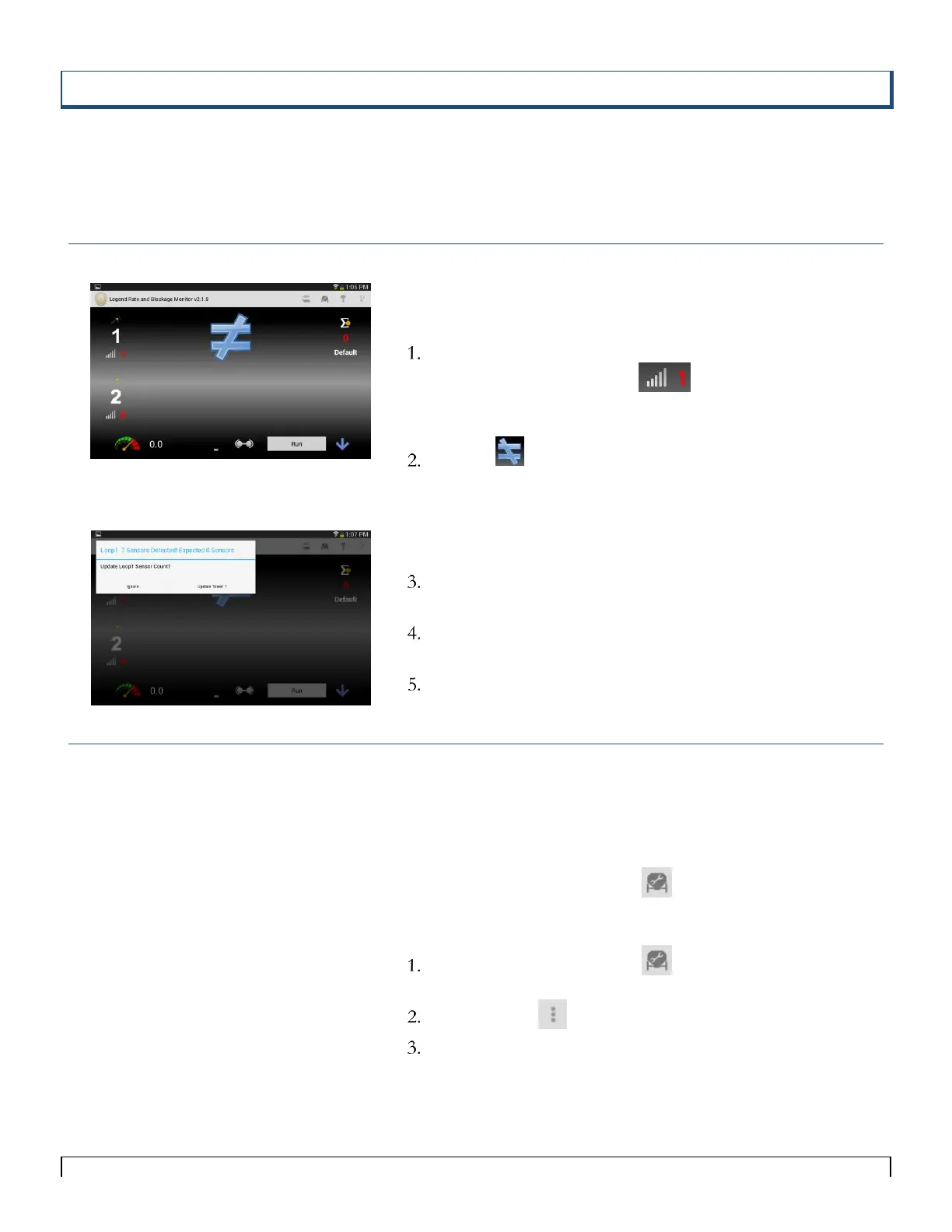
Verify Total Number of Sensors
On the Main screen:
Turn on Loop 1 Power by selecting the red number to the
right of the Sensitivity icon.
Set the Sensitivity to 1 and press Update.
Tap the icon.
A popup window displays the message:
Loop1 x Sensors Detected! Expected 0 Sensors.
(x represents the number of installed sensors)
If the number of sensors is correct, select the Update Tower
1 soft key.
If the number of sensors is incorrect, see System
Troubleshooting.
Repeat for Loop 2 as needed.
Speed Set-Up
A Speed is needed in order to set up the Seed Rate Wizard.
If you are using Test Speed:
1. On the Seeder Setup screen , set the Seeder Test Speed
value (speed normally travelled in field, ex: 5 mph).
If you are using GPS speed:
On the Seeder Setup screen , set Seeder Test Speed to
zero.
Tap the Menu icon and select GPS Settings.
On the GPS Setting screen, set the GPS Enable/Disable
button to Enable.
Note:
In order for the Legend GPS to work, GPS
needs to be enabled on your tablet as well.
Please consult your tablets owner’s manual on
how to enable GPS.



 To Next Page