MND172201 P a g e | 26 Software Revision 1.4.1
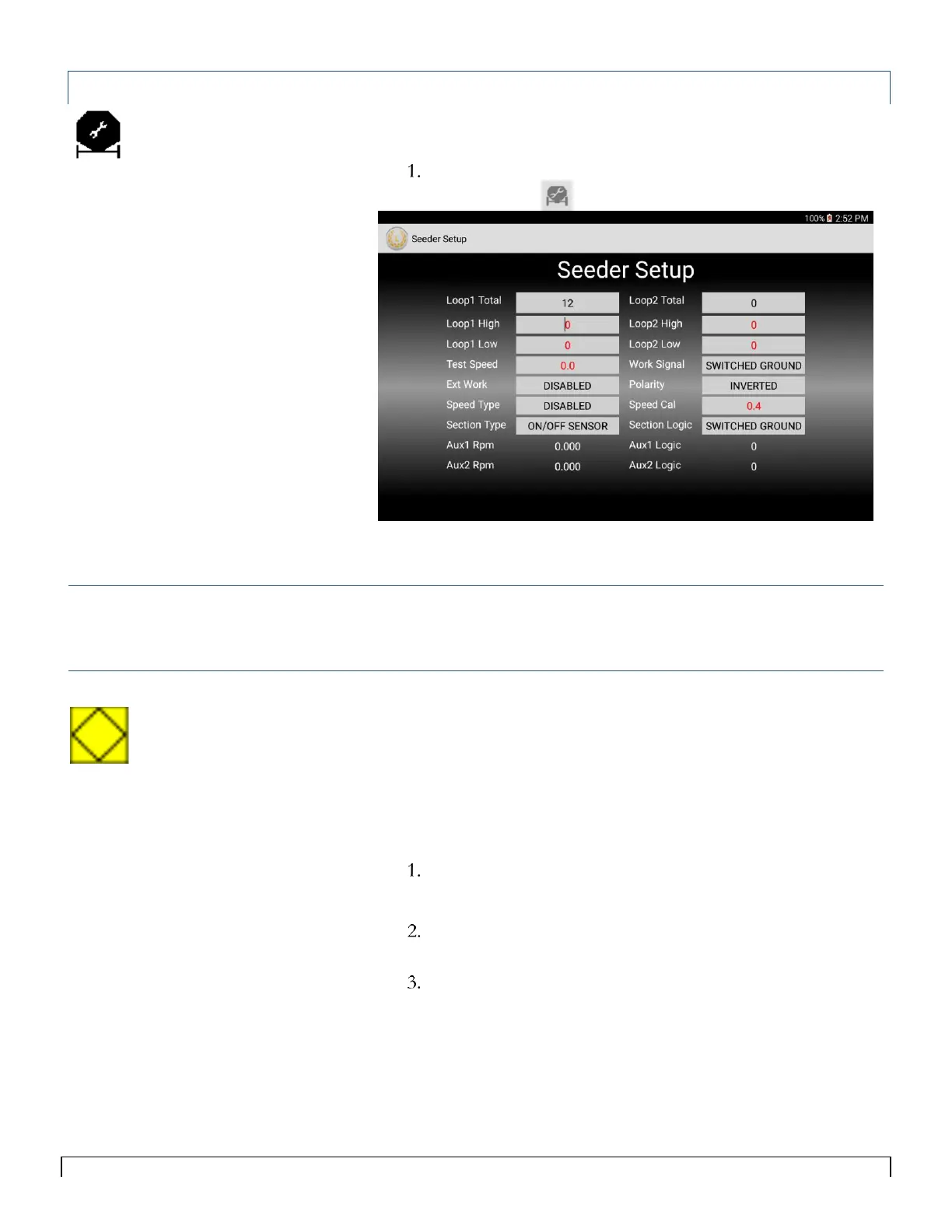
Seeder Setup
The Seeder Setup screen is used to setup and monitor multiple
functions on the system. To access the Seeder Setup screen:
Select the Seeder Setup icon in the menu bar at the top right
of the screen.
Figure 5-7
Loop 1 and Loop 2 Total
Loop 1 and Loop 2 total is the number of sensors installed on each
loop.
Loop 1 and Loop 2 High/Low Alarm Rate
If the flow rate through a seed sensor increases above its High Rate
alarm value, a High Rate alarm occurs.
If the flow rate through a seed sensor decreases below the Low Rate
alarm value a Low Rate alarm occurs.
The values that should be set for low and high alarms depend on the
desired operational range. To set an alarm value:
Tap the Loop 1 High Alarm Rate field
The on-screen keyboard appears
Enter the value at which you want the system to alarm (zero
(0) disables the alarm.)
Repeat for Loop 1 Low Rate Alarm and Loop 2 High and
Low Rate Alarms.
Tip:
The Seed Rate Wizard will
automatically set the High and low
alarms 50% above and 50% below the
Seed Rate entered.



 To Next Page