MND172201 P a g e | 58 Software Revision 1.4.1
Appendix E: Loop Diagnostic Settings
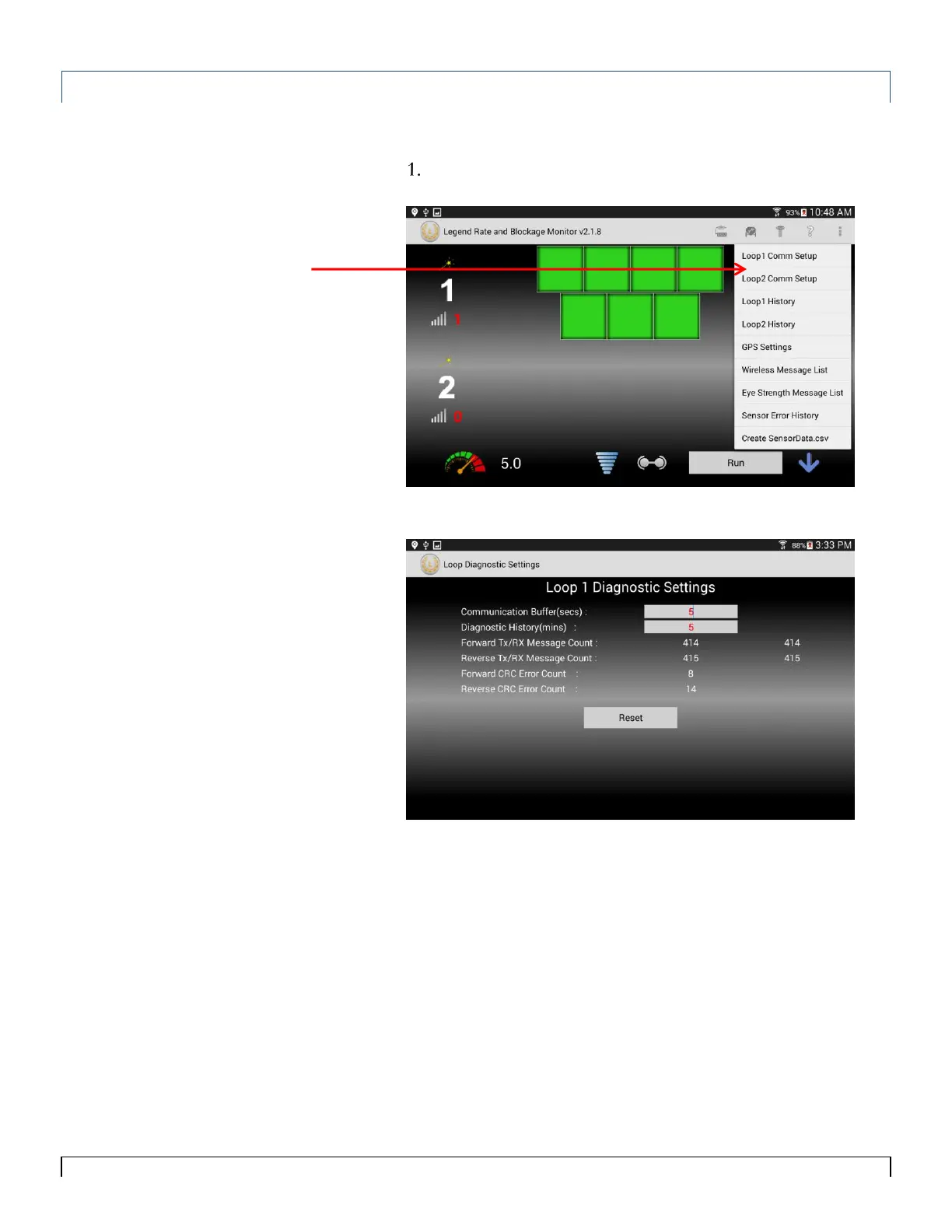
The Loop Diagnostic Setting screen allows users to view and change
communication settings.
To view the Loop Diagnostic Settings Screen, tap the Loop
Communication Setup icon for loop 1 or loop 2.
Figure 10-2 screen appears.
Communication Buffer – The length of time (in seconds) the
system waits to report a communication failure. Effective in
eliminating the display of intermittent Communication Errors.
Diagnostic History – The length of time (in seconds) diagnostic
messages are recorded.
Forward Tx/Rx Message Count – The number of messages
transmitted and received forward direction.
Reverse Tx/Rx Message Count – The number of messages
transmitted and received reverse direction.
Forward CRC Error Count – The number of corrupt messages that
are determined to be corrupt by the ECU forward direction.
Reverse CRC Error Count – The number of corrupt messages that
are determined to be corrupt by the ECU reverse direction.
Loop 1 and 2
Communication
Setup
Tip:
Numbers in RED can be
edited by tapping the
number and a keyboard
will be displayed.



 To Next Page