22
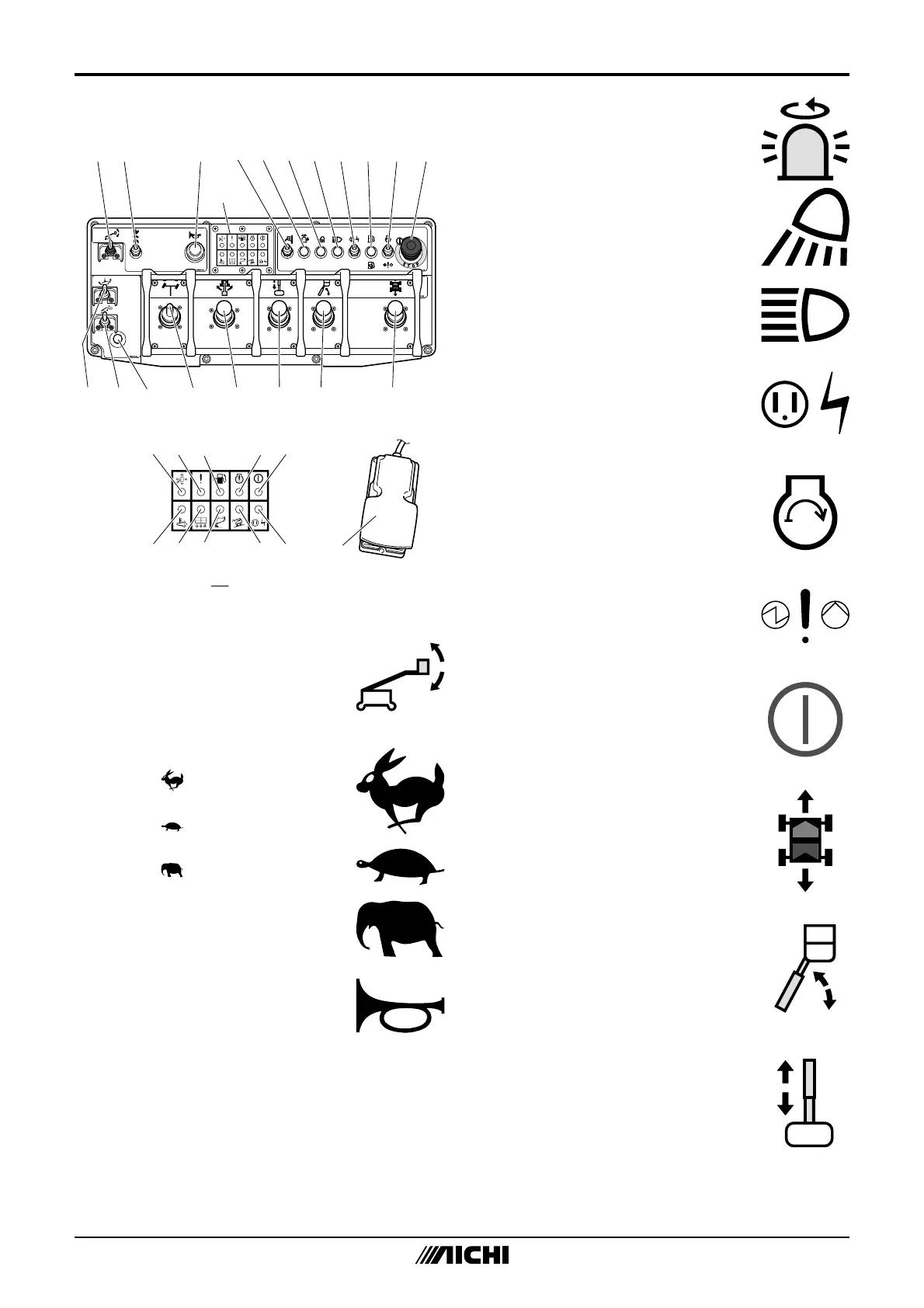
2. UpperControls
1 2 3 10 1154 6 7 8 9
A
A
1213141516171819
20 21 23
28
22
27
26
25 3029
24
M199B12-1
Fig.4‒2
1. PlatformLevelAdjustSwitch
Operatethisswitchupand
theplatformlevelwilltiltup.
Operatethisswitchdownand
theplatformlevelwilltiltdown.
2. TravelSpeedSelectSwitch
• Select“
”(RABBIT)fora“HIGH
SPEED”traveling.
• Select“
”(TURTLE)fora“LOW
SPEED”traveling.
• Select“
”(ELEPHANT)fora
“HIGHTORQUE”whentraveling
onaslope.
3. HornButton
Pushthehornbuttonandthe
alarmhornwillsound.Release
thehornbuttonandthealarm
hornwillstop.
Beforemovingthemachine,
soundthehorntowarnthe
personnelaroundthemachine.
4. Notused
5. RotatingBeaconSwitch(option)
Turnonthisswitchandthe
rotatingbeaconwilllighton.
6. WorkLightSwitch(option)
Turnonthisswitchandthework
lightwilllighton.
7. HeadLightSwitch(option)
Turnonthisswitchandthehead
lightwilllighton.
8. HydraulicGeneratorSwitch
Turnonthisswitchtousethe
hydraulicgenerator(ifequipped).
9. Notused
10. EngineStartSwitch/
EmergencyPumpSwitch
• Operatethisswitchupwithout
pressingthefootswitchandthe
enginewillstart.
• Holdthisswitchdownto
operatethemachinewith
emergencypump.(Referto
Chapter9fordetails)
11. EmergencyStopButton
Pushinthisbuttonto“OFF”
andallfunctionswillstop.Pull
outthisbuttonto“ON”andthe
machinewilloperate.
12. TravelJoystickController
Operatethisjoystickcontroller
upandthemachinewilltravel
forward.Operatethisjoystick
controllerdownandthe
machinewilltravelbackward.
13. BoomElevationJoystick
Controller
Operatethisjoystickcontroller
upandtheboomwillraise.
Operatethisjoystickcontroller
downandtheboomwilllower.
14. BoomTelescopeJoystick
Controller
Operatethisjoystickcontroller
upandtheboomwillextend.
Operatethisjoystickcontroller
downandtheboomwillretract.


 To Next Page