55
4‒2 BoomOperation
Whentheboomisshakenheavilyand/
ortheplatformispressedhardagainst
thewallsduringoperation,themachine
considersitasasensorerrorandstopsthe
engine.Inthiscase,restarttheengineand
resumeoperation.
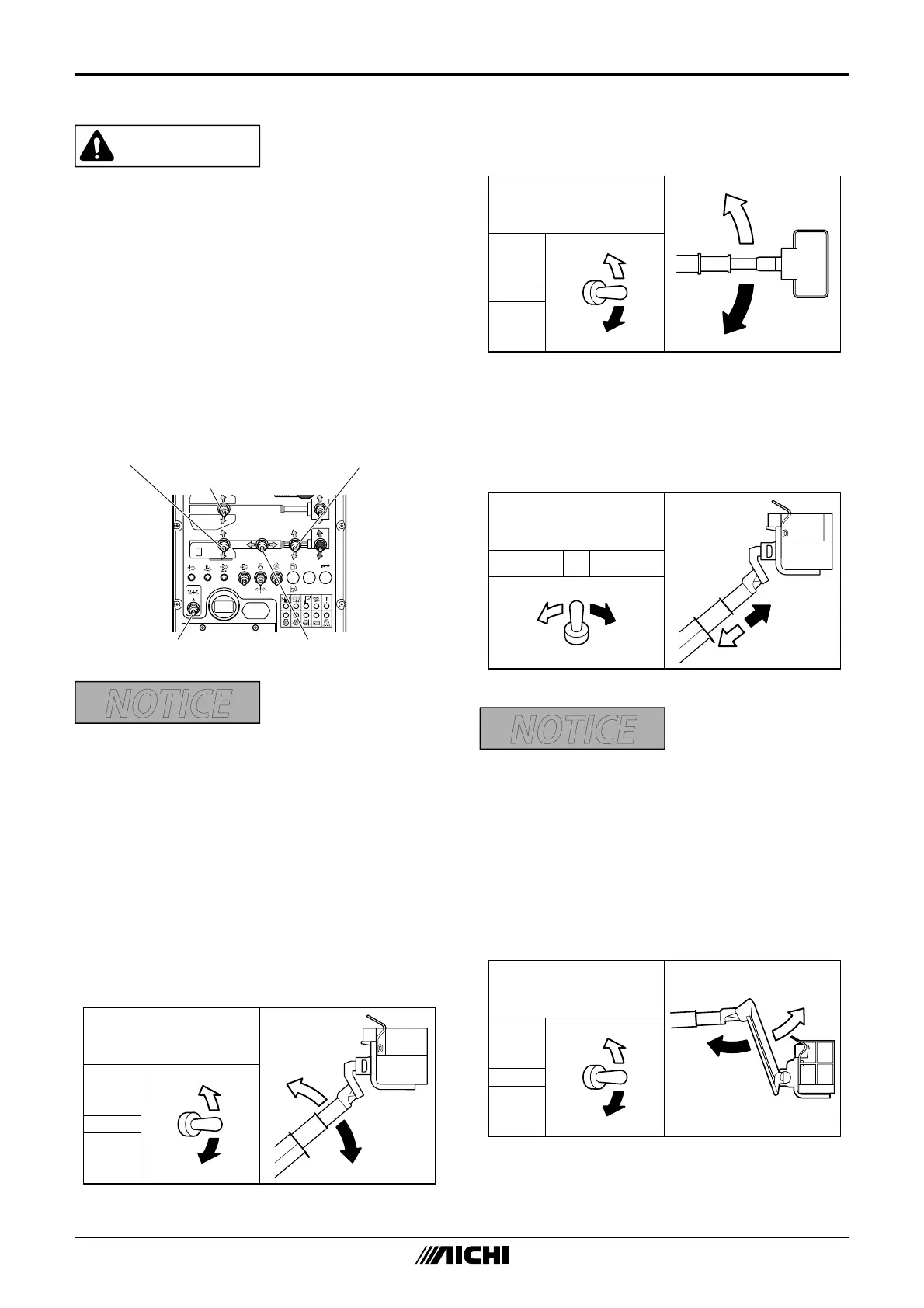
Holdtheenableswitchupto“ON”andusethe
threecontrolswitchesfortheboomelevation,
telescopeandrotationtooperatetheboom.
Theboomdoesnotmoveunlesstheenable
switchisholdup.
EnableSwitch
FlyJibSwitch
BoomRotationSwitch
BoomTelescopeSwitch
BoomElevationSwitch
M1991E2-1
Fig.8‒35
•Theboommaynotrotatesmoothlywhen
themachinetilts.
•Checkthattherearenoobstaclesinthe
waybeforerotating.
Ifyourfieldofvisionisobstructed,havea
guideassistyou.
4‒2‒1 BoomElevating
Holdtheenableswitchupto“ON”andoperate
theboomelevationswitchtoraiseorlowerthe
boom.
Raise
Lower
Boomelevation
switch
Stop
Raise
Lower
M147C620
Fig.8‒36
4‒2‒2 BoomRotating
Holdtheenableswitchupto“ON”andoperate
theboomrotationswitchtorotatetheboom.
Boomrotationswitch
(Clockwise)
(Counter-
clockwise)
CCW
CW
Stop
CCW
CW
M098M520
Fig.8‒37
4‒2‒3 BoomTelescoping
Holdtheenableswitchupto“ON”andoperate
theboomtelescopeswitchtoextendorretract
theboom.
Retract Extend
Stop
Retract
Extend
Boomtelescoopeswitch
M147C720
Fig.8‒38
Ifitisdifficulttoretracttheboom,
especiallywhentheplatformisnearthe
ground,raisetheboomorunloadthe
platformbeforeretractingtheboom.
4‒2‒4 FlyJibElevating
Holdtheenableswitchupto“ON”andoperate
theflyjibswitchtoraiseorlowertheflyjib.
Raise
Lower
Flyjibswitch
Stop
Raise
Lower
M098M820
Fig.8‒39



 To Next Page