UG-MD16E-EN (V1.3-190708)
MD-16E
Mixer Reference manual
Introduction of front panel functions (continued)
Input channel PAN. To adjust the Pan that assigned
to Main L/R output.
Touch Screen control area
Lighting power supply (5V/0.5A).
Standby power switch, push and stay 2 seconds till
it flashes, push one more time it will go for standby
mode. Another push will go back to working mode
Earphone volume /SOLO setup
The main jog dial for parameter adjustment ( push
down to switch between fast and fine adjustment ).
When you choose any parameter or icon on display
it will turn yellow, then you can adjust by the jog
dial.
TAP, system will detect the interval of 2 TAPs
and will make it as delay of the effect, the
indicator under the push button will keep the
same time as delay effect time
AUX / SUB output BUSES Routing setup.
MUTE group quick butoon, double click to switch.
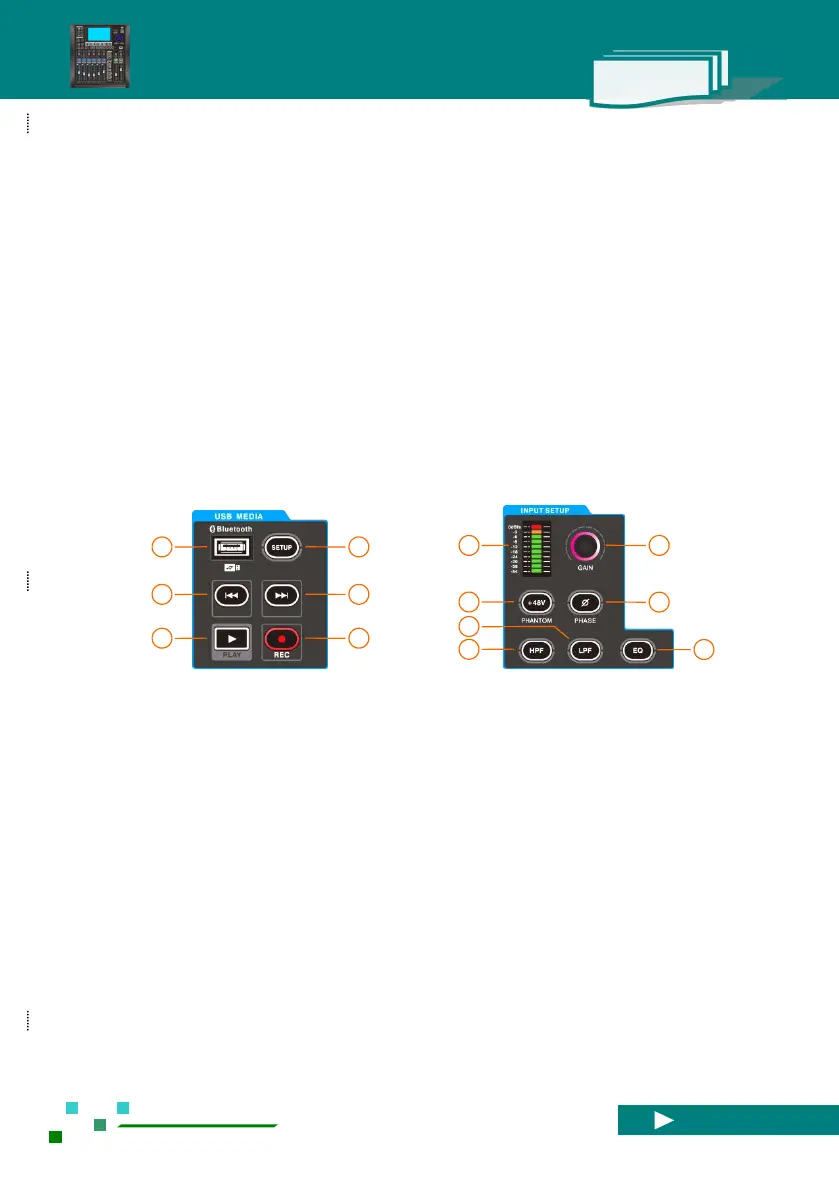
USB dock,can connect WIFI adapter, BT adapter
and USB stick, note: BT and USB can`t work at
same time.
USB quick button, single click will enter the
setup of USB.
Input channel level meter before fader and Mute.
Select channel input Gain adjustment knob.
48V phantom power,when light up 48V it`s
working.
Phase, when light up it`s 180 degree opposite.
Input channel low pass filter switch (LPF).
Input channel high pass filter switch (PHF).
Input channel parameter equalization filter switch
(PEQ)



 To Next Page