UG-MD16E-EN (V1.3-190708)
MD-16E
Mixer Reference manual
2.5. USB recording and playback
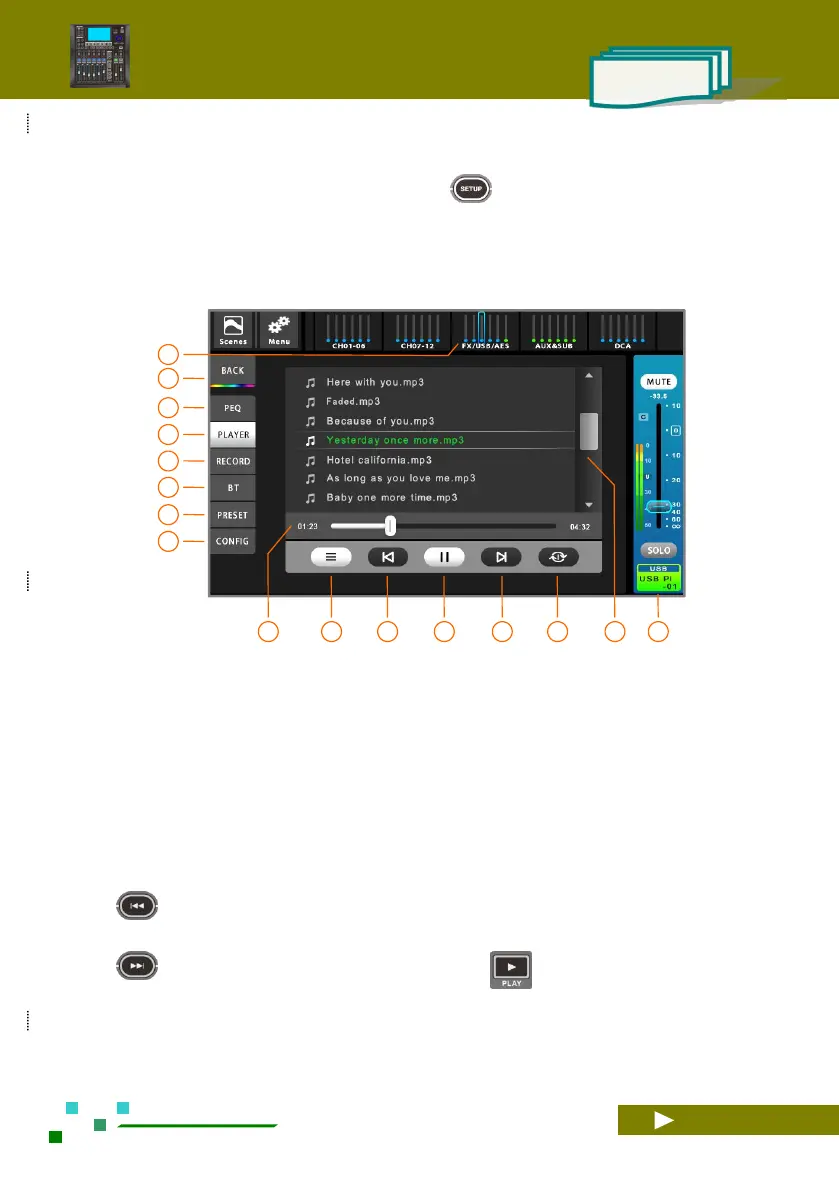
Click the [FX/USB/AES] group on the navigation bar, then click the USB channel name bar to enter the
USB control interface. As shown below. Or click the button on the USB MEDIA function area on the
panel to quickly switch to the USB channel interface.
2.5.1 USB playback
USB Media playback, supports MP3, AAC, WAV, AIFF, APE or FLAC file formats.
Click the [FX/USB/AES] group on the navigation
bar switch to the USB overview page, and then
click the USB channel name bar to enter the USB
control interface. As shown above.
Home button, back to the overview channels page.
Single click to PEQ setup.
Switch to the USB playback control interface.
Switch to the USB recording control interface.
Switch to the bluetooth playback control interface.
Single click to Preset setup.
Single click to configuration setup.
Play progress and time indication. Push and pull the
progress bar fader slider to fast forward or rewind.
Music file directory specification. If the music file
is not stored in the root directory of the USB disk,
you need to click this button to specify the music
file directory before playing. The player will
automatically list all the files that can be played in
this directory in the playlist.
The previous song. The same function as the button
on the panel.
The next song. The same function as the button
on the panel.
Play or pause. The same function as the button
on the panel.
Song playlists and scroll bars, click on the song
name to play.
Play mode: sequential play / single loop, etc.
Current USB channel master control panel,
adjustable gain and mute, etc.



 To Next Page