UG-MD16E-EN (V1.3-190708)
MD-16E
Mixer Reference manual
2.3. Route assignment operation
The MD-16E mixer has a very powerful and flexible routing function that enables any input to any output
routing control. Before the routing operation starts, please make the necessary settings for the relevant input
channel and output channel according to the previous chapter. The route assignment operation is as follows:
[Step 1]: If you are not in the home page, click to return to the home page.
[Step 2]: Click the bus area on the left side of the APP screen to select the output bus that needs to be routed.
Or click the button on the panel to
make the MD-16E mixer in the routing setting state. At this time, the input channel for routing
assignment is allowed. The fader
slider
is displayed in brown, and the OLED guide
screen is also displayed in brown. The color of channels that cannot be routed is not
changed.
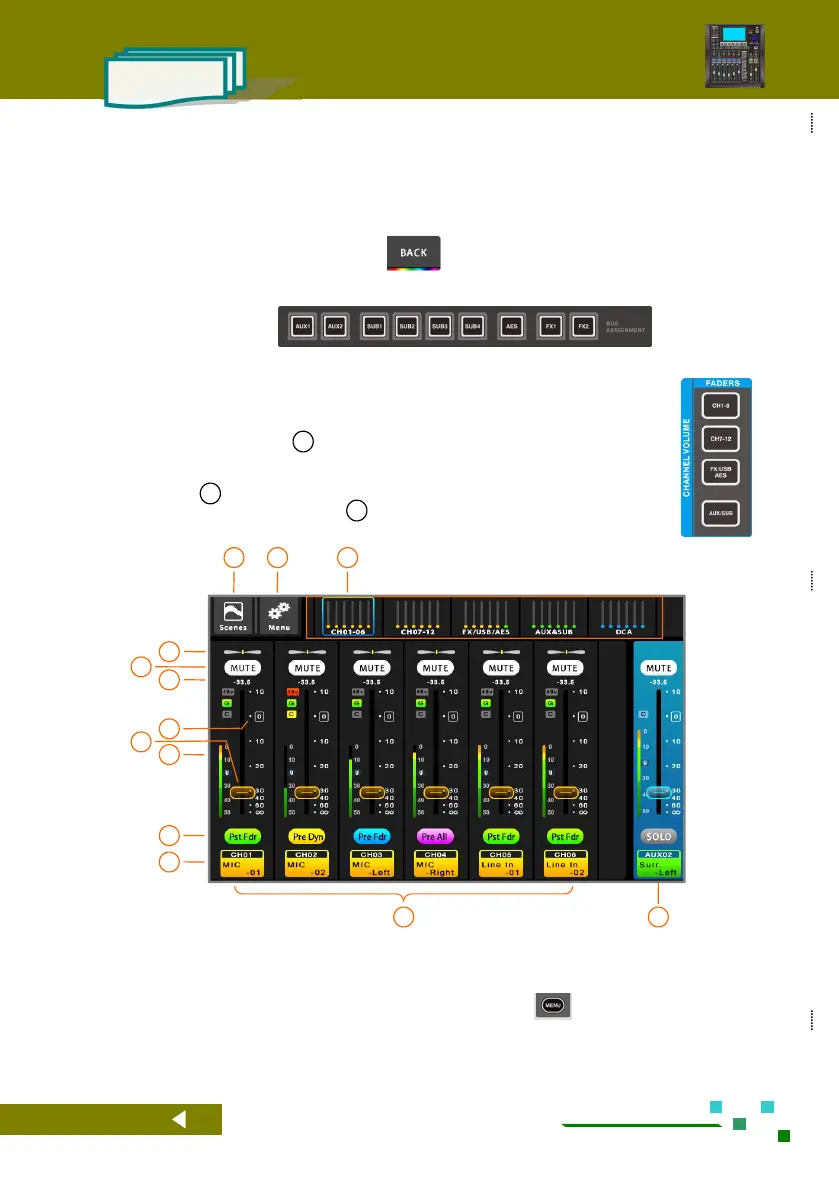
[Step 3]: Use the navigation bar 01 to select the group where the input channel is located, or
click the fader page button on the panel (as shown in the right figure), cancel the
[Mute] of the corresponding input channel in the input channel page, click the
button 10 to select the signal from Pre-fader or Post-fader and other locations, and
set the channel routing volume 08 to the appropriate position (as shown below)
The total navigation bar, click the corresponding
index page or the fader page button on the panel to
quickly switch to the page where the channel is
located.
System setup button, click to enter the system
parameter control page. Same function as the
button on the panel.
Scene button, click to enter the scene control page.
Save or load the scene parameters you need.
PAN, this channel is assigned to the panning of
the Main L/R.



 To Next Page