UG-MD16E-EN (V1.3-190708)
MD-16E
Mixer Reference manual
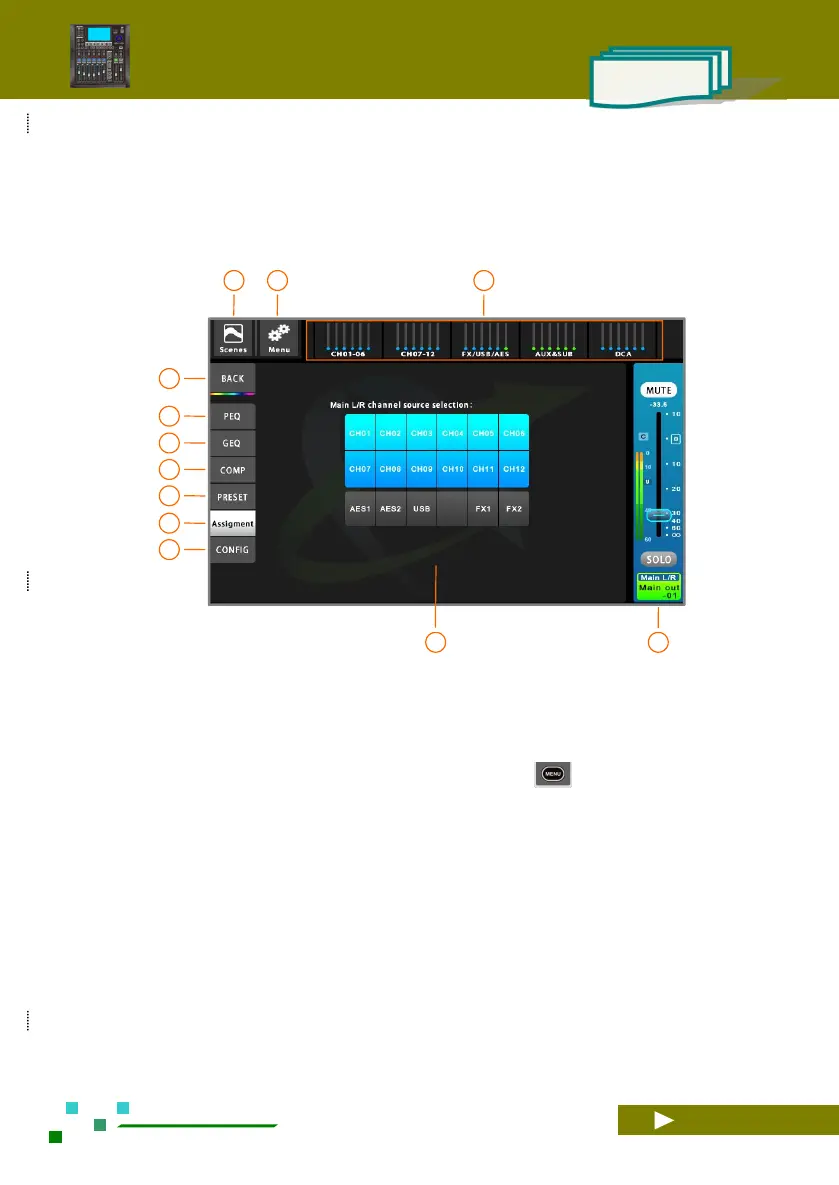
2.2.8 Main L / R channel setup
The Main L / R channel is identical to the other bus output channels. For details, please refer to the
previous section. The difference is that the channel name cannot be modified, the route has no volume control,
but which input channels can be selected as the source.
The total navigation bar, click the corresponding
index page or the fader page button on the panel to
quickly switch to the page where the channel is
located.
System setup button, click to enter the system
parameter control page. Same function as the
button on the panel.
Scene button, click to enter the scene control page.
Save or load the scene parameters you need.
Home button, back to the overview channels
page.
Single click to PEQ setup.
Single click to GEQ setup.
Single click to Compressor setup.
Single click to Preset setup.
Single click to Assignment setup.
Single click to configuration setup.
All source inputs can be assigned to the Main L / R
output bus, click to switch, and highlight to signal
on.
Main L/R channel master control panel,
adjustable gain and mute, etc.



 To Next Page