UG-MD16E-EN (V1.3-190708)
MD-16E
Mixer Reference manual
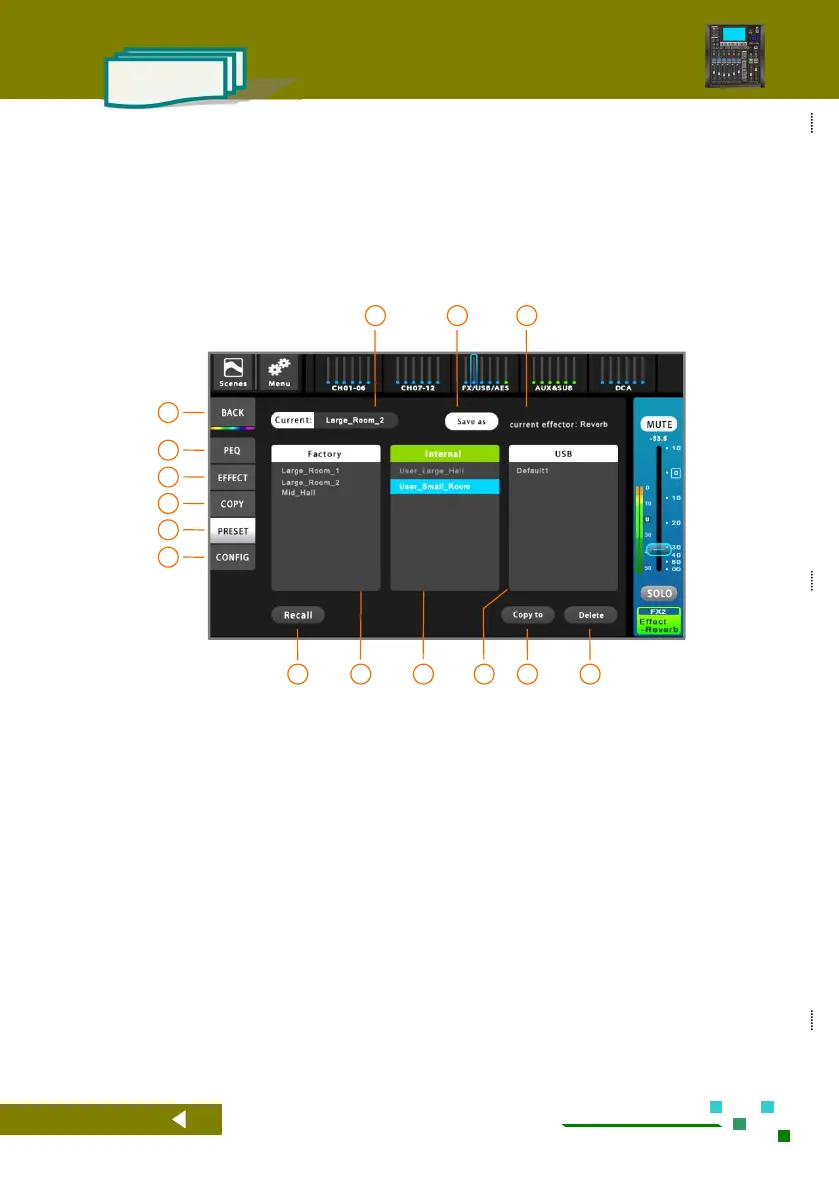
2.4.10. Effect Presets
According to the current effect type, the preset parameters of the effect are invoked, which greatly
simplifies the complexity of the operation, and is convenient for the user to quickly experience the flexibility
and powerful performance of the professional effect module.
The effect preset has a factory preset mode and is placed in the [Factory Preset] field. The user can also
adjust the effect module and save it in the user mode (placed in the [Device Internal Preset] field) or in the
external USB stick (placed in the [External U disk preset] field).
Home button, back to the overview channels page.
Single click to PEQ setup.
Switch to the FX setting interface.
Single click to Copy setup.
Single click to Preset setup.
Single click to configuration setup.
Call the selected preset parameters to the effect
module.
Factory-designed effects preset library.
A user-defined preset library placed inside the
machine.
A user-defined preset library placed on an
external USB stick.
Copy the selected user preset to the inside of the
mixer or to the external USB stick. Use this feature
to copy preset parameters to other mixer.
Delete the selected user preset.
Save the configuration parameters of the current
effect according to the specified path and name
(user mode).
The name of the effect preset currently in use.



 To Next Page