UG-MD16E-EN (V1.3-190708)
MD-16E
Mixer Reference manual
2.5.2 USB recording
You can perform stereo recording by inserting a USB stick into any USB port, and the recording source is
optional. U disk playback and recording can be performed in the same USB stick.
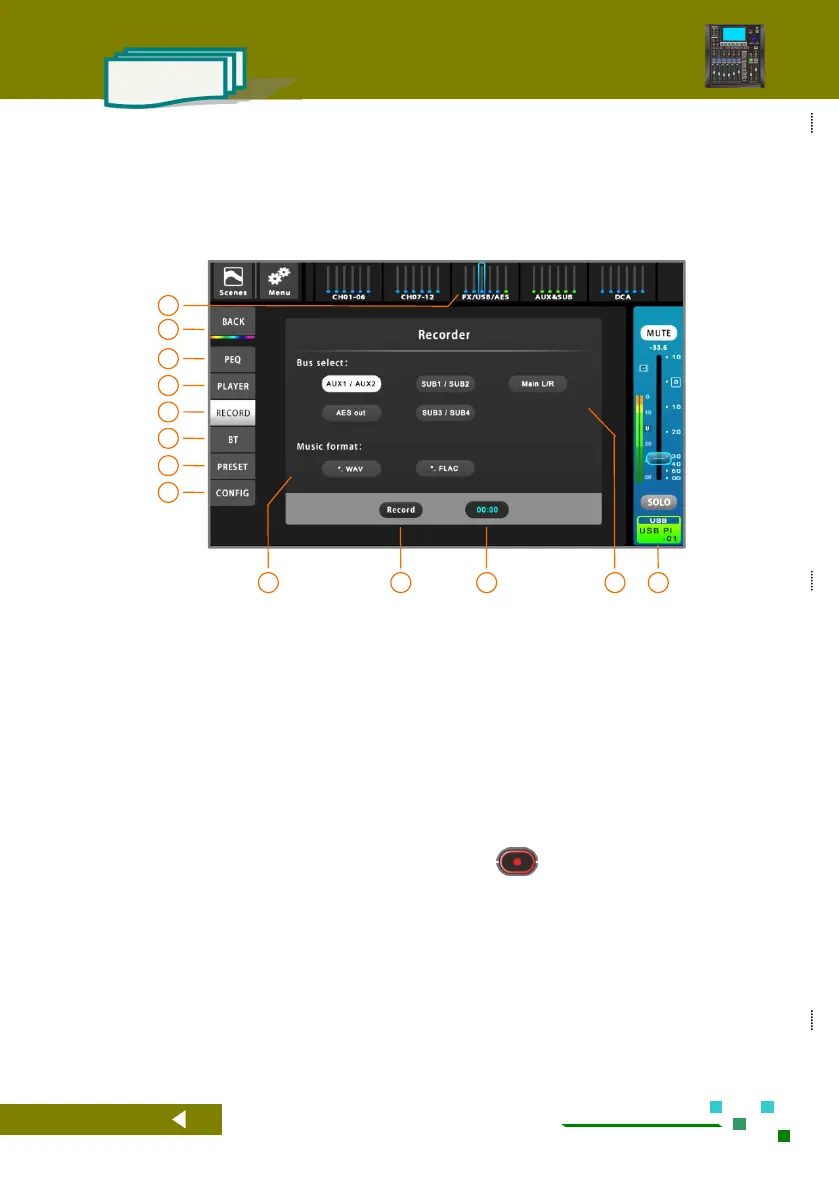
Click the [FX/USB/AES] group on the navigation
bar switch to the USB overview page, and then
click the USB channel name bar to enter the USB
control interface. As shown above.
Home button, back to the overview channels
page.
Single click to PEQ setup.
Switch to the USB playback control interface.
Switch to the USB recording control interface.
Switch to the bluetooth playback control
interface.
Single click to Preset setup.
Single click to configuration setup.
The recording file format is selected and can be
saved in WAV or FLAC lossless format.
Record button, the same function as the button
on the panel. Recording while red.
Current USB channel master control panel,
adjustable gain and mute, etc.



 To Next Page