UG-MD16E-EN (V1.3-190708)
MD-16E
Mixer Reference manual
2.5.3 Bluetooth playback
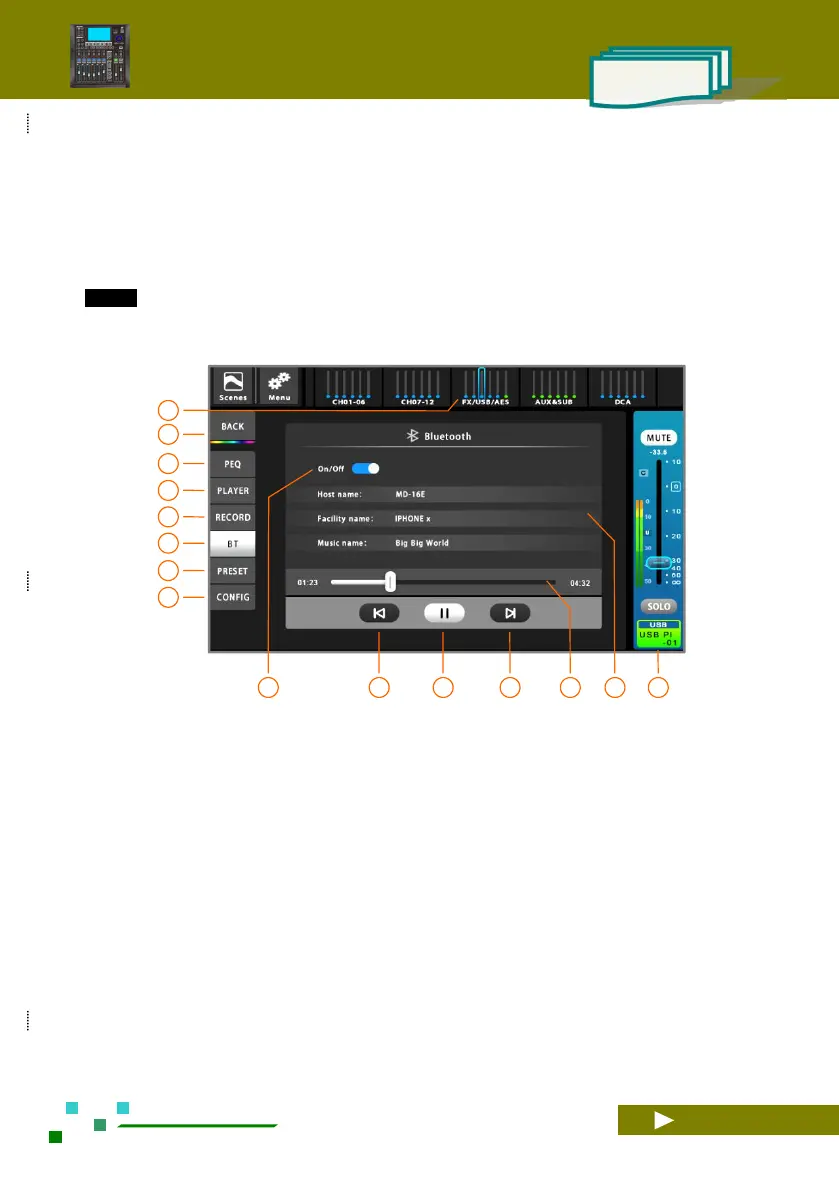
Plug in the USB port Bluetooth adapter that is shipped with the device at any USB port. Switch to the
USB control page as shown below. Click the Bluetooth switch to the open position, you can see the host
Bluetooth name: MD-16E (user can modify). Then search for available Bluetooth devices in Bluetooth devices
such as mobile phones, and click on the device for Bluetooth pairing. After the connection is successful, the
system displays the name of the connected device, such as "IPHONE x". The song name and playback progress
are displayed after playing Bluetooth music.
TIPS:
Since USB disk playback and Bluetooth playback use the same physical resources, in order to avoid
conflicts, the system does not allow USB disk and Bluetooth to play at the same time.
Click the [FX/USB/AES] group on the navigation
bar switch to the USB overview page, and then
click the USB channel name bar to enter the USB
control interface. As shown above.
Home button, back to the overview channels page.
Single click to PEQ setup.
Switch to the USB playback control interface.
Switch to the USB recording control interface.
Switch to the bluetooth playback control interface.
Single click to Preset setup.
Single click to configuration setup.
Bluetooth playback progress display. Can't fast
forward / rewind.
Device information. They are: the host Bluetooth
name (the user can click to modify), the connected
device name, and the name of the song played.
Current USB channel master control panel,
adjustable gain and mute, etc.



 To Next Page