UG-MD16E-EN (V1.3-190708)
MD-16E
Mixer Reference manual
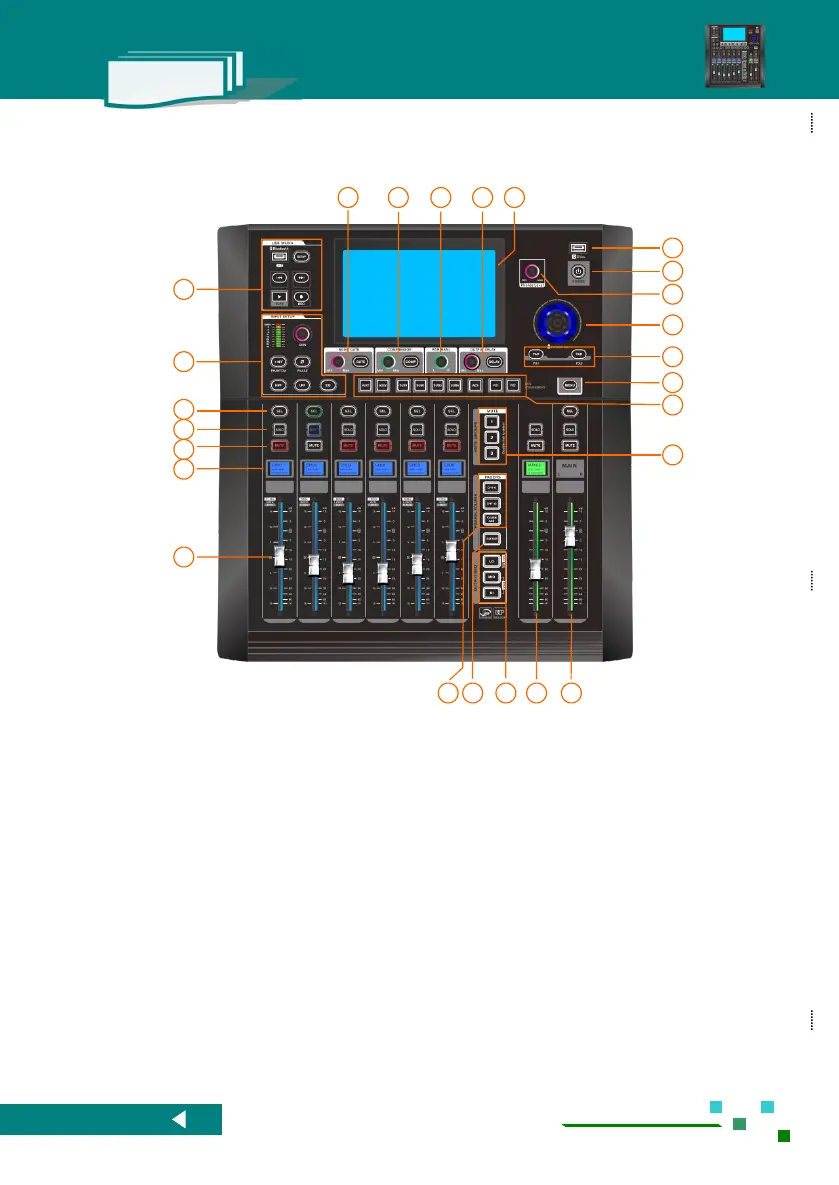
1.2.2. Introduction of front panel functions
Main L/R primary output channel control, Solo /
Mute / Volume fader, It can be controlled at any
time.
Buses output control, Solo / Mute / volume
control, it will be automatically related when you
choose the BUSES.
Fader page switch for output GEQ, double click
[LO] to turn on or turn off the GEQ. Push down
[MID] and [HI] buttons simultaneously to switch to
DCA operation page layout.
Fader page switch button for bus output channels.
Fader page switch button for input channels or
routing.
Multi-color guidance screen instantly plays the
associated channel information.
Channel MUTE or Routing MUTE
Channel select button, single push will enter the
setup of the channel.
MIC/Line IN channels control zone.
USB Media play / recording。
input /output Compressor.



 To Next Page