UG-MD16E-EN (V1.3-190708)
MD-16E
Mixer Reference manual
1.6. Monitor headphone
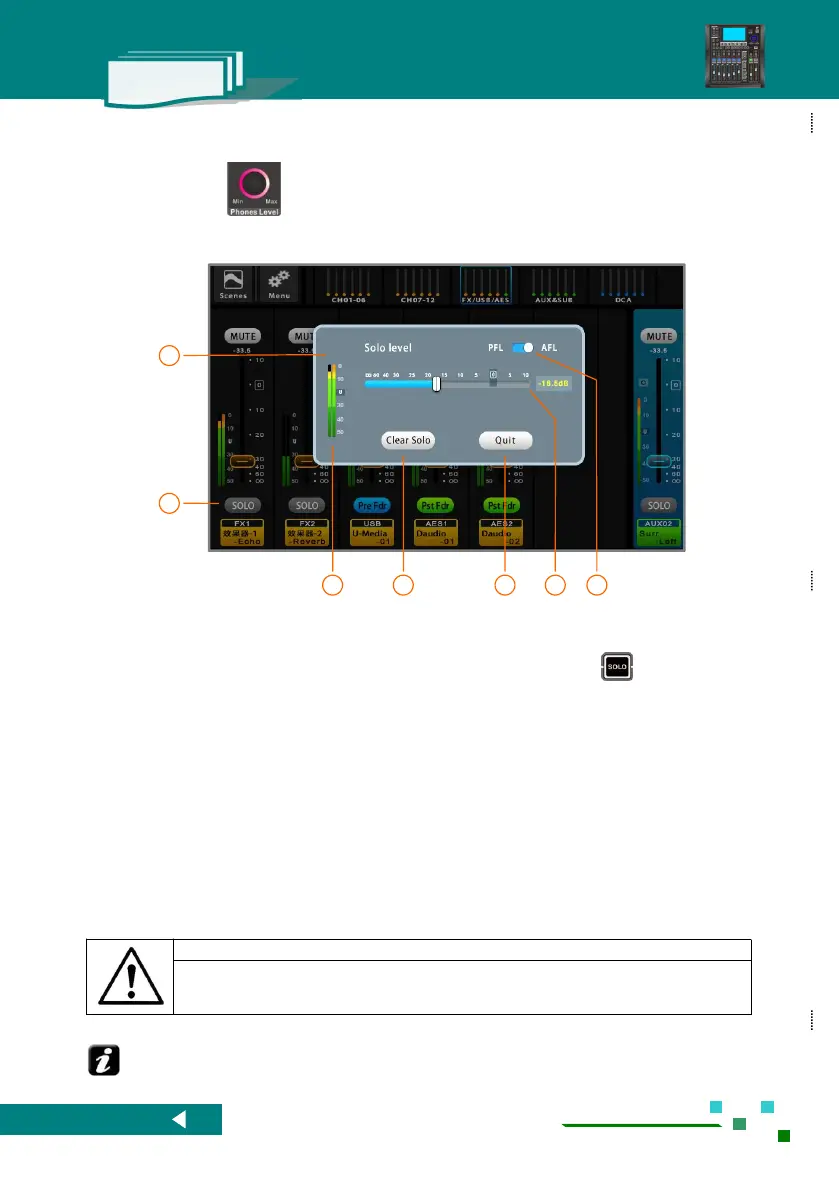
On the panel turn ,the system will pop up the Solo setup,the user can setup specs, view the
headphone output level, also you can clear Solo which is clear all monitor.
1.7. Restrictions on USB interface power
This mixer has two USB ports and a USB light port (only 5V power supply ), but no matter which USB
port, its power supply capacity is less than 500mA, it is strongly recommended:
1). Do not insert a high current USB device.
2). Do not insert the phone into the above socket for charging, the test has proved: when the
phone into the USB port charge, and the same time the phone as the input source for the mixer, it
will produce interference ! !
Use the phone comes with the charger from other places to take power, and the phone as the input source of
the mixer will not be a problem.
Rotate the headphone monitor knob on the panel to
automatically pop up this monitor control interface.
If there is no operation, it will automatically retreat
in 3 seconds.
Headphone monitoring can be accessed by
clicking the button 【 Solo 】 on the screen or by
clicking the button on the panel. Multiple
channels can be monitored simultaneously.
Headphone monitor output level meter.
Clear all related setup with headphone monitor.
For the input channels, the headphone monitor access point can be selected before the fader or after the fader. The access
points of the earphones of the output channels are all before the faders.



 To Next Page