UG-MD16E-EN (V1.3-190708)
MD-16E
Mixer Reference manual
2.2.2 PEQ
( Same as the input channel, please refer to section 2.1.2 )
2.2.3 GEQ
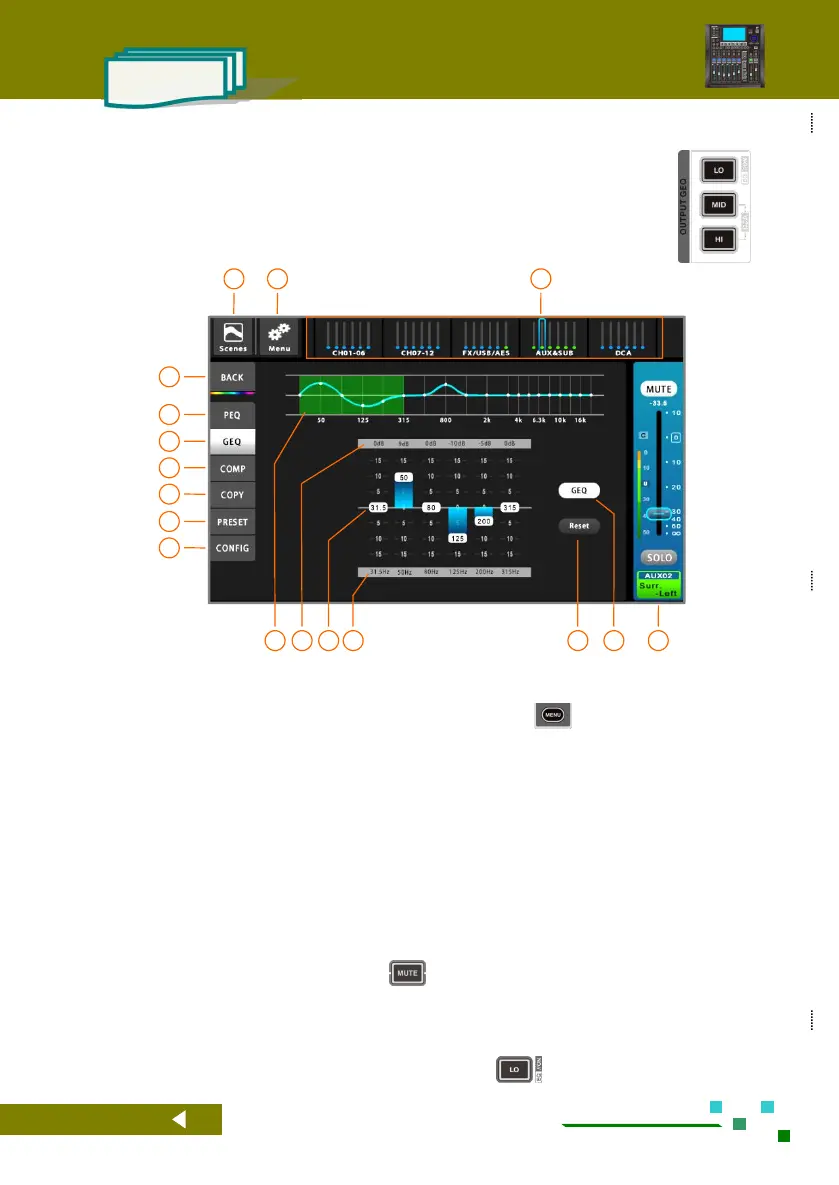
The MD-16E mixer provides a high-quality 18-segment graphic equalizer for each output
channel. To match the electric fader, the 20Hz~20kHz frequency range is divided into
[LO][MID][HI] three segments, click the fader page button on the panel to quickly switch (as
shown on the right).
The total navigation bar, click the corresponding
index page or the fader page button on the panel to
quickly switch to the page where the channel is
located.
System setup button, click to enter the system
parameter control page. Same function as the
button on the panel.
Scene button, click to enter the scene control page.
Save or load the scene parameters you need.
Home button, back to the overview channels
page.
Single click to PEQ setup.
Single click to GEQ setup.
Single click to Compressor setup.
Single click to Copy setup.
Single click to Preset setup.
Single click to configuration setup.
Current gain of the filter in dB.
The gain adjustment slider pushes to change the filter gain (double-click the blank area of the frequency point to reset the
filter gain to 0dB). You can also click on a certain frequency point area and then use the main jog dial to adjust (press the
main jog dial to switch between coarse and fine adjustment mode).
Or use the fader to adjust, when in the 0dB position, the system will automatically prevent the fader movement, giving the
user feedback of the zero position. Click the button to reset the filter gain to 0dB.
Reset all parameters of GEQ.
Current channel master control panel, adjustable
gain and mute, etc.
Graphic equalizer switch, when lit indicates GEQ
effective. Double-clicking the panel button
works the same.



 To Next Page