UG-MD16E-EN (V1.3-190708)
MD-16E
Mixer Reference manual
2.8. System settings
The system setup menu is used to set or browse system parameters and machine configuration. Click the
button on the panel, or on the host screen or
on
APP home interface to enter the
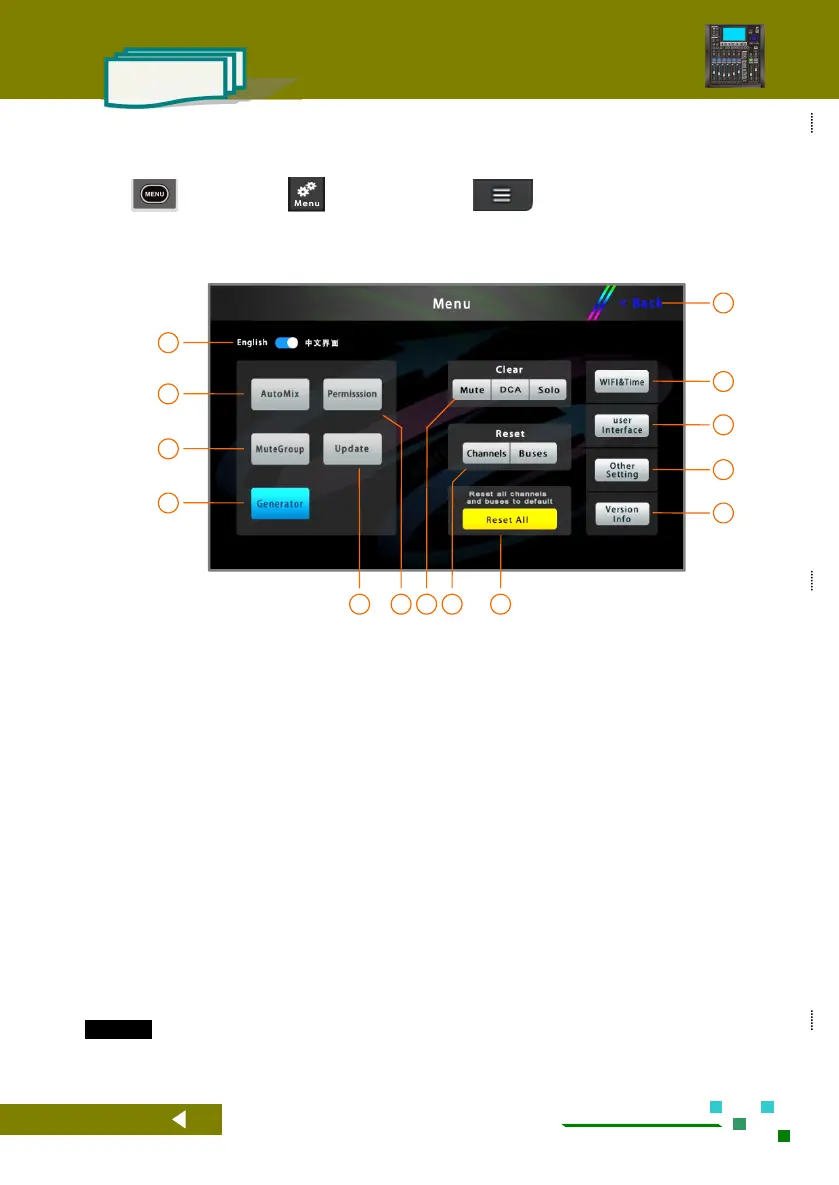
system settings interface, as shown below.
NOTE: The part with no buttons at the bottom of the gray is only used as an alternate function for
future expansion, and it is not available for use at the moment !!
System language, English or simplified Chinese.
Click to enter the Automix interface.
Click to enter the mute groups setting interface.
Click to enter the signal generator settings
interface.
Click to enter the system upgrade interface.
Click to enter the permission control management
interface.
Click to clear all mute settings, including channel
mute and mute grouping. Click DCA to clear the
DCA's mute setting and set the DCA volume to
0dB. Click to clear all SOLO settings.
Reset all input channels to their initial state.
Reset all output buses to their initial state.
Restore the device to the factory settings.
User settings will be cleared.
Information about the mixer, such as hardware
and software version, date of manufacture, etc.
Other parameter settings.
Set user interface parameters such as lighting,
color, software interface style, and more. (No
such feature)
Set WIFI network parameters and system date and
time.



 To Next Page