UG-MD16E-EN (V1.3-190708)
MD-16E
Mixer Reference manual
2.6. Grouping shortcuts
2.6.1 DCA volume grouping
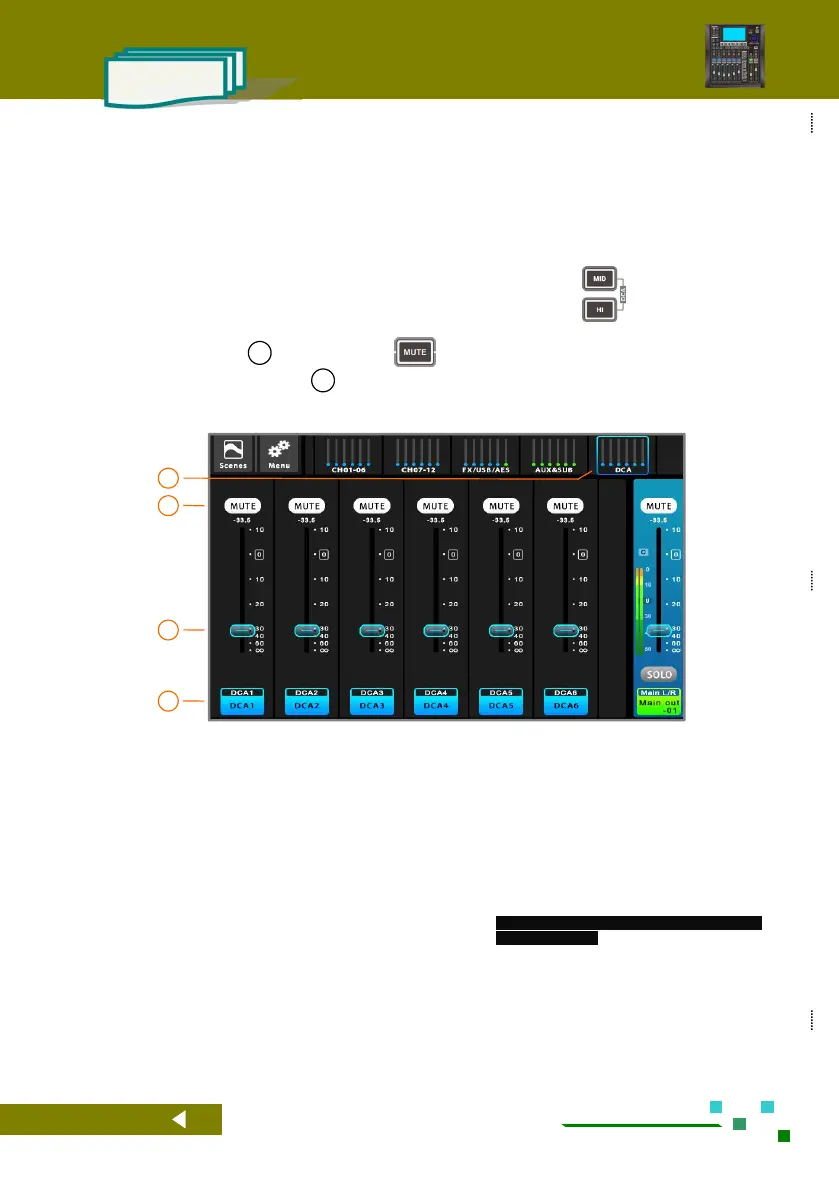
The DCA volume group control function can realize the volume control of a plurality of pre-associated
input and output channels by a single fader, and realizes the volume control of a group of devices very easily,
which greatly reduces the workload of tuning, and is flexible and convenient to operate. The mute of this group
can also be muted through the [Mute] button on the DCA interface.
In any case, click the DCA group in the navigation bar, or press the button
same time to quickly switch to the DCA overview page, as shown below.
Operate the button of 02 or click the button on the panel to achieve one-key group mute. The
fader or motorized fader of operation 03 can realize a fader to control a group of volume.
Click the [DCA] group on the navigation bar to
switch to the DCA Overview page. As shown
above.
When [Mute] is lit, it indicates that the mute of
the DCA group is effective, and all the channels
associated in advance will be muted. Click this
button to switch.
DCA group volume control, push the fader to adjust
the related channels volume
Channel name bar, with DCA number and DCA
channel name..
Click the channel name bar to enter the DCA
setting interface.



 To Next Page