UG-MD16E-EN (V1.3-190708)
MD-16E
Mixer Reference manual
2.8.3 Firmware Upgrade
The MD-16E Digital Mixer supports the powerful ISUeasy
TM
full firmware upgrade feature, and any
software feature can be easily upgraded with ISUeasy
TM
as long as it does not involve hardware circuit
changes. Make sure that the equipment you purchase is always in the best working condition and enjoy the
latest added features in the first place. Continuous quality service is our constant commitment !!
1). Log on to our website www.ai-mix.com and download the appropriate update software to your U
stick root directory .
Note : The upgrade file must be placed in the root directory of the U disk, and the
file name and extension name can not be changed !!
2). Turn on the power of MD-16E mixer, wait till the system starts up and enters normal operating
conditions.
3). Enter the system settings interface, Click [Upgrade] on the screen. Start the firmware upgrade
program ISUeasy
TM.
Read the precautions carefully and confirm that it is correct. Click [Continue]
to perform the upgrade process.
The upgrade process takes a few minutes, please be patient. Do not power off during
this process to avoid the upgrade failure and equipment failure !!
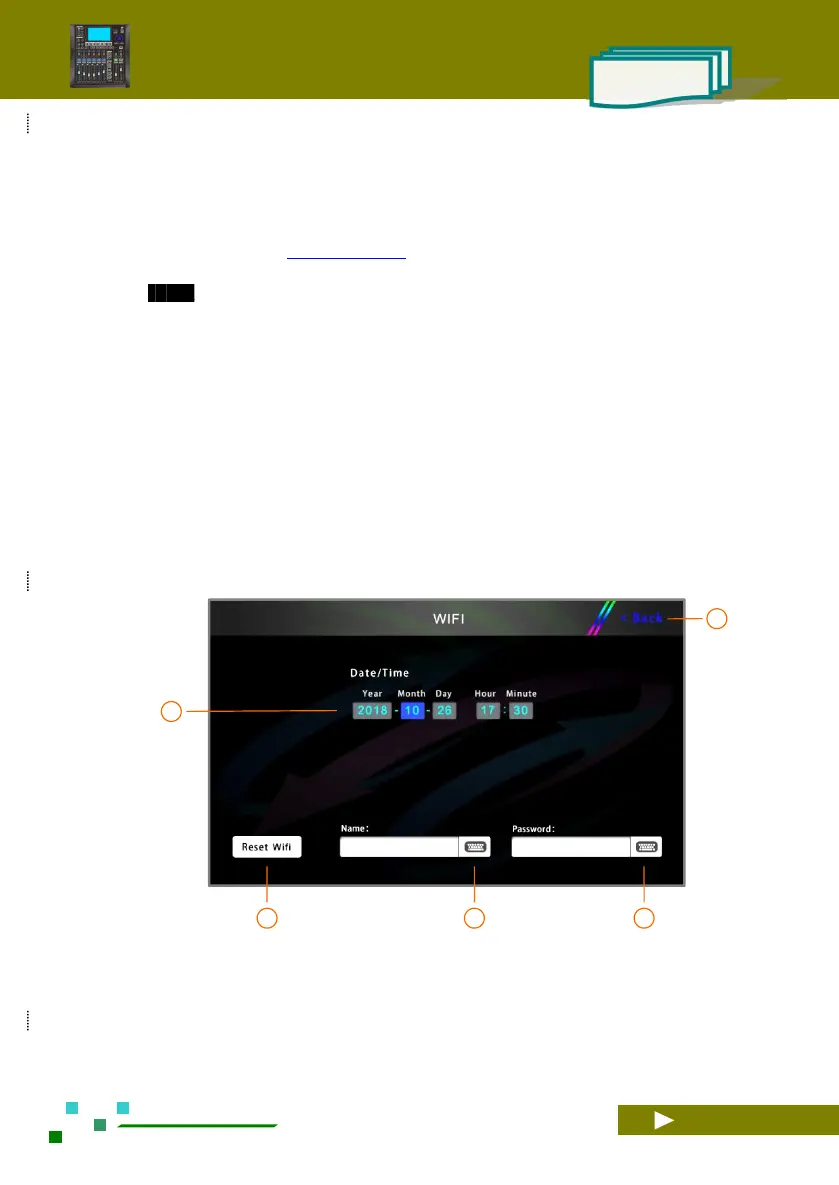
2.8.4 Network settings and iPad remote operation
Set the WIFI device name and password. After modifying the SSID name and password of WIFI, please
restart the network for the settings to take effect.
Current system date and system time. Click on the screen to modify the content, then turn the main jog dial on the panel to
change its value, the result is automatically saved.
After modifying the name SSID and password,
click this button to restart WIFI for it to take effect.
The name of the WIFI can be modified by the
user.
WIFI connection password, user modify settings.



 To Next Page