
 To Next Page
J
Jessica BanksAug 2, 2025
What to do if I can't hear on my Aiphone Intercom System?
- JJoshua VegaAug 2, 2025
If you cannot hear communication on your Aiphone Intercom System, adjust the receiving volume during communication.

What to do if I can't hear on my Aiphone Intercom System?
If you cannot hear communication on your Aiphone Intercom System, adjust the receiving volume during communication.
Why is my Aiphone Intercom System communication interrupted?
If communication on your Aiphone Intercom System is interrupted or becomes one-way, it might be due to loud sounds around the station or entrance station. Because of auto-voice actuation, audio may be interrupted when a surrounding sound is loud. In that case, enable the touch-to-talk method.
How to fix Aiphone GT-1C7W Intercom System when ringtone doesn't sound?
If the ringtone isn't sounding on your Aiphone Intercom System, the ringtone volume might be set to "0". Adjust the ringtone volume to resolve this.
How to turn on Aiphone GT-1C7W when the screen is black?
If the screen on your Aiphone Intercom System is black, the monitor might be in standby mode. Touch the screen to turn the monitor on.
Why can't others hear me on my Aiphone GT-1C7W?
If the other party can't hear you on your Aiphone Intercom System, ensure touch-to-talk is enabled and that you are tapping the touch-to-talk button while speaking.
What to do if recording is not possible on Aiphone GT-1C7W?
If recording is not possible on your Aiphone Intercom System, it might be due to an incompatible memory card or a damaged microSDHC card. Ensure you are using a microSDHC card that complies with the SD standard. If the card is already compliant, try replacing it.
What does firmware confirmation failure mean on Aiphone GT-1C7W Intercom System?
If you see a firmware confirmation failure notification on your Aiphone Intercom System, a network error may have occurred (e.g. router power-off, external network error). Confirm the network settings and the equipment used.
Critical safety guidelines to prevent death, injury, or property damage.
Important usage guidelines, environmental considerations, and operational advice.
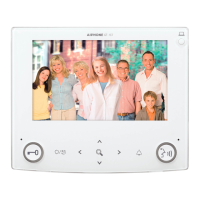
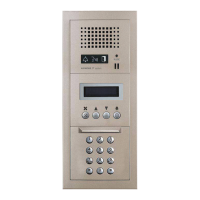
Identifies and describes the physical components and indicators of the station.
Explains how to interpret icons, menus, and on-screen information for operation.
Step-by-step instructions for initial configuration, including date, time, and language.
Details specifications, insertion, removal, and formatting of microSDHC cards.
Outlines the process and requirements for connecting a mobile device to the station via Wi-Fi.
Covers connecting the station to a Wi-Fi network using WPS or manual setup.
Guides users through downloading the app and registering their mobile device with the station.
Instructions on how to answer calls, speak to visitors, and end communication.
Explains automatic and manual recording, viewing stored recordings, and managing them.
Covers touch-to-talk, screen brightness, receiving volume, and visibility enhancement.
Details how to monitor entrance stations and call the guard station.
Describes how to use and respond to the emergency alarm feature.
Explains how to check and view system notifications, including firmware updates.
Adjusts screen brightness, receiving volume, ringtone volume, and touch sound.
Covers setting current date/time, display formats, time zones, and display language.
Manages mobile device registration, microSDHC card functions, and video quality.
Configures automatic firmware updates or receives notifications for available updates.
Methods for updating the station's firmware via network or microSDHC card.
Provides solutions for common problems like screen issues, no sound, or communication interruptions.
Lists product specifications, FCC compliance, and other regulatory information.
Details the warranty terms and conditions for the Aiphone product.
 General
| Audio | Full duplex |
|---|---|
| Connectivity | Wired |
| Mounting | Surface mount |
| Door Release | Yes |
| Housing Material | Plastic |
| Audio Output | Built-in speaker |
| Audio Input | Built-in microphone |
| Display | color LCD |
| Operating Temperature | 32°F to 104°F |